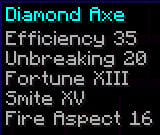
截图

介绍
In Minecraft, there is a bug where if you get an enchantment with level higher than 10, it will show the level as enchantment.level.<level>; For example, If I get an axe with efficiency 15, smite 25, and unbreaking 10, it will show as efficiency enchantment.level.15, smite enchantment.level.25 and unbreaking X.
This texture pack fixes that. WIth this texture pack, level displays (both for potion effects and enchantments) will now cap out at level 255 instead of level 10 (level 6 for potion effects).
It also has support for roman numerals (numbers like V, X, IX, III), but only until level 15. after level 15, to avoid confusion, it will switch to regular numbers (numbers like 15, 29, 69, 50). It still caps out after level 255 though.
| Number | Without texture pack (Enchantments) | Without texture pack (Potions) | With texture pack (Enchantments) | With texture pack (Potions) |
| :-: | :—————-: | :—————-: | :—–: | :—–: |
| 1 | I | I | I | I |
| 6 | VI | VI | VI | VI |
| 9 | IX | potion.potency.8 | IX | IX |
| 10 | X | potion.potency.9 | X | X |
| 11 | enchantment.level.11 | potion.potency.10 | XI | XI |
| 14 | enchantment.level.14 | potion.potency.13 | XIV | XIV |
| 15 | enchantment.level.15 | potion.potency.14 | XV | XV |
| 16 | enchantment.level.16 | potion.potency.15 | 16 | 16 |
| 17 | enchantment.level.17 | potion.potency.16 | 17 | 17 |
| 25 | enchantment.level.25 | potion.potency.24 | 25 | 25 |
| 80 | enchantment.level.80 | potion.potency.79 | 80 | 80 |
| 150 | enchantment.level.150 | potion.potency.149 | 150 | 150 |
| 255 | enchantment.level.255 | potion.potency.254 | 255 | 255 |
| 256 | enchantment.level.256 | potion.potency.255 | enchantment.level.256 | 256 |
| 257 | enchantment.level.257 | potion.potency.256 | enchantment.level.257 | potion.potency.256 |
License
This work is licensed under CC BY-NC-ND.

One exception is made for video content, which can be monetized. However, you must give appropriate credit in the description of your video.
常见问题
Better Numerical Displays 支持哪些 Minecraft 版本?
Better Numerical Displays 支持 Minecraft Java 版 1.6.1–1.21.4,共 75 个版本。下载时注意选择和你游戏版本一致的文件。
Better Numerical Displays 怎么安装?
把下载的 .zip 文件(不用解压)放进游戏目录的 resourcepacks 文件夹,进游戏后在「选项 → 资源包」里把它移到右边启用。
Sul4ur 的其他作品
查看全部 →
SGrave
A highly customizable and feature-rich grave data pack/mod

Duplication with Stars
Allows Duplication via Nether star. (DISCOUNTINUED)

Sul4ur’s global resource pack
The one in all resource pack for all of my mods

Increased Mob Drops
This data pack/mod significantly increases the amount of mob drops.
评论
登录后评论和评分