
Gear Echo
Gear Echo preserves a broken item’s name, enchantments, trim, colour, curses, and other supported data, then lets you restore it at a Smithing Table using an Amethyst Shard and a fresh matching item.
介绍
Gear Echo
Gear Echo is a Java datapack that saves the identity of valuable equipment when it reaches its breaking point.
If a supported item would break, it leaves behind a Gear Echo containing its supported name, enchantments, curses, trim, colour, lore, and other preserved data. The original item is gone, but its history remains.
To restore it, use a Smithing Table:
Template: Amethyst Shard
Base: Gear Echo
Addition: a fresh matching item
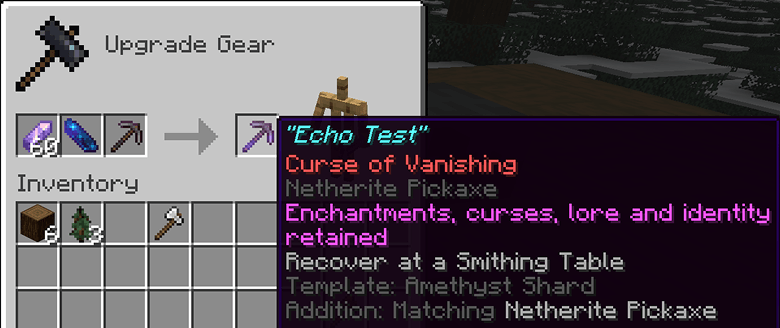
The fresh item provides the new body, while the Gear Echo restores the old item’s identity.
Example
A named Netherite Pickaxe with Efficiency V, Fortune III, Unbreaking III, and Mending reaches its final durability point.
Instead of losing everything, it leaves a Gear Echo. Combine that Echo with an Amethyst Shard and a fresh Netherite Pickaxe at a Smithing Table to rebuild the original pickaxe.
Installation
-
Place the Gear Echo datapack ZIP inside your world’s
datapacksfolder. -
Place the Gear Echo resource pack ZIP inside your Minecraft
resourcepacksfolder. -
Enable the resource pack.
-
Enter the world and run
/reloadif needed. -
Use
/datapack listto confirm that Gear Echo is enabled.
常见问题
Gear Echo 支持哪些 Minecraft 版本?
Gear Echo 支持 Minecraft Java 版 26.1–26.2,共 4 个版本。下载时注意选择和你游戏版本一致的文件。
Gear Echo 怎么安装?
新建世界时在「数据包」里把下载的 .zip 拖进去;已有的存档,把文件放进存档目录下的 datapacks 文件夹,进游戏输入 /reload 即可生效。服务器同样放在世界目录的 datapacks 里。
quillphen 的其他作品
查看全部 →
Ore Vein Miner
Vein Miner 会在你挖掘一块矿石时,自动挖掉与之相连的矿石。
Tree Vein Miner
砍树模组:潜行时砍掉整棵树(原木和树叶)

Tree Vein Miner
树木矿脉挖掘:潜行时移除整棵树(原木和树叶)

Ore Vein Miner
连锁挖矿会在你破坏一个矿石方块时自动挖掘相连的矿石方块
评论
登录后评论和评分