
Mod Sets
Control mods loading with gui. Useful for modpack and server with optional function. And also for geeks want to control mods without file operating.
截图
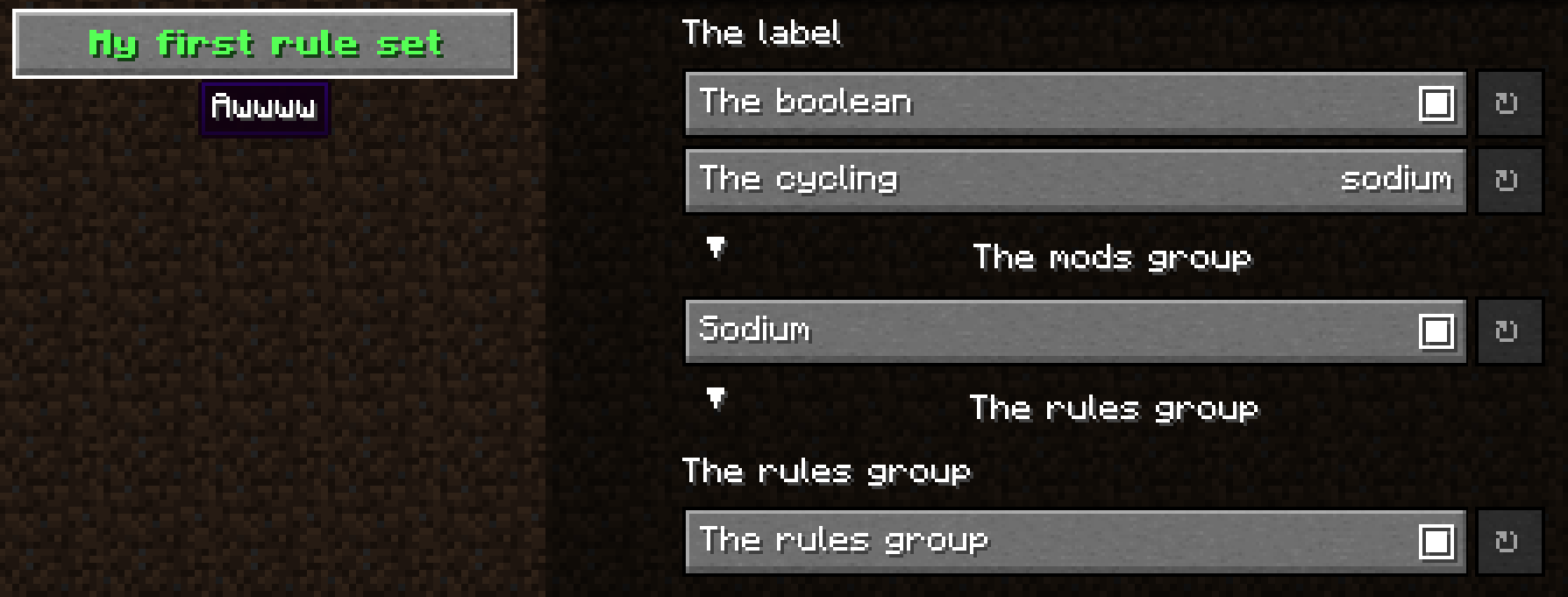
介绍
Mod Sets








This project heavily inspired by ThatOrThis
The mod is using for Minecraft Fabric/Quilt/Forge for managing mod loading in game.
And useful for modpack developer
Feature
- Enable/Disable mods in game with defined mod sets/subdirectory name/mod id(Need restart)
- Using https://github.com/isXander/YetAnotherConfigLib for config screen
- Custom mod loading rules for modpack developer to make the pack with more user defined options
Usage
The rules files should be json in config/modsets/rules.
Add rule and enter the config screen through Mod Menu
Full example: https://github.com/SettingDust/ModSets/blob/main/example_rules.json
Mod Set
Mod set is entry defined in config/modsets/modsets.json that is string to set of mod id map.
Specifically, sub folder name in mods folder will be mod sets the mods in it. And mod id will be the mod set only
contains itself.
Notice, the defined mod sets by config will override the folder/mod id with the same name.
Example:
{
    // The `sodium` will target the two mods here.
  // If disable this mod set, the mod in list won't load if it is exist
  "sodium": {
    "text": "Sodium",
    "description": "Performance: +++++",
    "mods": [
      "sodium",
      "indium"
    ]
  }
}
Rule

Every rule hold a text and description for displaying the info you want.
And a controller for YACL user interface
Example:
{
  "text": {
    "text": "My first rule set",
    "bold": true,
    "color": "green"
  },
  "description": "Awwww",
  "rules": [
    {
      "text": "text",
      "description": "description",
      "controller": {
        "type": "type" // Notice, this isn't valid type of controller. Take the type from controllers below
      }
    }
  ]
}
Controllers
Label
For displaying text on screen
Example:
{
  "text": "The label",
  "description": "Text Text",
  "controller": {
    "type": "label"
  }
}
Boolean
For switching a single mod set on/off
Example:
{
  "text": "The boolean",
  "description": "Text Text",
  "controller": {
    "type": "boolean",
      "id": "sodium"
  }
}
Cycling
For switching between mod sets in a list.
Useful when there is conflicting mods such as sodium and optifabric. Or switching the pack difficult
Example:
{
  "text": "The cycling",
  "description": "Text Text",
  "controller": {
    "type": "cycling",
      "ids": [
          // Don't empty
      "sodium",
      "optifabric"
    ]
  }
}
Mods Group
Assign a simple boolean controller option to every mods in the mod sets.
Example:
{
  "text": "The mods group",
  "description": "Text Text",
  "controller": {
    "type": "mods_group",
    // Default is true
    "collapsed": false,
      "ids": [
          // Don't empty
      "sodium",
      "optifabric"
    ]
  }
}
Rules Group
Group the rules so that it’s able to collapse the rules
Example:
{
  "text": "The rules group",
  "description": "Text Text",
  "controller": {
    "type": "rules_group",
    // Default is true
    "collapsed": true,
    "rules": [ // Don't empty
      {
        "text": "text",
        "description": "description",
        "controller": {
          "type": "label"
        }
      },
      {
        "text": "text",
        "description": "description",
        "controller": {
          "type": "boolean",
            "id": "sodium"
        }
      }
    ]
  }
}
Notice: Every text and description is text raw json.
Using https://www.minecraftjson.com/ for generating text.
常见问题
Mod Sets 支持哪些 Minecraft 版本?
Mod Sets 支持 Minecraft Java 版 1.19.2–1.21.11,共 21 个版本,可用的加载器:Fabric / Forge / NeoForge / Quilt。下载时注意选择和你游戏版本一致的文件。
Mod Sets 怎么安装?
先用 PCL2 或 HMCL 启动器安装对应版本的 Fabric / Forge / NeoForge / Quilt,再把下载的 .jar 文件放进游戏目录的 mods 文件夹,重新启动游戏即可。开启了版本隔离的,mods 文件夹在 versions/版本名 下面。运行环境:客户端 / 服务端。
settingdust 的其他作品
查看全部 →
Kiwi 🥝
Minecraft 模组开发库

Snow! Real Magic! ⛄
不是魔法类模组。 · 雪的重力与堆积 · 被雪覆盖的方块 · 调整雪的行为

Mod Compat Fixes
修复整合包中几个模组的问题。

lazyyyyy
主要优化大型整合包的游戏启动时间。
评论
登录后评论和评分