
Toggleable PieChart
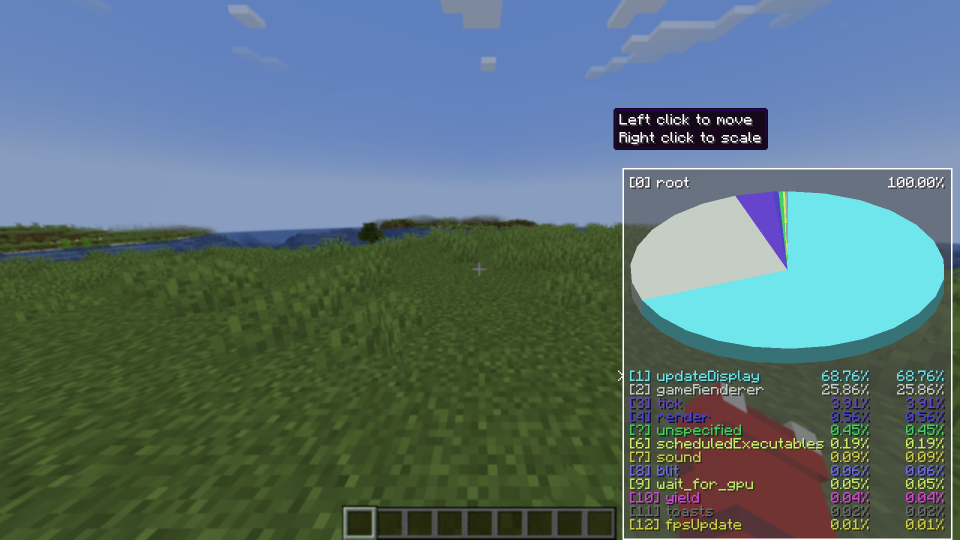
Allows you to toggle the Debug PieChart on/off, and also change it's position and scale. Now with a selection cursor!
截图



介绍
What it does
This mod allows users to toggle the debug piechart’s visibility regardless of the F3 debug menu.
This mod also allows the user to customize the piechart’s position and scale, along with easier navigation
How to use
Toggle the chart
Press the toggle key-bind to toggle the piechart
Customize the chart
Press the settings key-bind to configure it.
Navigate the chart
Use the navigation keys to navigate the chart using the selection cursor
_Default toggle key-bind is P_
_Default settings key-bind is O_
_Default navigation keys are -> Up/Down (Up/Down), Enter (Select), Backspace (Go back)_
Can I see 😀
Yes
常见问题
Toggleable PieChart 支持哪些 Minecraft 版本?
Toggleable PieChart 支持 Minecraft Java 版 1.20–1.21.11,共 17 个版本,可用的加载器:Fabric。下载时注意选择和你游戏版本一致的文件。
Toggleable PieChart 怎么安装?
先用 PCL2 或 HMCL 启动器安装对应版本的 Fabric,再把下载的 .jar 文件放进游戏目录的 mods 文件夹,重新启动游戏即可。开启了版本隔离的,mods 文件夹在 versions/版本名 下面。运行环境:仅客户端。
RooXChicken 的其他作品
查看全部 →
FireClient
A client side utility mod, specifically made for SMPs

True Health
This mod shows you your True Health (the in game decimal number)

Pibble XP
A tiny armor HUD with numbers
Pibble XP
A tiny armor HUD with numbers
评论
登录后评论和评分