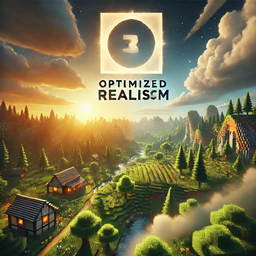
Optimized Realism
Optimized Realism is a modpack that enhances Minecraft's realism without sacrificing performance, delivering stunning visuals and smooth gameplay.
截图

介绍
Get ready to experience Minecraft like never before with Optimized Realism! This modpack takes the game you love and makes it even better by combining gorgeous visuals, immersive gameplay, and smooth performance. Whether you’re an adventurer exploring distant lands, a builder crafting stunning creations, or a survivalist thriving in harsh environments, this pack is designed to make your world feel alive while keeping everything running smoothly.
Features:
Optimized Realism adds a whole new layer of depth to Minecraft. With mods like Realistic Fire Spread and FallingTree, survival feels more dynamic and authentic. Meanwhile, Biomes O’ Plenty and Serene Seasons completely transform the environment, introducing diverse landscapes and seasonal changes that make your world feel fresh and alive. You’ll also find unique structures from Formations and Towns and Towers scattered across the map, waiting for you to discover them.
The visuals in this pack are breathtaking. BSL Shaders and the RealPix 32x Texture Pack give Minecraft a cinematic glow, while performance mods like Sodium keep everything running smoothly, even on lower-end systems. And with tools like BetterF3 and Inventory HUD+, you’ll always have the important info you need right at your fingertips, making gameplay more intuitive and enjoyable.
Why Choose Optimized Realism?
This modpack is perfect for anyone who wants the best of both worlds: stunning visuals and great performance. Builders will love how beautiful their creations look, and explorers will have endless adventures in a world packed with variety and detail. It’s a carefully balanced experience that makes Minecraft feel more polished and exciting without overwhelming your system.
常见问题
Optimized Realism 支持哪些 Minecraft 版本?
Optimized Realism 基于 Minecraft Java 版 1.21.3,使用 Fabric 加载器。
Optimized Realism 怎么安装?
点本页「前往下载」拿到整合包文件(Modrinth 的是 .mrpack,CurseForge 的是 .zip),在 PCL2 或 HMCL 启动器里选择「导入整合包」,启动器会自动装好 Minecraft、加载器和全部模组。建议在启动器里给游戏分配 4–6 GB 内存。
Optimized Realism 开服需要多大内存?
推荐服务器内存 12 GB。在线人数多、或者建了大量机器和区块加载器时,可以再加 2–4 GB。
怎么和朋友一起玩 Optimized Realism?
点本页的「一键开服」,选好配置后会自动安装 Optimized Realism 的服务端,几分钟就能开好。把服务器地址发给朋友,大家用同一个版本的整合包连进去就行。
linkthegod11 的其他作品
查看全部 →
DEADFALL
a simple but terrifying modpack, only for the worthy.
Celestial Quest Pack
The Celestial Quest Pack transforms your Minecraft adventure with new biomes, advanced crafting, and seamless performance. Explore and thrive in a beautifully immersive world!
Forsaken Horizons
Forsaken Horizons is A huge modpack with 100+ mods, overhauled world generation, and an endless, fun experience.

Otherworldly Adventures
This is a Minecraft Mod-pack that adds quality of life features, better world gen and much much more.
评论
登录后评论和评分