Hydron – Clear Water
A simple texture pack which makes water clearer. Works with Vanilla, Sodium, Optifine, and Vulkan.
截图



介绍
<img
src=”https://i.imgur.com/JgFK9cK.png”
alt=”Hydron Title”
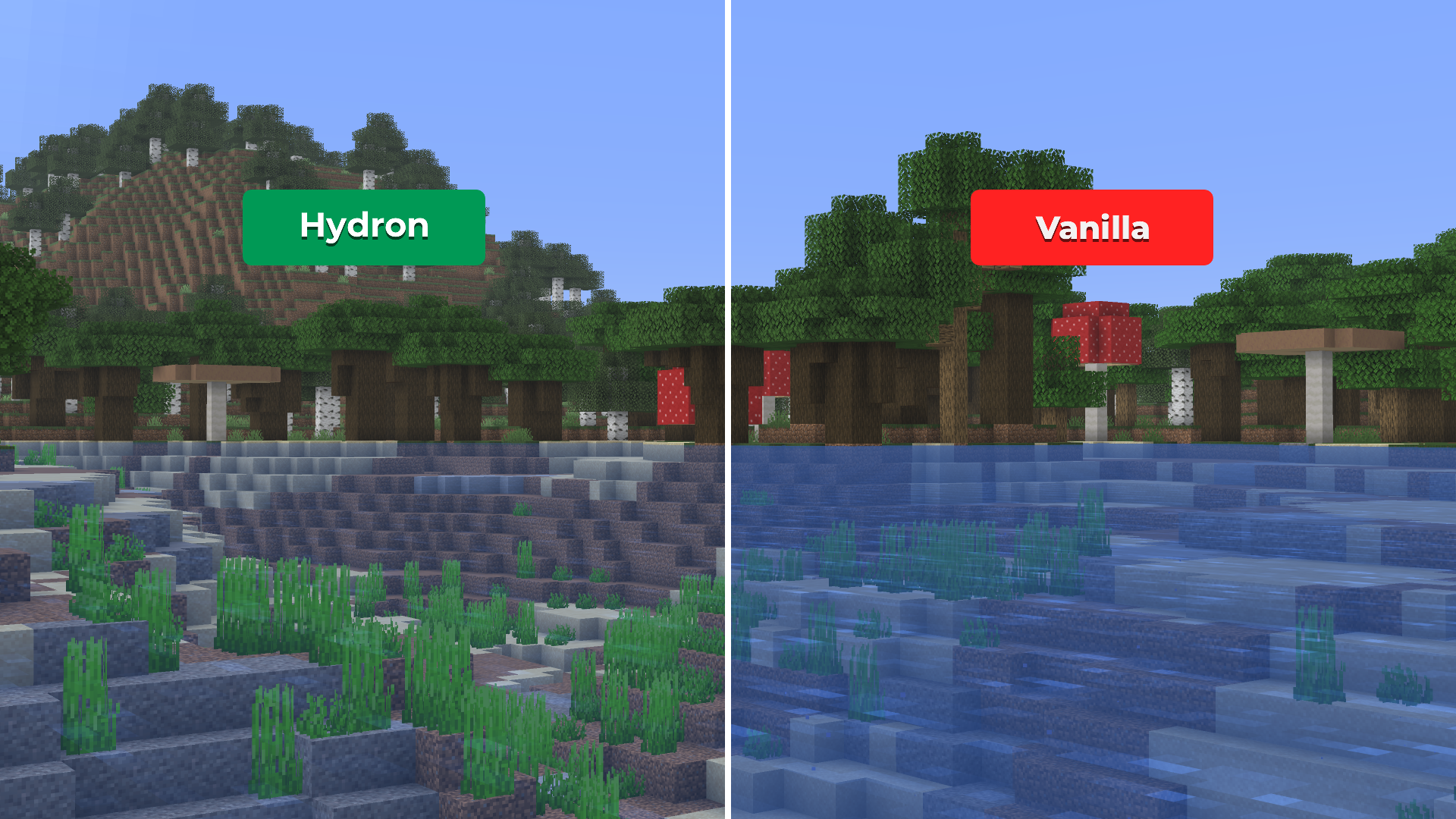
Tired of murky water and terrible underwater visibility?
Hydron makes water noticeably clearer — while preserving Minecraft’s vanilla look and feel.


” alt=”Discord Icon” width=”50″>

<img
src=”https://i.imgur.com/h95aVDZ.png”
alt=”Hydron Featured Image”

- Clearer underwater visibility
- Reduced blue tint and fog for cleaner oceans, rivers, and caves
- Vanilla-consistent visuals with no FullBright or night-vision behavior
- Fully server-friendly, no gameplay advantages or shaders

Underwater exploration shouldn’t feel like looking through fogged glass. Hydron makes oceans, rivers, and flooded caves easier to navigate while keeping water natural and immersive. Lightweight, subtle, and designed to feel native to vanilla Minecraft.

Screenshots
| Hydron | Vanilla |
|———————————-|———————————-|
|  |
 |
| View Full Size | View Full Size |
| Hydron | Vanilla |
|———————————-|———————————-|
|  |
 |
| View Full Size | View Full Size |
For a brighter and clearer underwater experience, Hydron can optionally be paired with Photon

Any pack downloaded from PrecisionZero or ChillByte will completely work with all other packs from us. Our texture packs are designed in a way that no pack would clash with each other, ensuring a reliable and seamless experience.
Discover the PrecisionStudios Collection
| | |
|—|—|
|  |
 |

Installation
- Download the
.zipfile - Open Minecraft → Options → Resource Packs → Open Pack Folder
- Paste the
.zipfile into the folder - Close and re-open the Resource Packs menu
- Enable Hydron from the list
Compatibility
- Works with all vanilla-based gameplay
- Compatible with everything as long as Hydron is above every other pack
- Resource pack only, no mods required
Contact
For any concerns regarding Hydron, contact me at:
[email protected]

Licensed as All Rights Reserved (ARR) under PrecisionZero
常见问题
Hydron – Clear Water 支持哪些 Minecraft 版本?
Hydron – Clear Water 支持 Minecraft Java 版 1.6.1–26.3,共 87 个版本。下载时注意选择和你游戏版本一致的文件。
Hydron – Clear Water 怎么安装?
把下载的 .zip 文件(不用解压)放进游戏目录的 resourcepacks 文件夹,进游戏后在「选项 → 资源包」里把它移到右边启用。
PrecisionZero 的其他作品
查看全部 →
Photon – Fullbright
A simple Full Bright texturepack for Vanilla, Sodium, Optifine, and Vulkan.

Photon – Fullbright
A simple Full Bright texturepack for Vanilla, Sodium and Optifine
Hydron – Clear Water
A simple texture pack which makes water clearer

Veinify – Better Mining
The Most Feature Complete Texture Pack Dedicated to Make Mining Better
评论
登录后评论和评分