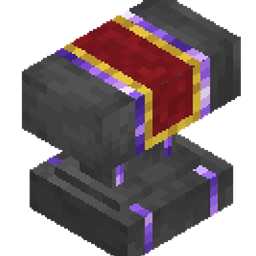
Advanced Anvil
Bypasses the vanilla level 40 limit! Forge high-tier enchantments and repair gear with an interactive dialog UI and custom 3D anvil model.
介绍
# Advanced Anvil Bundle — Break the Level 40 Cap & Forge Without Limits!
> **Tired of the “Too Expensive!” message? Forge, combine, and repair your endgame gear beyond level 40 with a custom interactive UI and sleek 3D anvil model.**
In vanilla Minecraft, combining heavily enchanted gear eventually hits the dreaded **”Too Expensive!”** wall at level 40. **Advanced Anvil** solves this problem completely—allowing you to forge items regardless of the XP level cost while maintaining vanilla-balanced prior work penalties and mechanics.
—
## Key Features
* **No “Too Expensive!” Limit**: Forge and repair items even if the cost exceeds level 40 (e.g., costs of 50, 68, or 100+ levels work seamlessly).
* **Intuitive Mainhand & Offhand UI**:
* **Main Hand:** Target item (Tool, Weapon, Armor, or Book).
* **Offhand:** Sacrificial item, Enchanted Book, or Repair Material.
* **Right-Click:** Opens an interactive preview dialog showing the result and exact XP cost. Click **[Forge]** to confirm!
* **Smart Material Repairs**: Restores 25% max durability per material ingot/gem and only consumes the exact amount required.
* **Full Enchantment Compatibility**:
* Full support for all **Minecraft 26.3 Vanilla enchantments**.
* Built-in support for **AppleTomaTo’s Custom Enchants** (194 custom enchantments!).
* Strict conflict checks (e.g., Sharpness vs. Smite) and level capping.
* **Custom 3D Model & Textures**: Features dark forged iron with elegant amethyst accents.
* **Retains Anvil Physics**: Subject to gravity, falling damage, and wear degradation (Chipped/Damaged).
—
## Crafting Recipe
Craft the **Advanced Anvil** in a standard 3×3 Crafting Table:
| Recipe Layout | Materials |
| :—: | :— |
| `[Amethyst]` `[Iron Block]` `[Amethyst]` |
| `[Iron Block]` `[Anvil]` `[Iron Block]` |
| `[Amethyst]` `[Iron Block]` `[Amethyst]` |
—
## How to Use
1. Place down your **Advanced Anvil**.
2. Hold your **base item** in your **Main Hand**.
3. Hold the **book, duplicate item, or repair material** in your **Offhand**.
4. **Right-Click** the anvil to inspect the preview and XP level cost.
5. Click **[Forge]** in the dialog to complete the operation.
> **To Retrieve / Move the Anvil:**
> Hold any Pickaxe, **Sneak (Shift) + Left-Click** the anvil. It retains its wear state when broken and placed again!
—
## What’s Included in the Bundle?
This download is a **Bundle ZIP**. Please extract it before installing:
1. **`Advanced Anvil.zip`**: The core Datapack (handles crafting, XP costs, calculations, and forging logic).
2. **`Advanced Anvil Resources.zip`**: The Resource Pack (provides the custom 3D block model, textures, and clean UI text).
—
## Installation Guide
### Singleplayer:
1. Extract `Advanced Anvil Bundle.zip`.
2. Move `Advanced Anvil.zip` into your world’s `.minecraft/saves/<WorldName>/datapacks/` folder.
3. Move `Advanced Anvil Resources.zip` into your `.minecraft/resourcepacks/` folder.
4. In Minecraft, go to **Options > Resource Packs** and enable **Advanced Anvil Resources**.
5. Join your world (run `/reload` if you were already inside the world).
### Multiplayer / Server:
1. Place `Advanced Anvil.zip` inside the server’s `world/datapacks/` folder and restart/reload.
2. Ensure players download and enable `Advanced Anvil Resources.zip` on their clients (or configure it as the server resource pack).
—
## Technical Details
* **Target Version:** Minecraft Java Edition **26.3**
* **Server-Side Safe:** 100% vanilla data pack architecture. No forge/fabric mods or server plugins required.
* **Non-Destructive:** Does not modify vanilla anvils or standard item textures.
—
*Created by **AppleTomaTo***
常见问题
Advanced Anvil 支持哪些 Minecraft 版本?
Advanced Anvil 支持 Minecraft Java 版 26.3。下载时注意选择和你游戏版本一致的文件。
Advanced Anvil 怎么安装?
新建世界时在「数据包」里把下载的 .zip 拖进去;已有的存档,把文件放进存档目录下的 datapacks 文件夹,进游戏输入 /reload 即可生效。服务器同样放在世界目录的 datapacks 里。
AppleTomaT_o 的其他作品
查看全部 →
Bigger Stack Size Limit
Increases stack sizes of 64 and 16 stackable items up to 99!

Armor Trim Synergy
Turns armor trims into functional gear! 18 unique pattern bonuses, stackable hybrid stats, and game-changing full-set passive effects.
Collector Advancement
Track and collect every survival item in Minecraft! Features 32 cumulative advancements covering all items, blocks, trims, pottery sherds, discs, and 3,072 tropical fish.

Item Hunt
Action-packed Runner vs Seekers minigame data pack! The Runner must collect random target items while Seekers track and hunt them down.
评论
登录后评论和评分