
Network Protocol Disconnect (netprodis)
This mod Prevents the Client from disconnecting when invalid packets are received.
截图
介绍
# Network-Protocol-Disconnect
Network Protocol Disconnect is a mod designed to enhance your multiplayer experience by preventing automatic disconnections caused by invalid server packets in Minecraft.
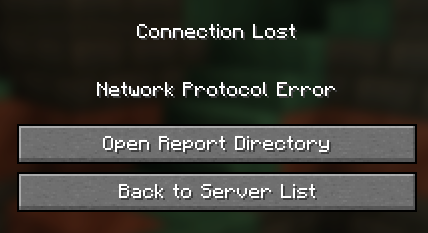
In Minecraft 1.20.5, Mojang introduced a change where any invalid data in packets sent from a server would result in an immediate client disconnect, disrupting gameplay and making it difficult to remain connected to servers with imperfect network handling.
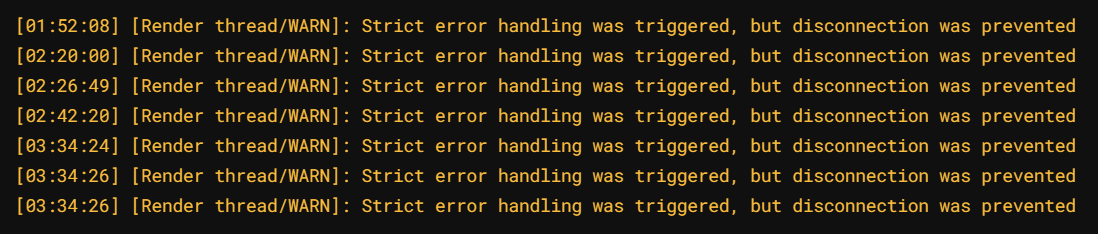
With Network Protocol Disconnect, this issue is resolved by overriding the default behavior, allowing the game to continue running even when invalid packets are detected. Instead of disconnecting, the mod ensures no interruptions while still logging any issues for your review.
Network protocol errors aren’t all just caused by invalid packets sent from the server; they can also be triggered by other mods, conflicting configurations, or unexpected network conditions. Network Protocol Disconnect ensures that the network protocol error screen never appears, preventing forced disconnects regardless of the source. This means the mod can also stop other mods from triggering network protocol error disconnections, making it a vital tool for maintaining stable multiplayer sessions. Any issues that arise are still logged for debugging, but they will never interfere with your gameplay.
⚠️ Warning: By disabling the disconnect feature, you may remain connected to servers sending faulty or malicious packets. Use this mod at your own risk, especially when playing on untrusted or unknown servers. Always ensure you play on reputable servers to avoid potential security issues.
Ideal for players encountering frequent disconnects on modded or unstable servers!
常见问题
Network Protocol Disconnect (netprodis) 支持哪些 Minecraft 版本?
Network Protocol Disconnect (netprodis) 支持 Minecraft Java 版 1.20.5–26.3,共 19 个版本,可用的加载器:Fabric / NeoForge / Quilt。下载时注意选择和你游戏版本一致的文件。
Network Protocol Disconnect (netprodis) 怎么安装?
先用 PCL2 或 HMCL 启动器安装对应版本的 Fabric / NeoForge / Quilt,再把下载的 .jar 文件放进游戏目录的 mods 文件夹,重新启动游戏即可。开启了版本隔离的,mods 文件夹在 versions/版本名 下面。
mobilelize 的其他作品
查看全部 →
Network Protocol Disconnect
This mod Prevents the Client from disconnecting when invalid packets are received.

Hold That Chunk V2
Delays client chunk unloading

Revert Toggle Sneak
Revert Toggle Sneak brings back the classic toggle-sneak behavior. With this mod, sneaking stays active through inventories, menus, and other screens.

GhostBlock
Gives you the ability to give yourself ghost block and other cool features CLIENT-SIDE
评论
登录后评论和评分