
截图
介绍
这是一个前置库模组,如果你是普通玩家,只需安装它,无需阅读下文!
开发者须知 —
添加依赖项 [
只需使用 CurseMaven,仓库地址在这里:https://www.cursemaven.com/
在“文件”中找到所需版本的代码片段,并用它添加依赖项
示例(并非正确的模组)
implementation “curse.maven:cloth-config-348521:5987045”
]
与 Forge 配置相比的优缺点
###
-优点 ———————————-
使用 JSON 而非 TOML,因此更加可靠(例如,Forge 配置对空列表的支持不完善,使用时可能会出错)
兼容读写的 Java / Minecraft 类比 Forge 配置多得多(例如,Vec3 无法写入或读取 Forge 配置;JasonConfig 使用 JSON 对象,因此不存在这个问题)
代码编写更简单,同时与创建 Forge 配置类的方式类似(见下文)
-缺点 ———————————-
由于采用 JSON 格式,用户阅读起来稍微不太方便
目前仍处于实验阶段;虽然我还没发现问题,但肯定会有一些问题出现,毕竟我只有一个人
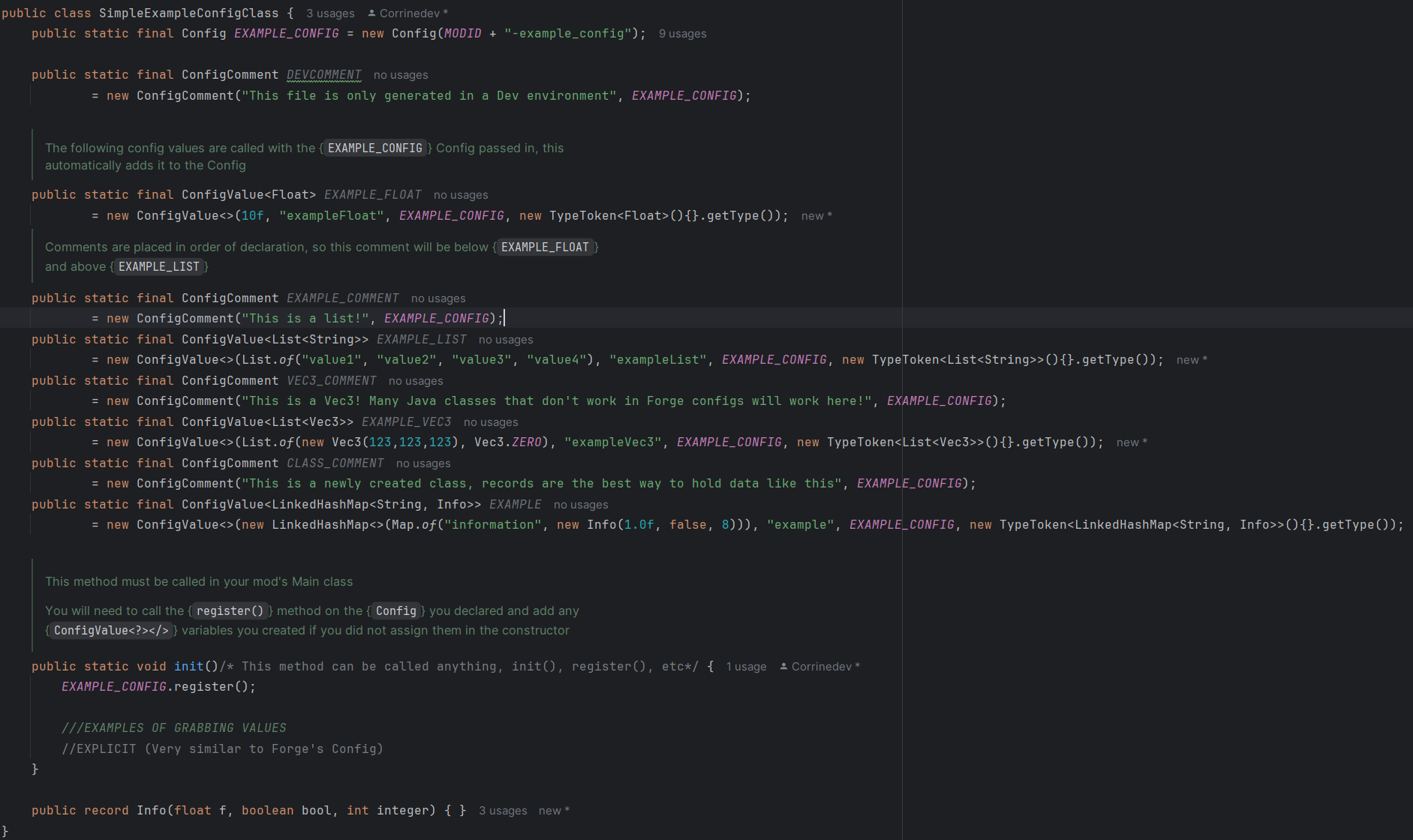
配置示例(添加到依赖项后,也可以在模组的“api”包中找到)
“api”包中的所有内容都有完善的文档说明,请查阅相关文档
public class ExampleConfigClass {
    public static final Config EXAMPLE_CONFIG = new Config(MODID + "-example_config");

    public static final ConfigComment DEVCOMMENT
            = new ConfigComment("This file is only generated in a Dev environment", EXAMPLE_CONFIG);

    ///The following config values are called with the {<code>EXAMPLE_CONFIG</code>} Config passed in, this automatically adds it to the Config
    public static final ConfigValue<Float> EXAMPLE_FLOAT
            = new ConfigValue<>(10f, "exampleFloat", EXAMPLE_CONFIG, new TypeToken<Float>(){}.getType());
    ///Comments are placed in order of declaration, so this comment will be below {<code>EXAMPLE_FLOAT</code>} and above {<code>EXAMPLE_LIST</code>}
    public static final ConfigComment EXAMPLE_COMMENT
            = new ConfigComment("This is a list!", EXAMPLE_CONFIG);
    public static final ConfigValue<List<String>> EXAMPLE_LIST
            = new ConfigValue<>(List.of("value1", "value2", "value3", "value4"), "exampleList", EXAMPLE_CONFIG, new TypeToken<List<String>>(){}.getType());
    public static final ConfigComment VEC3_COMMENT
            = new ConfigComment("This is a Vec3! Many Java classes that don't work in Forge configs will work here!", EXAMPLE_CONFIG);
    public static final ConfigValue<List<Vec3>> EXAMPLE_VEC3
            = new ConfigValue<>(List.of(new Vec3(123,123,123), Vec3.ZERO), "exampleVec3", EXAMPLE_CONFIG, new TypeToken<List<Vec3>>(){}.getType());
    public static final ConfigComment CLASS_COMMENT
            = new ConfigComment("This is a newly created class, records are the best way to hold data like this", EXAMPLE_CONFIG);
    public static final ConfigValue<LinkedHashMap<String, Info>> EXAMPLE
            = new ConfigValue<>(new LinkedHashMap<>(Map.of("information", new Info(1.0f, false, 8))), "example", EXAMPLE_CONFIG, new TypeToken<LinkedHashMap<String, Info>>(){}.getType());

    ///This method must be called in your mod's Main class
    ///
    /// You will need to call the {<code>register()</code>} method on the {<code>Config</code>} you declared
    /// and add any {<code>ConfigValue<?></></code>} variables you created if you did not assign them in the constructor
    public static void init()/* This method can be called anything, init(), register(), etc*/ {
        EXAMPLE_CONFIG.register();

        ///EXAMPLES OF GRABBING VALUES
        //EXPLICIT (Very similar to Forge's Config)
    }

    public record Info(float f, boolean bool, int integer) { }
}
常见问题
JasonConfig 支持哪些 Minecraft 版本?
JasonConfig 支持 Minecraft Java 版 1.20.1–1.21.1,共 7 个版本,可用的加载器:Forge / NeoForge。下载时注意选择和你游戏版本一致的文件。
JasonConfig 怎么安装?
先用 PCL2 或 HMCL 启动器安装对应版本的 Forge / NeoForge,再把下载的 .jar 文件放进游戏目录的 mods 文件夹,重新启动游戏即可。开启了版本隔离的,mods 文件夹在 versions/版本名 下面。运行环境:客户端 / 服务端。
Corrinedev 的其他作品
查看全部 →
[TACZ] NPCs
Fully animated neutral and enemy NPCs with loot tables and proper player-like TACZ shooting.

[TACZ] Durability
Adds durability to the Timeless and Classics guns with a jamming and repairing system.

Pointblank: Jelly
A fork of the popular gun mod, Pointblank
评论
登录后评论和评分