
截图
介绍
BetterBackups
Never lose your worlds again.
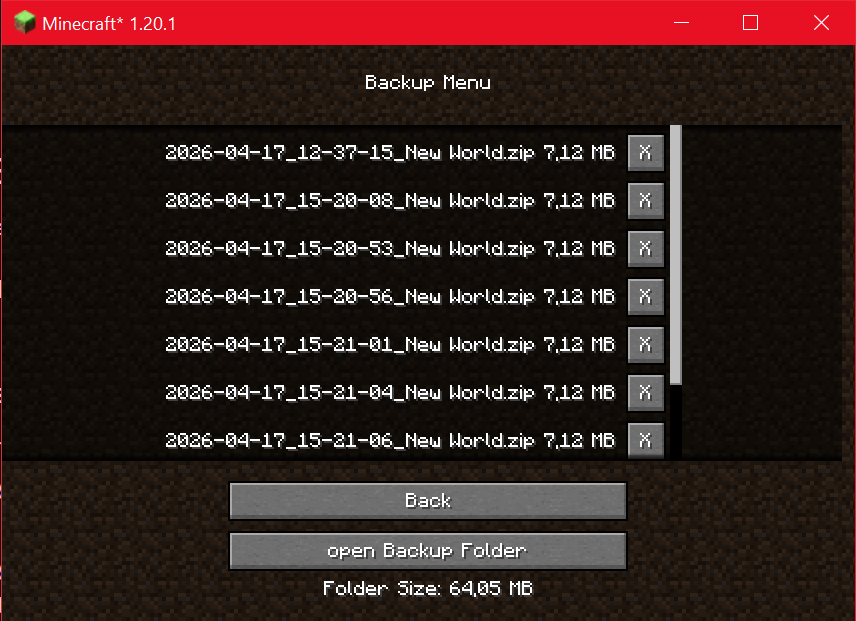
BetterBackups adds a simple and user-friendly backup manager directly into Minecraft. Browse, manage, and organize your world backups without leaving the game.
Features
✅ In-game backup browser
✅ Displays all backups from the Minecraft backups folder
✅ Shows the size of every backup
✅ Displays the total size of the backup folder
✅ Open the backup folder with a single click
✅ Clean and lightweight interface
✅ Fully integrated into Minecraft’s GUI
Why BetterBackups?
Managing backups through your file explorer can be inconvenient, especially when you have dozens of backup files. BetterBackups provides a dedicated screen where you can quickly view and organize your backups directly from inside Minecraft.
Whether you’re a casual player or a modpack creator, BetterBackups helps you keep track of your saved worlds and storage usage.
Current Functionality
- View all available backups
- Display backup file sizes
- Display total backup folder size
- Open the backup folder from within the game
Planned Features
- Restore backups directly in-game
- Delete backups from the backup screen
- Search and sort backups
- Backup creation with one click
- Additional information such as creation date and world name
Compatibility
- Client-side mod
- Works with existing Minecraft backups
- No server installation required
Feedback & Suggestions
Found a bug or have an idea for a new feature? Feel free to leave feedback and help improve BetterBackups.
Keep your worlds safe. Manage your backups with ease. 📦💾
常见问题
betterbackups 支持哪些 Minecraft 版本?
betterbackups 支持 Minecraft Java 版 1.20.1–1.20.6,共 6 个版本,可用的加载器:Fabric。下载时注意选择和你游戏版本一致的文件。
betterbackups 怎么安装?
先用 PCL2 或 HMCL 启动器安装对应版本的 Fabric,再把下载的 .jar 文件放进游戏目录的 mods 文件夹,重新启动游戏即可。开启了版本隔离的,mods 文件夹在 versions/版本名 下面。运行环境:仅客户端。
ShadowDara 的其他作品
查看全部 →
Simple Timer
This Datapack introduces a simple, customizable timer and countdown feature, making it perfect for mini-games, events, or personal projects. It works easy within your existing Minecraft worlds.

UwU Tools Netherite
Do you ever wanted to have pink netherite tools? Here they are!

Invisible Armor
A simple Texture Pack for you if you dont like armor Texture at all!

easy Speedruntimer
This is a little easy Timer Datapack for speedruning minecraft
评论
登录后评论和评分