
HttpChat Python chat, Linux chat
作者:TenshiBunny
A mod that adds the ability to send messages or commands to the chat on behalf of the player directly from any programming language or console.
截图

介绍
中文介绍正在准备中,下面暂时显示原文。
This mod is designed to write to the chat from outside the game, you can create amazing projects with this mod
Here are examples of how to use it:
linux, windows cmd:
c url -X POST http://localhost:6789 -d "Greetings from the TenshiBunny!"
c url -X POST http://localhost:6789 -d "/tp 0 10 0"
windows powershell:
Invoke-WebRequest -Uri http://localhost:6789 -Method POST -Body "Greetings from the TenshiBunny!"
Invoke-RestMethod -Uri http://localhost:6789 -Method POST -Body "/tp 0 10 0"
python:
import requests

response1 = requests.post('http://localhost:6789', data='Greetings from the TenshiBunny!')
print(f'Статус: {response1.status_code}')
print(f'Ответ: {response1.text}')

response2 = requests.post('http://localhost:6789', data='/tp 0 10 0')
print(f'Статус: {response2.status_code}')
print(f'Ответ: {response2.text}')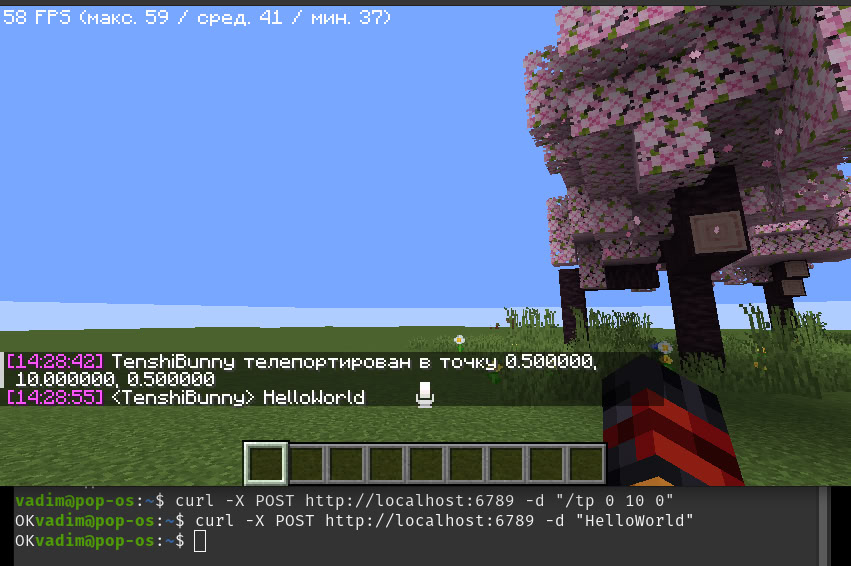
常见问题
HttpChat Python chat, Linux chat 支持哪些 Minecraft 版本?
HttpChat Python chat, Linux chat 支持 Minecraft Java 版 1.21.8,可用的加载器:Fabric。下载时注意选择和你游戏版本一致的文件。
HttpChat Python chat, Linux chat 怎么安装?
先用 PCL2 或 HMCL 启动器安装对应版本的 Fabric,再把下载的 .jar 文件放进游戏目录的 mods 文件夹,重新启动游戏即可。开启了版本隔离的,mods 文件夹在 versions/版本名 下面。运行环境:仅客户端。
评论
登录后评论和评分