
Player Guard
CoreProtect-style transaction logging and rollback for player inventories, armor, backpacks, and Cobblemon data. Recover lost items after crashes, dupes, or bad restarts.
截图

介绍
Player Guard
CoreProtect for player inventories.
Player Guard logs every item that moves through a player’s inventory, armor, offhand, and equipped accessories, then lets admins snapshot, roll back, or fully restore a player’s gear after a crash, a bad mod interaction, a dupe exploit, or just “I logged out and now I have nothing.”
Unlike CoreProtect, this mod doesn’t touch blocks or chests, it’s laser-focused on what’s
on the player: main inventory, armor, offhand, cursor slot, ender chest, and anything
Accessories/Trinkets has equipped or stored as cosmetics.
If you also run Cobblemon, Player Guard backs up and restores party, PC boxes, and Pokédex/spawn data alongside the
player’s items, so a rollback covers everything a player would consider “my stuff.”
Why you need this
Modded servers break inventories. A crash mid-join, a broken mod interaction, a rogue
plugin, or a player exploiting a bug can wipe someone’s gear in an instant, and without a
tool like this, that’s just gone. Player Guard gives you a full paper trail and a one-command
way to give it back.
Features
- Full transaction logging: every inventory click is diffed and logged per-slot, the same way CoreProtect logs block changes. See exactly what a player added, removed, or modified, and when.
- Automatic snapshots: configurable interval snapshots while a player is online, plus a snapshot on disconnect, so you always have a recent recovery point without relying on someone remembering to ask for one.
- Full player state, not just the hotbar: armor, offhand, main inventory, ender chest, cursor, and anything Accessories/Trinkets attaches to the player (equipped + cosmetic slots) are all captured together.
- Optional Cobblemon integration: automatically detected. Backs up and restores party, PC, Pokédex, and spawn data alongside item snapshots. Runs perfectly fine without Cobblemon installed too.
- Online or offline restore: bring a player’s gear back while they’re online (with a safety snapshot taken automatically first), or edit their playerdata directly while they’re offline.
- Safe by design: restores can never teleport a player, change their gamemode, or move them between dimensions. A pre-restore snapshot is always taken automatically so a bad restore is itself reversible. All writes are atomic (crash-mid-write can’t corrupt data).
- Zero server-thread impact: all database and file I/O runs on a background thread, so logging and snapshotting never causes lag or tick stutter.
- Configurable retention: old snapshots and transaction logs are pruned automatically after however many days you configure (or kept forever).
- Clickable, paginated lookup: /playerguard lookup shows a Ledger-style paginated list with clickable next/previous page arrows.
Commands
All commands are under /playerguard (permission level configurable, default 3):
/playerguard: Quick status line
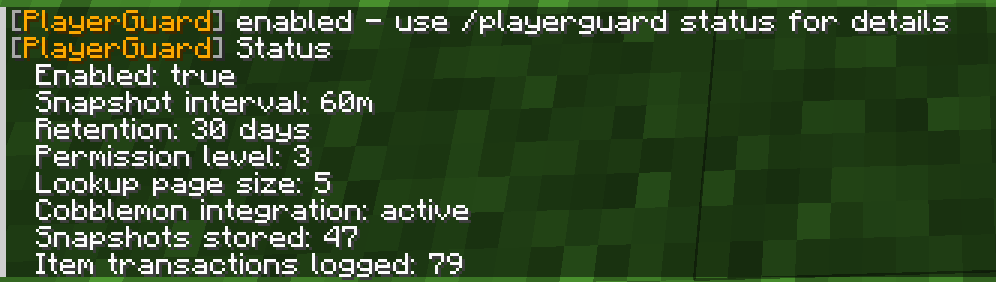
/playerguard status: Full status – config, database stats, Cobblemon detection
/playerguard enable: disable – Toggle background snapshotting/logging
/playerguard reload: Reload config from disk
/playerguard snapshot : Take a manual snapshot right now
/playerguard rollback
Configuration
config/playerguard/playerguard.json:
{
“enabled”: true,
“snapshotIntervalMinutes”: 60,
“snapshotOnJoin”: false,
“snapshotOnDisconnect”: true,
“retentionDays”: 30,
“permissionLevel”: 3,
“lookupPageSize”: 5
}
Installation
- Install [Fabric Loader] 0.18.4 and [Fabric API] 0.116.13+1.21.1.
- Drop playerguard jar into your server’s mods folder.
- Start the server once to generate the config, then adjust
config/playerguard/playerguard.jsonto taste. - No client installation needed for your players.
Compatibility
- Works on any Fabric 1.21.1 server, Cobblemon or not.
- No known conflicts. Inventory click logging is defensively wrapped so a broken third-party inventory implementation (storage mods, etc.) can never interrupt normal play.
About Mossfall Network
Player Guard was built for the Mossfall Network, a collection of long-term, community-driven multiplayer worlds, including Mossvale (Minecraft survival) and Greyhaven (Vintage Story). Rather than resetting every few months, Mossfall worlds are built to last for years, so the tools we make for our own communities are built the same way: safe, low-maintenance, and meant to stick around and now we want to share the mods with you all.
Come say hi: Discord – https://discord.gg/APmGC8vwtZ
Support the Network on Patreon: https://www.patreon.com/c/Mossfall
常见问题
Player Guard 支持哪些 Minecraft 版本?
Player Guard 支持 Minecraft Java 版 1.21.1,可用的加载器:Fabric。下载时注意选择和你游戏版本一致的文件。
Player Guard 怎么安装?
先用 PCL2 或 HMCL 启动器安装对应版本的 Fabric,再把下载的 .jar 文件放进游戏目录的 mods 文件夹,重新启动游戏即可。开启了版本隔离的,mods 文件夹在 versions/版本名 下面。运行环境:仅服务端。

评论
登录后评论和评分