
GearHud
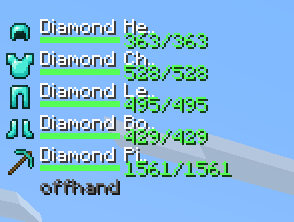
See equipped armor and hand-item durability in a compact Fabric HUD, with color-coded bars and remaining/max values.
截图
介绍
GearHud
Keep equipped item durability visible while you play, with a compact vertical HUD for armor, main-hand, and off-hand slots.
Features
- Equipped-item icons and names
- Durability bars that change from green to yellow to red
- Numeric remaining/maximum durability for damageable items
- Configurable HUD X and Y position
How to use
Equip armor or hold an item and the HUD appears automatically. Open Mod Menu → GearHud to adjust its position.
Installation
Client-side Fabric mod. Choose a file marked for your Minecraft version. Requires Fabric Loader 0.17.2 or newer, Java 21, Fabric API, and YetAnotherConfigLib (YACL). Mod Menu is optional for opening settings.
常见问题
GearHud 支持哪些 Minecraft 版本?
GearHud 支持 Minecraft Java 版 1.21.10,可用的加载器:Fabric。下载时注意选择和你游戏版本一致的文件。
GearHud 怎么安装?
先用 PCL2 或 HMCL 启动器安装对应版本的 Fabric,再把下载的 .jar 文件放进游戏目录的 mods 文件夹,重新启动游戏即可。开启了版本隔离的,mods 文件夹在 versions/版本名 下面。运行环境:仅客户端。
zachphul 的其他作品
查看全部 →
ChatMacros
Keyboard shortcuts for chat messages and slash commands, with configurable per-macro cooldowns. Client-side Fabric mod.

Bazaar Flipper
Hypixel SkyBlock Bazaar, craft, and NPC flip estimates in a client-side Fabric overlay. Live market data, configurable filters, no API key required.

AutoToolSwap
Automatically switches hotbar slots when mining or attacking, with configurable swap-back. Client-side Fabric tool selection.

ReJoin
Reconnect to your last multiplayer server with a keybind or automatic retries, with a live ping HUD. Client-side Fabric mod.
评论
登录后评论和评分