介绍
Overview
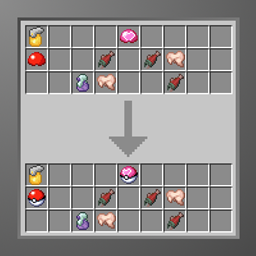
In Pixelmon 1.21.1, instead of being able to get pokeballs you now only get pokeball lids. This datapack undoes that change and brings back the pokeballs within loot chests.
Installation:
Head over to the files tab, pick the latest version for your pixelmon version and download it, if there isnt any for your exact version pick the newest version that is lower than your pixelmon version
Due to this datapack modifying world gen it is recomended that you install it before the world is generated. Installing it into an existing world will only allow newly generated chests to have the modified loot.
During world creation (Recomended):
- After clicking “Create New World”
- Head over to the “More” tab at the top of your screen
- Click on the “Datapacks” button
- Click “Open Pack Folder”
- Drag and drop the ZIP file into the folder you opened in the previous step, DO NOT UNZIP
- Close the folder, enable the datapack, click done and continue with world creation
In an existing world or server:
- Head on over to your game/packs files, where you find the files depends on which launcher you use though most have a simple button you can press right within the launcher to open its files
- Go into your saves/<worldname>/datapacks folder (world/datapacks on a server)
- Place the ZIP file into that folder, DO NOT UNZIP
- Close the world and rejoin or restart the server
常见问题
Bring back Pokeball loot 支持哪些 Minecraft 版本?
Bring back Pokeball loot 支持 Minecraft Java 版 1.21.1。下载时注意选择和你游戏版本一致的文件。
Bring back Pokeball loot 怎么安装?
新建世界时在「数据包」里把下载的 .zip 拖进去;已有的存档,把文件放进存档目录下的 datapacks 文件夹,进游戏输入 /reload 即可生效。服务器同样放在世界目录的 datapacks 里。
SlimeyBoi123 的其他作品
查看全部 →
Shopkeeper Universal selling
能够向任何店主出售Pixelmon物品

Drakar Vara
Modpack Build For playing with Mr. Wraith on stream and with friends

Drakar Vara: PixelFriends 2
Pixelmon server pack, focused on building with automation capabilities

Drakar Vara: Dragons From the Past
Explore Dungeons, Fight Dragons, build whatever you like
评论
登录后评论和评分