
Emote Chat
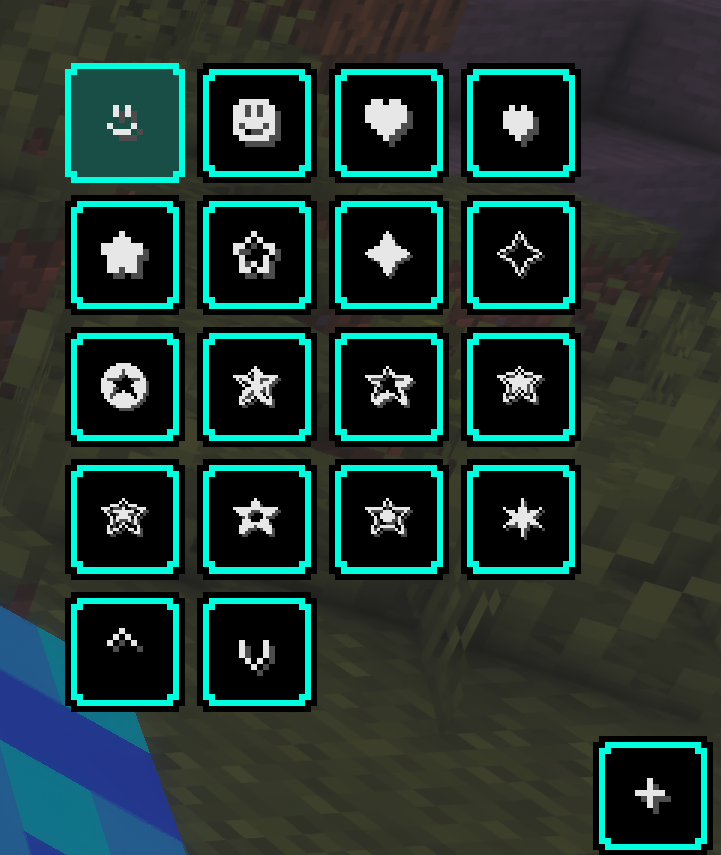
This Minecraft Fabric client mod that adds a small + button next to the chat, allowing players to quickly insert special emotes and symbols directly into chat.
截图
介绍
Emote Chat 1.0.0
This is a Minecraft Fabric client mod that adds a small + button next to the chat, allowing players to quickly insert special emotes and symbols directly into chat.
Features in Version 1.0.0:
- Adds a + button next to the chat input
- Opens an emote menu directly from the chat screen
- Inserts emotes into the chat input with a single click
- Includes a customizable emote list
- Uses a config file for personal emote presets
- Lightweight client-side utility
How it works:
- Open the Minecraft chat
- Click the + button
- Select an emote from the menu
- The selected symbol is inserted into the chat input
Configuration:
The mod creates an emotechat.json file inside the config folder. You can edit this file to add or remove emotes.
Supported Environment:
- Minecraft Java Edition
- Fabric
- Client-side only
Just send me a message on Discord if you have any questions or suggestions.
常见问题
Emote Chat 支持哪些 Minecraft 版本?
Emote Chat 支持 Minecraft Java 版 26.1–26.1.2,共 3 个版本,可用的加载器:Fabric。下载时注意选择和你游戏版本一致的文件。
Emote Chat 怎么安装?
先用 PCL2 或 HMCL 启动器安装对应版本的 Fabric,再把下载的 .jar 文件放进游戏目录的 mods 文件夹,重新启动游戏即可。开启了版本隔离的,mods 文件夹在 versions/版本名 下面。运行环境:仅客户端。

评论
登录后评论和评分