
KsuChat (TG Bridge)
Mod to sync Telegram and Minecraft chats (with images)
截图
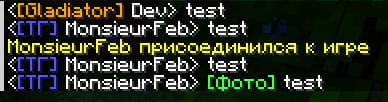
介绍
This project was created primarily for our private server. It’s a small, unpretentious mod.
How does it work? It needs to be added to both the client and server – then the game chat and Telegram will sync, with player messages on the server being transmitted to Telegram and vice versa.
You also need to configure the configuration file (it’s best to use a separate chat for this; you’ll need a Telegram bot; you need to specify the chat and bot IDs in the configuration file).
What else has been added:
- Image description text is now visible
- The mod is now optional on the client (however, without the mod, you won’t be able to view the image from the chat)
- Color styling
- Images in the cache (stored in RAM and cleared)
- Command call directly from Telegram chat (and admin designation, if necessary, in the configuration file)
_(Please note that the text was obtained using an online translator)_
Этот проект был создан по большей части для нашего приватного сервера, однако было принято решение поделиться решением с публикой. Это небольшой и ни на что не претендующий мод.
Как он работает? Его необходимо добавить на клиент и сервер – и тогда игровой чат и Telegram синхронизируются, сообщения игроков на сервере будут видны в Telegram и наоборот.
Необходимо также настроить конфиг (лучше использовать отдельный чат для этого, потребуется telegram бот, необходимо указать id беседы и бота в конфиге)
Что ещё было добавлено:
- Виден текст описания к картинке
- Мод на клиенте стал опционален (однако без мода просмотреть картинку из чата будет невозможно)
- Оформление цветом
- Картинки в виде кэша (хранятся в оперативной памяти и подчищаются)
- Вызов команд прямо из чата telegram (и обозначение админов, настраивается в конфиге)
Acknowledgements
This project is inspired by these projects:
常见问题
KsuChat (TG Bridge) 支持哪些 Minecraft 版本?
KsuChat (TG Bridge) 支持 Minecraft Java 版 1.21.1,可用的加载器:NeoForge。下载时注意选择和你游戏版本一致的文件。
KsuChat (TG Bridge) 怎么安装?
先用 PCL2 或 HMCL 启动器安装对应版本的 NeoForge,再把下载的 .jar 文件放进游戏目录的 mods 文件夹,重新启动游戏即可。开启了版本隔离的,mods 文件夹在 versions/版本名 下面。运行环境:客户端和服务端都要装。
MonsieurFeb 的其他作品
查看全部 →
TMUC-Immersive
Modpack from the TMUC series, dedicated to Immersive Engineering

TMUC-Create5
Modpack from the TMUC series, dedicated to Create
TMUC-Create5
Modpack from the TMUC series, dedicated to Create

JER Ore Integration (Fork)
A JER addon that integrates various ores with its graphing capabilities (fork).
评论
登录后评论和评分