截图

介绍
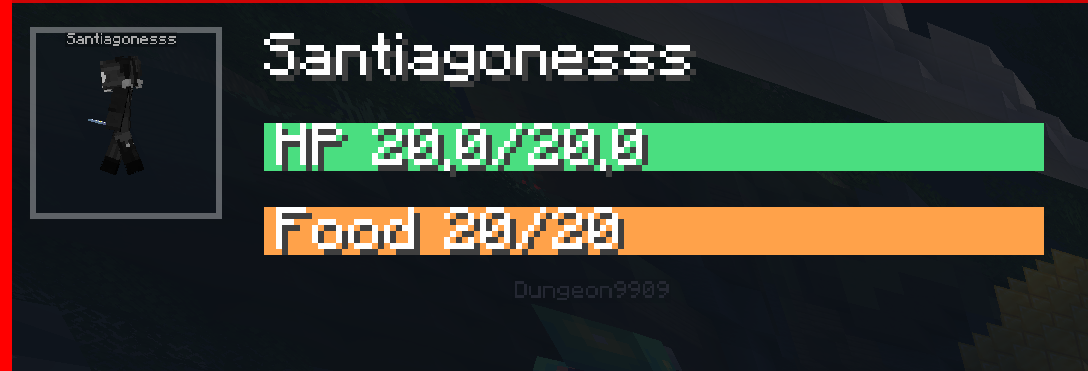
A lightweight HUD overlay mod that shows contextual info about what you’re looking at, plus always-visible stats.
Features
🔍 Looking-At Panel (top corner, animated)
Shows a gray semi-transparent box (80% opaque) that slides in when you look at something, and slides off-screen upward in 0.2 seconds when you look away.
📊 Stats Bar (below the panel, always visible)
Always-on stats rendered in the same corner:
- XYZ Coords — your current position
- FPS — current frames per second
- CPS — clicks per second (left mouse button)
- BPS — blocks broken per second
⚙️ Settings GUI (press M)
Opens an in-game screen where you can:
Looking At Left / Right · On / Off
Coords Left / Right · On / Off
FPS Left / Right · On / Off
CPS Left / Right · On / Off
BPS Left / Right · On / Off
Settings are saved automatically to %appdata%\.minecraft\config\infoview.json
Installation
- Install Fabric Loader 0.18.4+ for Minecraft 26.1
- Install Fabric API (matching 26.1)
- Drop infoview-1.0.0.jar into your`mods/ folder
- Launch!
常见问题
INFO HUD 支持哪些 Minecraft 版本?
INFO HUD 支持 Minecraft Java 版 26.1,可用的加载器:Fabric。下载时注意选择和你游戏版本一致的文件。
INFO HUD 怎么安装?
先用 PCL2 或 HMCL 启动器安装对应版本的 Fabric,再把下载的 .jar 文件放进游戏目录的 mods 文件夹,重新启动游戏即可。开启了版本隔离的,mods 文件夹在 versions/版本名 下面。运行环境:客户端和服务端都要装。
omena.kuusisto 的其他作品
查看全部 →
Sulfur cubes
This mod adds sulfur cubes for minecraft 1.21.11

GAMBLING
lets go gambling (please do not do it in real life!)

Grappling Hook Mod
This project adds a grappling hook to minecraft

Simply Coloured
This is a texture pack that avarages the texture colors by 30%
评论
登录后评论和评分