
Pocket Weather
Ever wished you could carry the perfect forecast in your pocket? With Pocket Weather, you can.
介绍
This Fabric mod for Minecraft 26.2 introduces a series of powerful, upgradeable weather bottles that allow players to capture and release specific weather phenomena.
Key Features:
Capture Weather: Right-click an Empty Weather Bottle during various weather states to capture them:
Clear Sky Bottle: Captured during Clear weather.
Rain Bottle: Captured during Rain.
Thunder Bottle: Captured during a Thunderstorm.
Snow Bottle: Captured during Snowfall.
Release & Control: Take your filled bottles and release the captured weather elsewhere with another right-click. Each filled bottle has three uses.
Localized Effects: Unlike global weather commands, these bottles create local “Pocket Weather” zones that interact dynamically with the environment.
Understanding the Effects:
Rain: Hydrates farmland, extinguishes fires.
Snow: Accumulates snow, and over time, gradually freezes players.
Thunder: Creates rain and localized lightning strikes within the effect zone.
Clear Sky: Instantly removes any active Pocket Weather zone in its area.
The Progression Tiers:
Unlock larger areas and longer duration effects by upgrading your empty bottles. (See image below for the complete bottle types, referencing image_0.png for visual styles).
Tier I: The Copper Core
Effects: Affects a 1-chunk area for 5 minutes.
Crafting Recipe: See Recipe Card 1
Tier II: The Diamond Standard (Shapeless Upgrade)
Effects: Affects a 4-chunk area for 8 minutes.
Upgrade Recipe: Combine a Tier I Empty Weather Bottle, 4 Diamonds, 1 Breeze Rod, and 1 Eye of Ender. See Recipe Card 2
Tier III: The Netherite Pinnacle (Shapeless Upgrade)
Effects: Affects a massive 12-chunk area for 12 minutes.
Upgrade Recipe: Combine a Tier II Empty Weather Bottle, 1 Nether Star, 1 Heavy Core, 1 Dragon’s Breath, 1 Echo Shard, and 4 Netherite Scraps. See Recipe Card 3
Advanced Weather Brewing (Optional Feature):
Combine different weather types through brewing stands to create complex, multi-layered climate systems like “Thunderous Snow” or localized Fog (Fog reduces visibility and interacts with redstone).
Recipe Visualizations:
Below are standard Minecraft crafting visualizations for creating the upgradeable bottles. The visual style of the final output bottles corresponds directly to the tiers shown in image_0.png.
Recipe Visualizations:
Below are standard Minecraft crafting visualizations for creating and upgrading the various weather bottles. The visual style of the bottles in the output slots corresponds directly to the three tiers shown in the mod’s asset catalog, image_0.png.
- Tier I Empty Weather Bottle (The Foundation)
This recipe requires a standard 3×3 crafting grid. Players must assemble the core bottle using Copper and Echo Shards.
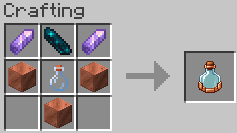
Ingredients: 2x Amethyst Shard, 1x Echo Shard (Top Row); 2x Copper Block, 1x Glass Bottle (Middle Row); 1x Copper Block (Bottom-Center).
Result: 1x Tier I Empty Weather Bottle (Copper trim).
- Tier II Upgrade (Shapeless)
This is a shapeless recipe that can be crafted in any 2×2 or 3×3 grid (like the Player Inventory crafting area). It requires combining valuable materials with the Tier I bottle.
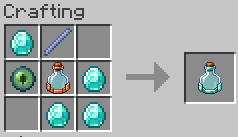
Ingredients: 1x Tier I Empty Weather Bottle, 4x Diamonds, 1x Breeze Rod, 1x Eye of Ender.
Result: 1x Tier II Empty Weather Bottle (Diamond trim).
- Tier III Upgrade (Shapeless)
This is the ultimate shapeless upgrade, demanding end-game materials to unlock maximum weather control.
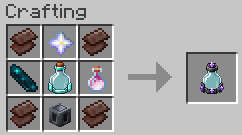
Ingredients: 1x Tier II Empty Weather Bottle, 1x Nether Star, 1x Heavy Core, 1x Dragon’s Breath, 1x Echo Shard, 4x Netherite Scraps.
Result: 1x Tier III Empty Weather Bottle (Netherite and Amethyst trim).
CurseForge: https://www.curseforge.com/minecraft/mc-mods/pocket-weather/preview
常见问题
Pocket Weather 支持哪些 Minecraft 版本?
Pocket Weather 支持 Minecraft Java 版 26.2,可用的加载器:Fabric。下载时注意选择和你游戏版本一致的文件。
Pocket Weather 怎么安装?
先用 PCL2 或 HMCL 启动器安装对应版本的 Fabric,再把下载的 .jar 文件放进游戏目录的 mods 文件夹,重新启动游戏即可。开启了版本隔离的,mods 文件夹在 versions/版本名 下面。运行环境:客户端和服务端都要装。
KJS0 的其他作品
查看全部 →
EchoShift
EchoShift is a cinematic Minecraft Java shader that makes the world feel more alive with realistic lighting, clearer skies, softer shadows, moving foliage, reflective ores, improved water, and a custom star-filled End atmosphere.

Lumora Shader
Lumora is a cinematic shader that improves Minecraft with realistic lighting, better clouds, glowing portals, reflective blocks, and a custom End sky.

EcoShift Lite
A lighter, refined version of EchoShift with cleaner lighting, balanced colors, improved water, softer bloom.

Gravity Artifacts
Gravity Artifacts is a Fabric mod that adds the Gravity Glove, Gravity Bracelet, Gravity Ore, and Gravity Shards, bringing smooth mob control, flight, and gravity-based abilities to Minecraft.
评论
登录后评论和评分