
截图


介绍
Configurable Client Tweaks [CCT]
Current (Optional) Features:
First-Person:
- Make health shown as a bar instead of in half-hearts
- Change On Fire overlay postion (like height)
- Change Shield Positions (all 3 directions)
- Change Item Positions (all 3 directions)
Cosmetics:
- Display Particles around you\ Current particles:\ Enderman\ Flame\ Soul flame
- Display a custom Cape model
- Display a custom model on your head
- Display a custom model on your body
Back-Item
- Display a item on your back (change position and rotation at will
- Display an extra model (requires resourcepacks, see below)
Loading Models:
Loading models is done via Resourse Packs.\
Models are loaded with item models under “namespace/items/item_model.json”
Example:
If you made a item model and saved it as “cct/items/backpack.json” (this is in the mod by default),\
then the model should be loaded like this in-game:
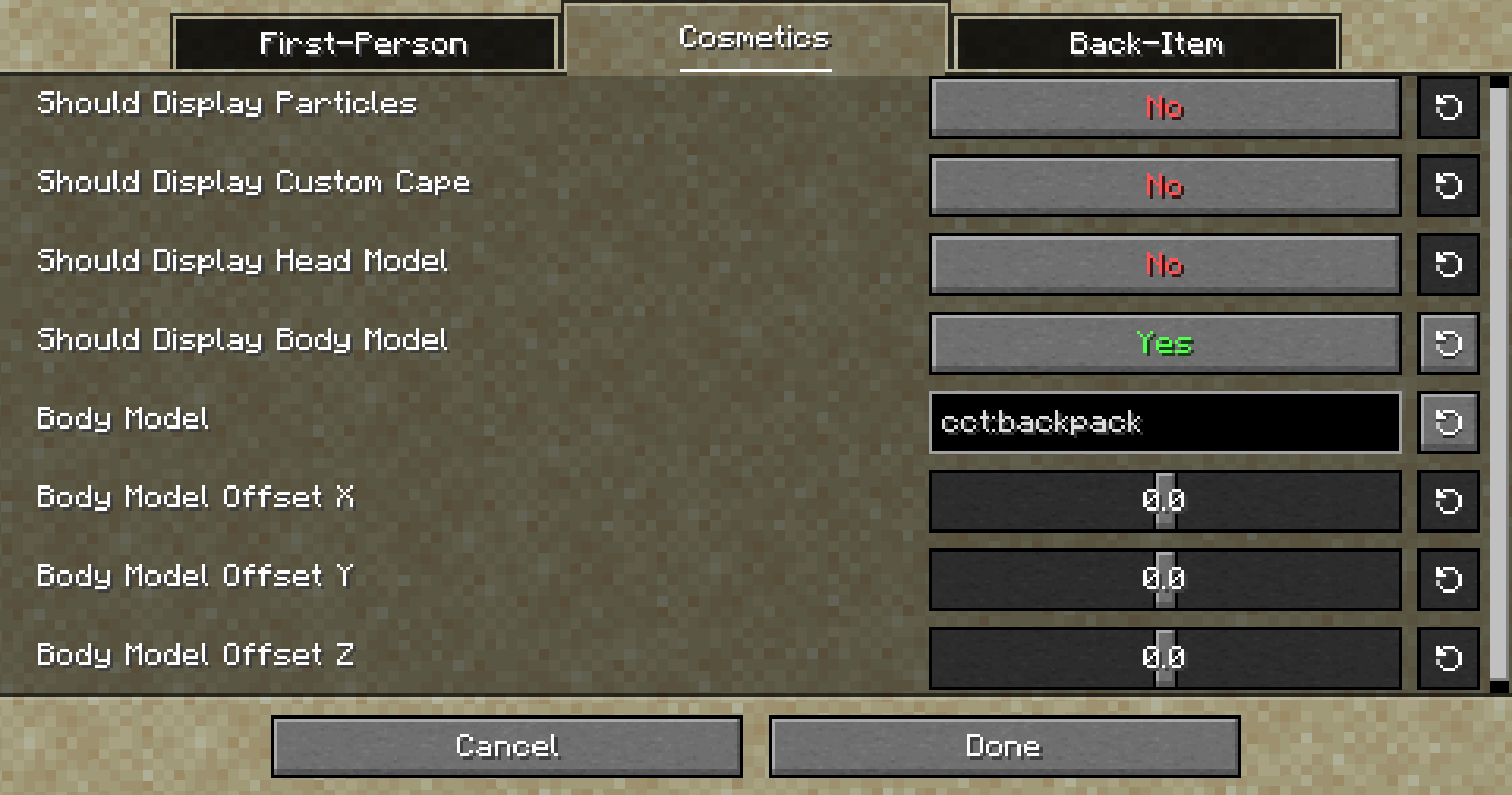
(Animations are supported)
Loading an Extra model for Back-Items:
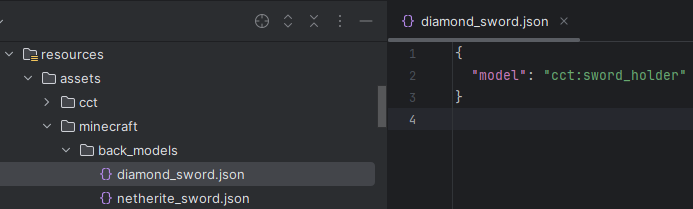
This can be done via the config, or Resourse Packs, but this time you want to make a new folder called “back_models” under your namespace, then put in a new json named after your item.\
(Example: “minecraft/back_models/diamond_sword.json”)\
Inside you will be able to set a item model to render when that item is set as a back-item.
Example:
常见问题
Configurable Client Tweaks [CCT] 支持哪些 Minecraft 版本?
Configurable Client Tweaks [CCT] 支持 Minecraft Java 版 1.21.5,可用的加载器:Fabric。下载时注意选择和你游戏版本一致的文件。
Configurable Client Tweaks [CCT] 怎么安装?
先用 PCL2 或 HMCL 启动器安装对应版本的 Fabric,再把下载的 .jar 文件放进游戏目录的 mods 文件夹,重新启动游戏即可。开启了版本隔离的,mods 文件夹在 versions/版本名 下面。运行环境:仅客户端。
medecoole 的其他作品
查看全部 →
Sea Weapons
A mod that adds new sea themed weapons to minecraft!

Backslot Mod
This mod adds Another inventory Slot: The Backslot!
Reeling Scythes
Adds Scythes and more! Weapons meant for the Enchancement mod!
Reeling Scythes
Adds Scythes and more! Weapons meant for the Enchancement mod!
评论
登录后评论和评分