
介绍
中文介绍正在准备中,下面暂时显示原文。
I made the backpack, which is
- Dyeable through the crafting table.
- Easily renamable using an anvil.
- Wearable in your chest slot.
- Upgradable to get more slots (9 -> 18 -> 26 slots)
How to Use Backpacks
- To store or retrieve items, simply drop the backpack on the ground. It will transform into a barrel, allowing you to manage your items. Click the “Exit” button slot to revert it to a backpack item.
Crafting Recipes
-
Craft a Small Backpack:
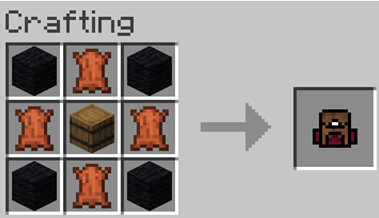
-
Craft a Backpack Upgrader:
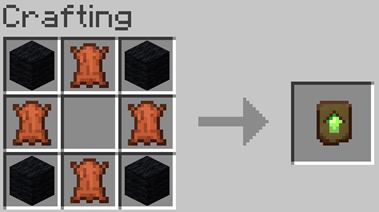
-
Upgrading to a 26-Slot Backpack:
Place the upgrader into your backpack block.
Demo Video
Coming soon…
常见问题
Upgradable Backpack 支持哪些 Minecraft 版本?
Upgradable Backpack 支持 Minecraft Java 版 1.17–1.21.10,共 19 个版本。下载时注意选择和你游戏版本一致的文件。
Upgradable Backpack 怎么安装?
把下载的 .zip 文件(不用解压)放进游戏目录的 resourcepacks 文件夹,进游戏后在「选项 → 资源包」里把它移到右边启用。
paul90317 的其他作品
查看全部 →
Upgradable Backpack
by paul90317
Dyeable, renamable, wearable, and upgradeable backpacks (9-slots, 18-slots, 26-slots)
12.7万
11 个月前
Modrinth · CurseForge

Texture of Paul90317’s Datapacks
by paul90317
add the textures of custom items in my data packs.
11.4万
3 年前
Modrinth

Special Mobs
by paul90317
Discover special mobs with distinct abilities in different dimensions!
7.7万
1 年前
Modrinth

Disenchanting Book
by paul90317
easily move enchantments to enchanted book.
4万
1 年前
CurseForge
评论
登录后评论和评分