
Auto Reset Player Data
A mod that automatically deletes a player’s data when they deaths in server.
介绍
AutoRePlayer Mod
A server-side mod that automatically resets a player’s data after death.
How it Works?
When a player dies, the mod does not reset them immediately.
It first allows the normal death screen to appear, then waits until the player respawns.
After that, the player is disconnected and their saved files are cleared, including player data, stats, advancements, and optional backup data.
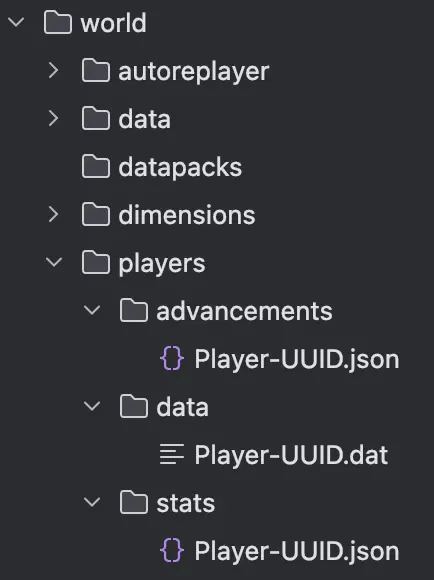
This makes the player rejoin with a clean state instead of keeping their previous progress.
Commands
The mod also includes several commands.
- “
/repl deadscore“ shows how many times each player has died on the server. - “
/repl locklist“ shows players who are currently waiting for reset or are in the middle of the reset process. - “
/repl locklist <player> remove“ manually removes a player from the lock list if an administrator needs to clear it.
**You should not set the server world to Hardcore mode.
In Hardcore, players are switched to Spectator mode unlike in Survival, so the mod may not detect things correctly.**
Requirements
- Minecraft 26.1+
- Fabric Loader
- Fabric API (required)
- Server-side only (clients do not need to install the mod)
To help us develop a more convenient and better mod, please share any bugs, issues, or feature ideas you have! -> Bug Report
It is designed to be simple, lightweight, and stable for dedicated server use.
常见问题
Auto Reset Player Data 支持哪些 Minecraft 版本?
Auto Reset Player Data 支持 Minecraft Java 版 26.1–26.1.2,共 3 个版本,可用的加载器:Fabric。下载时注意选择和你游戏版本一致的文件。
Auto Reset Player Data 怎么安装?
先用 PCL2 或 HMCL 启动器安装对应版本的 Fabric,再把下载的 .jar 文件放进游戏目录的 mods 文件夹,重新启动游戏即可。开启了版本隔离的,mods 文件夹在 versions/版本名 下面。运行环境:仅服务端。
helloairbix 的其他作品
查看全部 →
Player-to-Player Trade Mod
A server-side Fabric trading mod that lets players trade items safely through a dedicated UI.

Non-OP Command Blocker
This mod blocks selected commands for non-operator players and lets operators manage the block list in-game.
评论
登录后评论和评分