
LiveStat Server
A server-and-client side mod that provides real-time status statistics via an in-game menu and customizable on-screen notifications.
截图
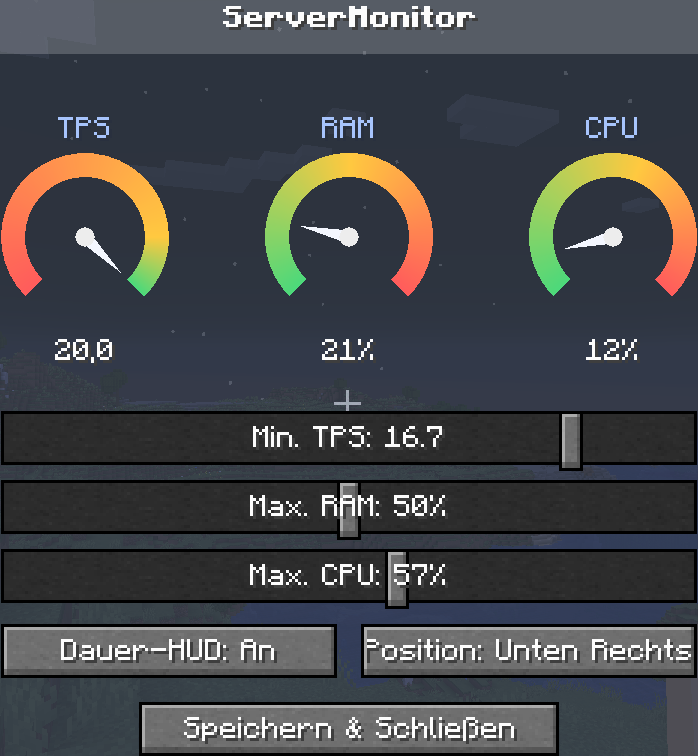
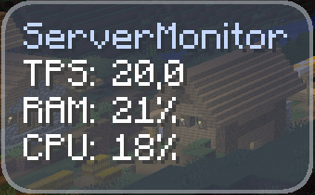

介绍
Overview
LiveStat Server is a powerful, lightweight status monitoring tool designed for both servers and clients. It provides players and administrators with real-time insights into the server’s performance and status directly from within the game.
Note: This mod is required on both the server and the client to function properly.
Features
Real-Time Live Statistics: Press the “P” key to open a clean, intuitive in-game menu displaying live server performance metrics and status updates.
Customizable On-Screen Alerts: Never miss a critical status change. You can toggle and configure notifications to pop up directly in the center or at the edge of your screen.
Instant Alerts: Get notified the exact moment server performance drops or shifts, allowing for quick troubleshooting.
Installation & Requirements
Download the mod file corresponding to your Minecraft version.
Drop the .jar file into the mods folder of your server.
Drop the same .jar file into the mods folder of your client (Minecraft launcher).
Launch the game, connect to your server, and press P to get started!
常见问题
LiveStat Server 支持哪些 Minecraft 版本?
LiveStat Server 支持 Minecraft Java 版 1.21.1–1.21.11,共 11 个版本,可用的加载器:NeoForge。下载时注意选择和你游戏版本一致的文件。
LiveStat Server 怎么安装?
先用 PCL2 或 HMCL 启动器安装对应版本的 NeoForge,再把下载的 .jar 文件放进游戏目录的 mods 文件夹,重新启动游戏即可。开启了版本隔离的,mods 文件夹在 versions/版本名 下面。运行环境:客户端和服务端都要装。
评论
登录后评论和评分