
介绍
中文介绍正在准备中,下面暂时显示原文。
MP4player GUI:
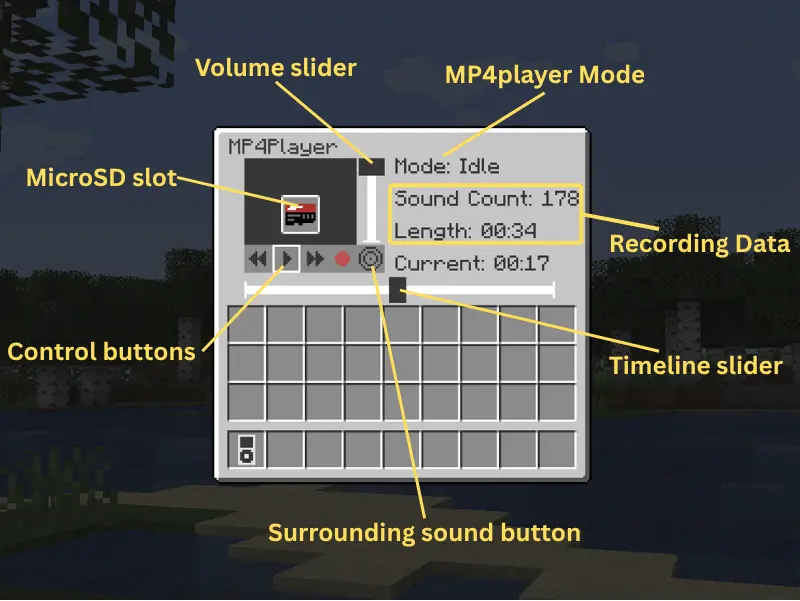
- Spacebar to pasue.
- Left/Right arrow to move the timeline slider.
How to Record:
- Shift and right-click the MP4player to open the GUI. (You can also right-click to play/pause the recording.)
- Insert the microSD into it.
- Click the red button to start recording. (The old recording data in microSD will be removed.)
- Now the sounds you heard should be recorded. (It is not allowed to take away the microSD from the MP4player while recording.)
- Open the GUI again and click the square button to save the recording to the microSD.
How to play your recording from speaker:
- Right-click the speaker with the microSD to insert.
- The recording should loop automatically.
- Give a redstone signal to the speaker to pause the loop.
- Right-click the speaker with your hand to get back the microSD.
This mod is still under development.
More playable features are coming soon.
If you find any bugs, please tell me.
This is my first mod. Hope you enjoy it!
常见问题
SoundRecording 支持哪些 Minecraft 版本?
SoundRecording 支持 Minecraft Java 版 1.21.1,可用的加载器:Fabric。下载时注意选择和你游戏版本一致的文件。
SoundRecording 怎么安装?
先用 PCL2 或 HMCL 启动器安装对应版本的 Fabric,再把下载的 .jar 文件放进游戏目录的 mods 文件夹,重新启动游戏即可。开启了版本隔离的,mods 文件夹在 versions/版本名 下面。运行环境:客户端和服务端都要装。
评论
登录后评论和评分