Pete’s Ignivorus Spawn Tweaks for Saint’s Dragons
Changes the Ignivorus spawn so it only is found in the Nether
介绍
Saint’s Dragons is a great mod, but the Ignivorus is a Nether-themed dragon and yet doesn’t normally spawn there.
- It’s very powerful, more rare, and eggs are only found in the Nether and Ancient Cities – so naturally this beast belongs where it best fits.
- The Saint’s Dragons mod currently allows spawning in the overworld, which doesn’t fit the theme as well, and can lead to terrifying battles that you really aren’t prepared for until you’e gotten gear from the Nether.
- Making the Ignivorus more rare makes it far more rewarding when you encounter and conquer this fierce dragon.
With these thoughts in mind, this datapack adjusts the spawning so that the Ignivorus only spawns in the Nether (where it belongs).
This covers all five default Nether biomes (nether wastes, crimson forest, warped forest, soul sand valley, basalt deltas). No Overworld or End spawning.
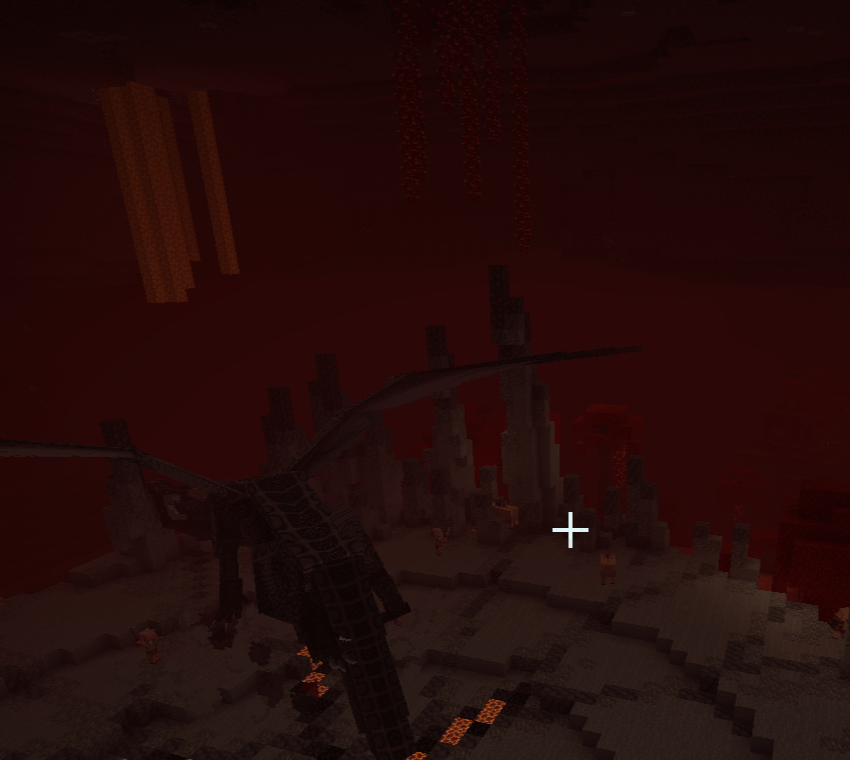 An ignivorus in its roost in the Nether.
Note: This does not necessarily support modded biomes, so mods that add Nether biomes could theoretically lower the frequency of encounters with naturally spawned Ignivoruses (Ignivori?).
Let me know in the comments, if you’re a grammar nerd like I aspire to be, if you know whether it should be “Ignivoruses” or “Ignivori” – it’s rather like the classic octopus/octopi debate 😂
Dependencies: I… feel like this should be unnecessary, but to be on the safe side, I would like to clarify you do need to have Saint’s Dragons installed. This datapack literally does nothing without it 😂
Modpacks: Yes, you may use this in any CurseForge-hosted modpack!
This should be accessible in your game during initial world creation like any other datapack 👍
I have noticed that sometimes this is not the case; if it is not visible during world creation, make sure you go to CurseForge’s Instances > (Select your Instance/Modpack) > Datapacks > drag and drop onto your world creation datapacks page. It should work as normal after that.
For use on servers or any other situation in which you would upload it manually as a file, it should still just function like any other normal datapack.
Need some help? If you are uploading datapack(s) for the first time (or have been unsure if you’re doing it right), make sure to follow these steps:
Download your chosen datapack. It will usually be a .zip file. Leave it zipped — Minecraft reads the .zip file directly. (If the creator specifically instructed you to extract it, or if it downloaded as a regular folder, that works too).
Find your main game folder based on your operating system:
Windows: Press Win + R, type %appdata%\.minecraft, and hit Enter.
Mac: Open Finder, press Command + Shift + G, type ~/Library/Application Support/minecraft, and hit Enter.
Linux: Open your file manager and navigate to ~/.minecraft (you may need to press Ctrl + H to show hidden files).
Inside your .minecraft directory, locate and open the saves folder. This contains the files for all your single-player worlds.
Open the folder that matches the name of the world where you want to install the datapack. For example, if your world is named “My Survival World”, open the folder with that name.
Inside your specific world’s folder, look for a folder named datapacks and open it.
Note: Every generated Minecraft world has this folder by default. If it is somehow missing, create a new folder and name it exactly datapacks (all lowercase).
Drag and drop (or copy and paste) your downloaded .zip file into this datapacks folder. You do not need to unzip this one.
Copyright (c) 2026 petesc3
All Rights Reserved.
No part of this datapack may be reproduced, distributed, or transmitted in any form or by any means, including re-uploading to other platforms or modifying the source code, without prior written permission from the author.
常见问题
Pete’s Ignivorus Spawn Tweaks for Saint’s Dragons 支持哪些 Minecraft 版本?
Pete’s Ignivorus Spawn Tweaks for Saint’s Dragons 支持 Minecraft Java 版 1.20.1。下载时注意选择和你游戏版本一致的文件。
Pete’s Ignivorus Spawn Tweaks for Saint’s Dragons 怎么安装?
新建世界时在「数据包」里把下载的 .zip 拖进去;已有的存档,把文件放进存档目录下的 datapacks 文件夹,进游戏输入 /reload 即可生效。服务器同样放在世界目录的 datapacks 里。
petesc3 的其他作品
查看全部 →
Pete’s Pack
A pack adding tools, crafting recipes, and map improvements!

Pete’s Loot Tweaks for Saint’s Dragons
Adjusts the eggs present in loot tables for Saint's Dragons

Lads – Redux
The official, approved pack for the Summer of the Lads: Redux

Pete’s Picks
Everything you need to play with your Vanilla friends without sacrificing improvements
评论
登录后评论和评分