
Minimal Debug Menu
作者:laopz
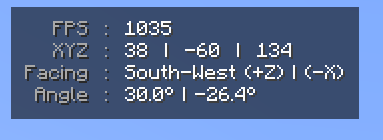
completely removes the Debug Menu and replaces it with only the information you need in a clean format and UI
截图
介绍
中文介绍正在准备中,下面暂时显示原文。
Completely removes every feature from the debug menu and replaces it with a custom GUI in the top left instead. it will only display information that is important in a neat format. you can also use the defaulted keybind ‘J’ to copy your current coordinates to the clipboard. this keybind can be changed in settings under controls.
常见问题
Minimal Debug Menu 支持哪些 Minecraft 版本?
Minimal Debug Menu 支持 Minecraft Java 版 1.21.11,可用的加载器:Fabric。下载时注意选择和你游戏版本一致的文件。
Minimal Debug Menu 怎么安装?
先用 PCL2 或 HMCL 启动器安装对应版本的 Fabric,再把下载的 .jar 文件放进游戏目录的 mods 文件夹,重新启动游戏即可。开启了版本隔离的,mods 文件夹在 versions/版本名 下面。运行环境:仅客户端。

评论
登录后评论和评分