
Memory Album
When you take screenshots, you can view them ingame, with coordinates saved.
截图
介绍
Memory Mod
Browse, organize, and annotate your Minecraft screenshots — all without leaving the game.
Memory Mod adds a full in-game screenshot browser to Minecraft. Every time you press F2, the mod automatically captures your coordinates, dimension, and world or server name alongside the screenshot. No more forgetting where that perfect view was. No more scrolling through hundreds of unnamed screenshot files in your folder.
What does it do?
When you take a screenshot with F2, Memory Mod silently records extra metadata — your X, Y, Z coordinates, which dimension you’re in (Overworld, Nether, End, or any modded dimension), and the name of your world or server. This metadata is saved as a small JSON file right next to your screenshot PNG, so your files stay portable and organized.
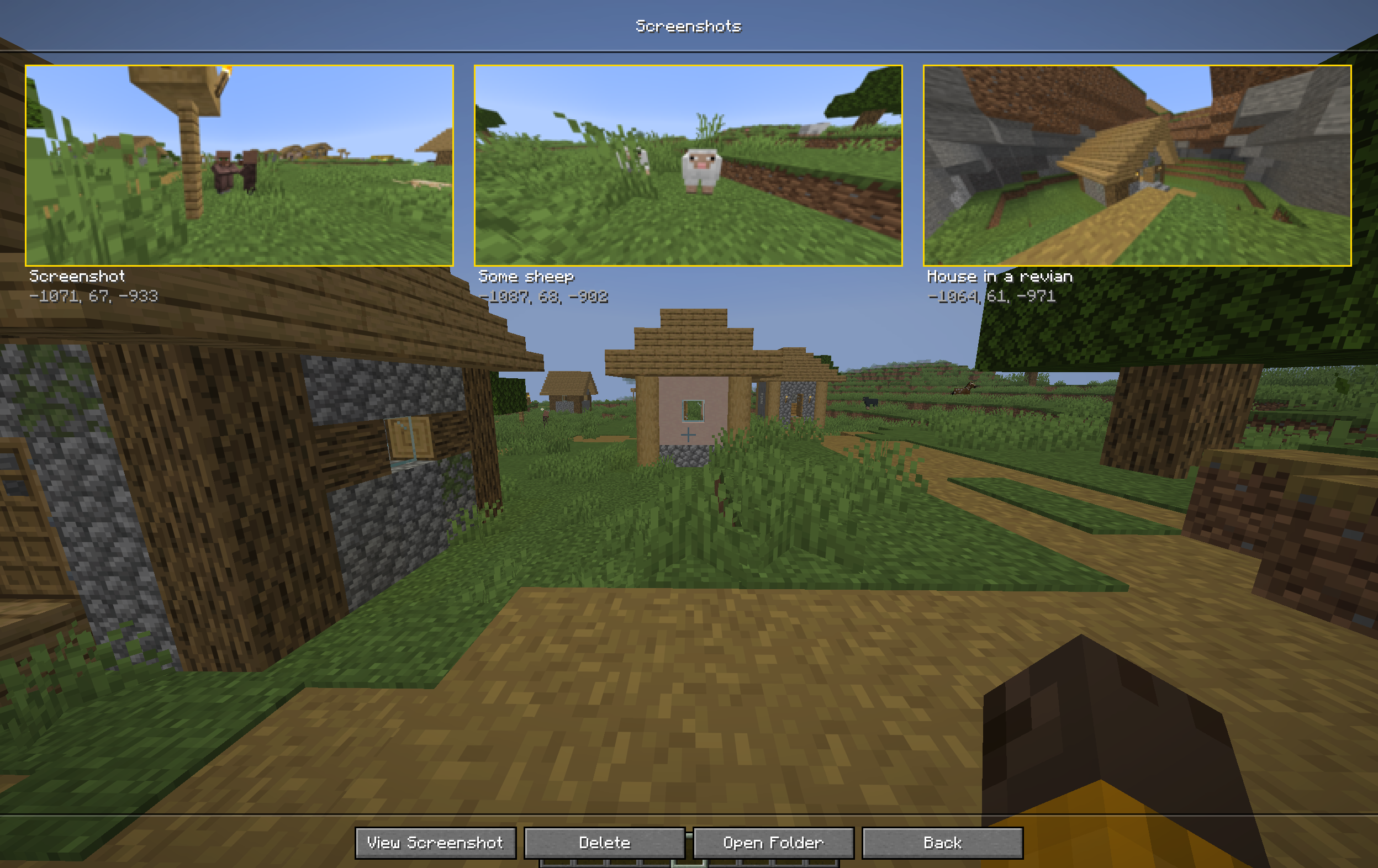
Open the screenshot gallery from the main menu or the pause screen by clicking the new Screenshots button. You’ll see a clean 3-column grid of all your screenshots with thumbnail previews, names, and coordinates at a glance.
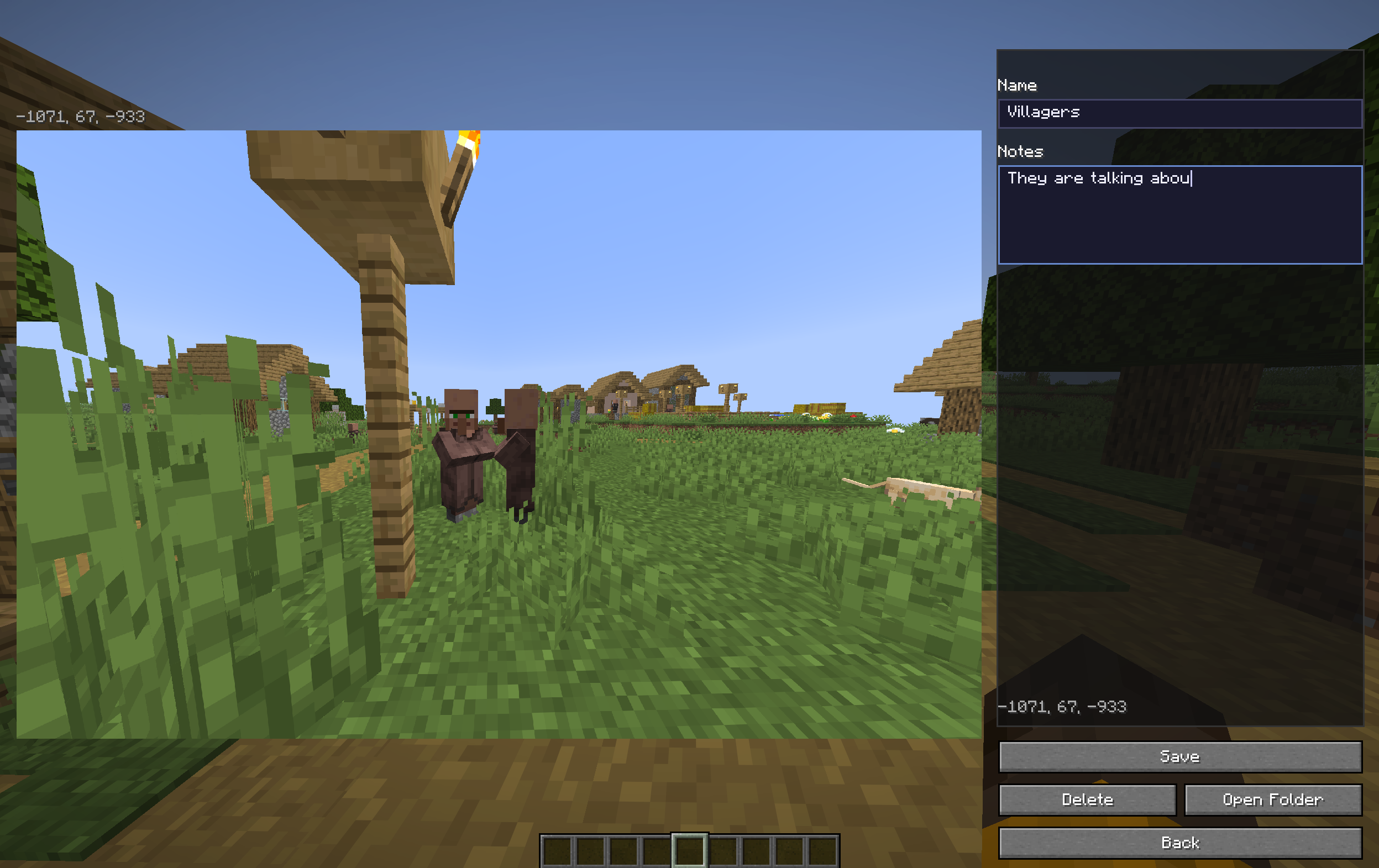
Single-click any screenshot to select it, then use the toolbar at the bottom to view, delete, or open your screenshots folder. Double-click to open the detail view, where you’ll find:
A full-size preview of the screenshot
An editable name field so you can give each screenshot a meaningful title
A notes field for writing down what was happening, what you built, or anything else you want to remember
Save, Delete, Open Folder, and Back buttons
All changes are saved instantly. Rename a screenshot and the mod updates the metadata file. Delete a screenshot and the metadata is cleaned up automatically.
Why did I make this?
Minecraft takes screenshots, but it doesn’t help you find them again. After a few months, your screenshots folder is a wall of timestamped PNG files with no context. Memory Mod solves this by capturing the information you actually care about — where you were, what world you were in — and letting you browse everything in a clean gallery right inside the game.
Key Features
- Automatic metadata capture — coordinates, dimension, and world/server name saved with every screenshot
- In-game screenshot browser — accessible from both the main menu and the pause screen
- 3-column grid gallery — thumbnail previews with names and coordinates visible at a glance
- Detail view — full-size preview with editable custom name and notes
- Per-screenshot metadata — each screenshot gets its own .json sidecar file, keeping your files portable
- Quick actions — view, delete (with confirmation dialog), and open the screenshots folder
- Non-destructive — metadata files sit alongside your screenshots, never modifying the images themselves
Requirements
Minecraft 26.2
Fabric Loader 0.19.3 or newer
Fabric API 0.154.2+26.2 or newer
Java 25 or newer
Links
GitHub
Issues & Bug Reports
License
Memory Mod is open source under the MIT License. Feel free to learn from it, fork it, or incorporate it into your own projects. If you do publish a derivative on Modrinth or CurseForge, please add me (pixel22 on Modrinth and The_Real_Drex on CurseForge) as a co-owner on the project page.
常见问题
Memory Album 支持哪些 Minecraft 版本?
Memory Album 支持 Minecraft Java 版 26.2,可用的加载器:Fabric。下载时注意选择和你游戏版本一致的文件。
Memory Album 怎么安装?
先用 PCL2 或 HMCL 启动器安装对应版本的 Fabric,再把下载的 .jar 文件放进游戏目录的 mods 文件夹,重新启动游戏即可。开启了版本隔离的,mods 文件夹在 versions/版本名 下面。运行环境:仅客户端。
KitRocky 的其他作品
查看全部 →
Fast Block Placement
This mod makes you place blocks a lot faster. You can open a menu (O by default), you can configure how fast you want to place blocks. Then by pressing "V" (by default, you can change that) you will place blocks really quickly.
Fast Block Placement
A mod that allows you to place blocks faster.

Visible Invisible
When toggled on you can see mobs/player with invis potion effect.

Visible Invisible
When toggled on you can see mobs/player with invis potion effect.
评论
登录后评论和评分