
截图
介绍
Blazin Hide Coordinates
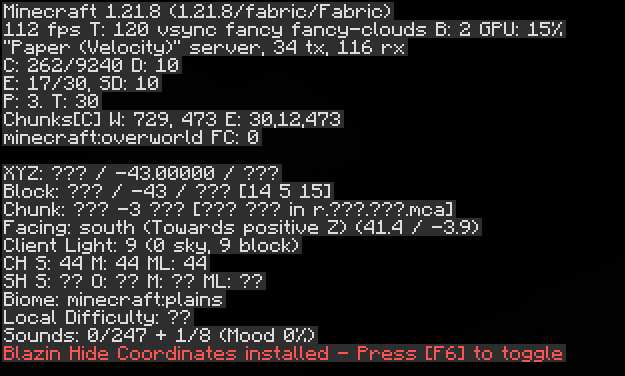
Allows you to hide the X/Z coordinates inside the Minecraft F3 Menu
Useful if you are streaming or sharing your screen and don’t want others to know where you are located in the world, but still want to be able to see your Y coordinate!
_(You may also toggle the Y coordinate off in the YAML config file if you’d like)_
Coordinates are toggled on/off by using the F6 key by default, but can be binded any other key in the Controls menu
May or may not be compatible with other F3 menu mods. Future updates may add support to these mods if there is a high enough demand. 🙂
常见问题
Blazin Hide Coordinates 支持哪些 Minecraft 版本?
Blazin Hide Coordinates 支持 Minecraft Java 版 1.21.8,可用的加载器:Fabric。下载时注意选择和你游戏版本一致的文件。
Blazin Hide Coordinates 怎么安装?
先用 PCL2 或 HMCL 启动器安装对应版本的 Fabric,再把下载的 .jar 文件放进游戏目录的 mods 文件夹,重新启动游戏即可。开启了版本隔离的,mods 文件夹在 versions/版本名 下面。运行环境:仅客户端。


评论
登录后评论和评分