
截图


介绍
中文介绍正在准备中,下面暂时显示原文。
- A clean, lightweight toolbelt that keeps your hotbar clutter-free without forcing you into clunky backpack menus.
- Carry your pickaxe, axe, shovel, and hoe all in a single hotbar slot that seamlessly adapts to whatever block you’re looking at.
Features
- All Your Tools in One Slot:
- Your active tool sits directly in your hotbar, so mining speed, weapon damage, enchantments, and durability work 100% like vanilla.
- Smart Auto-Switching:
- Look at stone, and your pickaxe is in your hand. Look at wood, and your axe is ready. Look at dirt, and your shovel takes over. No scrolling needed.
- Manual Cycling (When You Want Control):
- Prefer manual control? Press R while holding your tool to cycle through your stowed tools on the fly.
- Press Shift + R anytime while hovering on the belt hotbar slot to toggle between Auto-Switch and Manual mode.
- Integrated Inventory Drawer:
- Equip your belt in your inventory, and a small toggle button lets you unfold your 4 tool slots (Pickaxe, Axe, Shovel, Hoe) whenever you want to add or swap tools. Close it to keep your screen clean.
- Put It Anywhere on Your Hotbar:
- Use the slider below your hotbar in your inventory to choose which slot your toolbelt uses. You can also swap it with other hotbar items simply by picking them up and clicking your belt slot.
- Lava & Drop Protection:
- Pressing Q is blocked while holding your tool so you never accidentally toss an enchanted pickaxe into lava. Press Ctrl + Q when you actually want to drop it.
Controls
| Key | Action |
| :— | :— |
| R | Cycle to the next stored tool (Manual Mode) |
| Shift + R | Toggle between Auto-Switch and Manual mode |
| Ctrl + Q | Drop the active tool into the world |
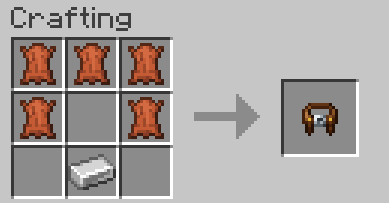
Crafting Recipe
Crafted with 5 Leather and 1 Iron Ingot:
How to Install
- Install NeoForge for Minecraft 1.21.1.
- Drop
truetoolbelt-0.1.0-alpha.jarinto your.minecraft/modsfolder. - Launch the game
Modpacks & Permissions
You are completely free to include True Toolbelt in any modpack on CurseForge and Modrinth.
常见问题
True Toolbelt 支持哪些 Minecraft 版本?
True Toolbelt 支持 Minecraft Java 版 1.21.1,可用的加载器:NeoForge。下载时注意选择和你游戏版本一致的文件。
True Toolbelt 怎么安装?
先用 PCL2 或 HMCL 启动器安装对应版本的 NeoForge,再把下载的 .jar 文件放进游戏目录的 mods 文件夹,重新启动游戏即可。开启了版本隔离的,mods 文件夹在 versions/版本名 下面。运行环境:客户端和服务端都要装。
评论
登录后评论和评分