
Sulfur+
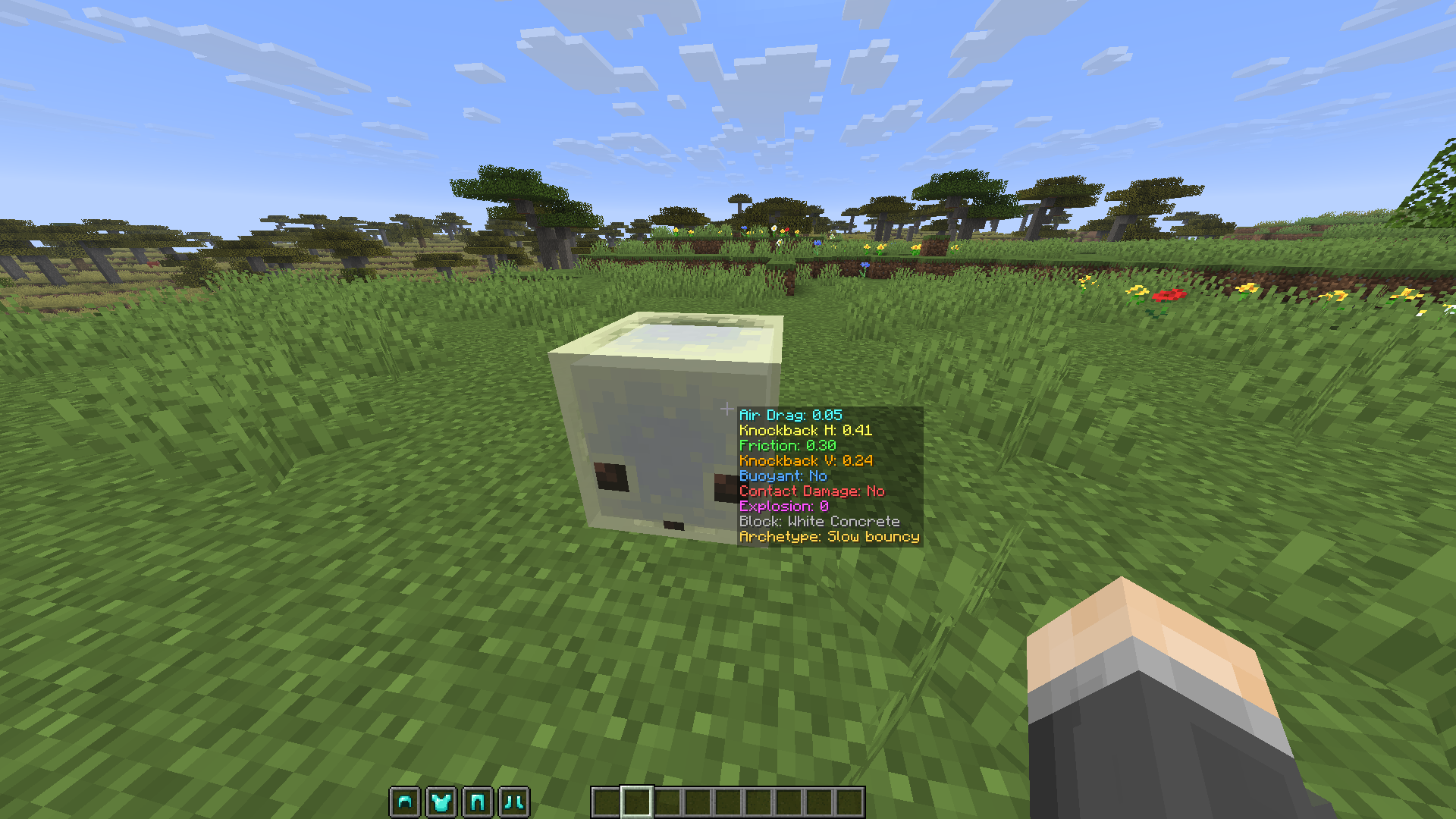
Shows a sulfur cube's archetype and physics stats next to your crosshair. Client-side, configurable, per-stat colours.
截图
介绍
Sulfur+
See what’s really going on inside a sulfur cube. Look at a sulfur cube that has absorbed a
block and Sulfur+ shows its archetype and physics stats right next to your crosshair — no
guessing which cube is bouncy, sliding, explosive, or floaty.
Sulfur+ is a lightweight, client-side overlay. It doesn’t change any gameplay, add items, or
touch the world — it just reads the cube you’re looking at and puts the numbers on screen.
What it shows
Point at a sulfur cube with a block inside it and, by default, two stats pop up:
- Air Drag — the cube’s
air_drag_modifier - Knockback H — the archetype’s horizontal knockback power
Turn on any of the rest whenever you want:
- Friction modifier
- Knockback V (vertical knockback power)
- Buoyant (does it float?)
- Contact Damage (does it hurt to touch?)
- Explosion power
- Block — the block the cube absorbed
- Archetype — the cube’s physics profile by name (Bouncy, Light, Explosive, Sticky, Hot, Fast Sliding, …)
Make it yours
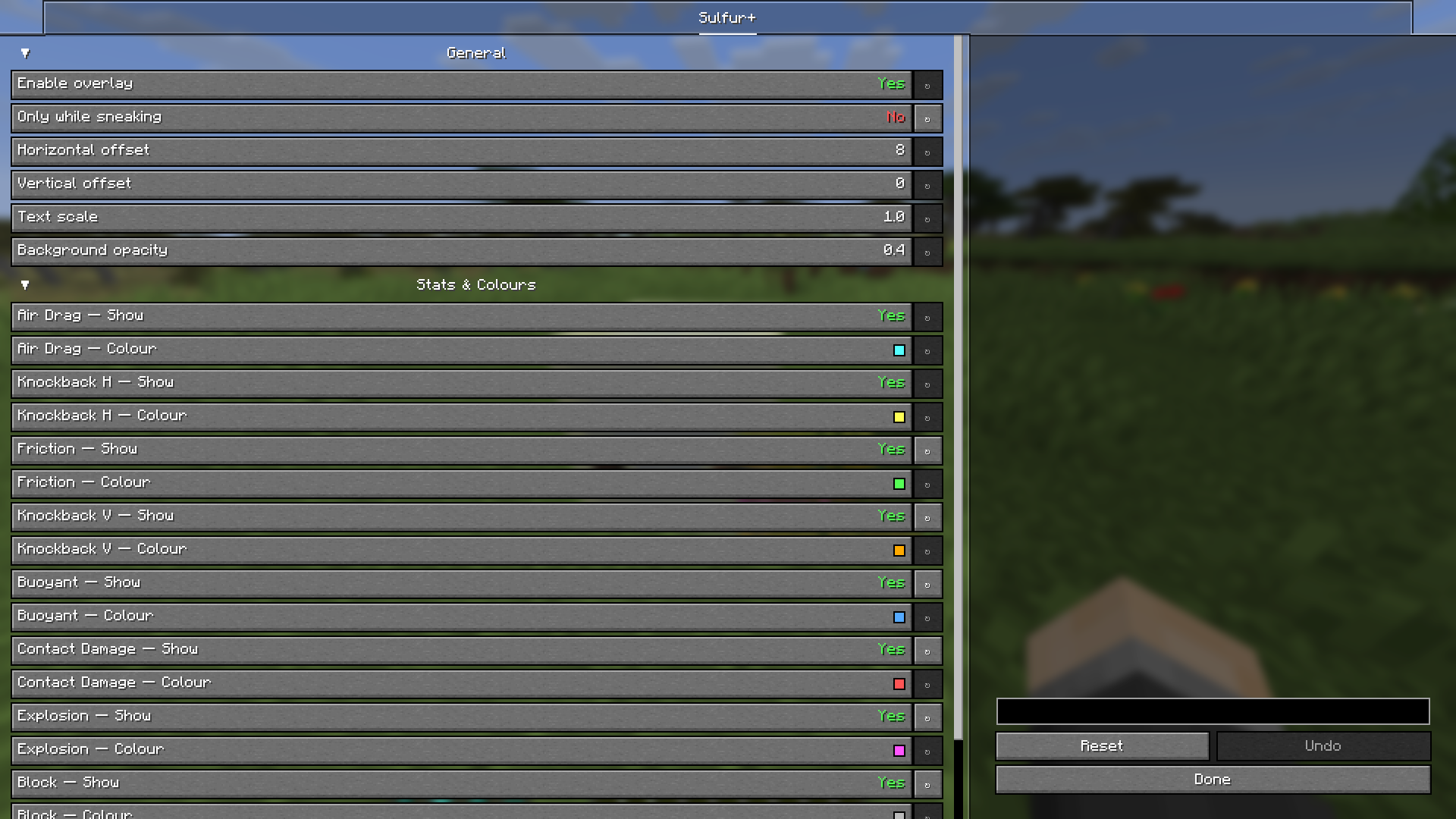
Everything is configurable from the in-game settings screen (Mod Menu on Fabric/Quilt, the
mods list on NeoForge):
- Toggle each stat on or off individually.
- Pick a colour for every line so the info you care about stands out.
- Only show while sneaking (on by default) to keep your HUD clean — or show it always.
- Nudge the position, scale the text, and set the background opacity.
Changes apply instantly — no restart.
常见问题
Sulfur+ 支持哪些 Minecraft 版本?
Sulfur+ 支持 Minecraft Java 版 26.2,可用的加载器:Fabric / NeoForge / Quilt。下载时注意选择和你游戏版本一致的文件。
Sulfur+ 怎么安装?
先用 PCL2 或 HMCL 启动器安装对应版本的 Fabric / NeoForge / Quilt,再把下载的 .jar 文件放进游戏目录的 mods 文件夹,重新启动游戏即可。开启了版本隔离的,mods 文件夹在 versions/版本名 下面。运行环境:仅客户端。
SaolGhra 的其他作品
查看全部 →
Armor Hud
盔甲HUD模组为Minecraft添加了一个可视化悬浮层,用颜色区分的耐久条显示你的盔甲状况。这样在游戏过程中就能更轻松地掌握盔甲的耐久情况。

Elytra Swapper
Swap the Elytra and Chestplate easily with a keybind of your choosing

BannerHeads
BannerHeads is a Minecraft mod that allows players to right-click on banners to equip them as headgear. It works on both server and client sides, making it easy for multiplayer servers and single-player worlds alike.
Hot Experience
Fabric Mod that swaps Bottles of Experience with Totem's of Undying in the offhand.
评论
登录后评论和评分