
Anime Hologram
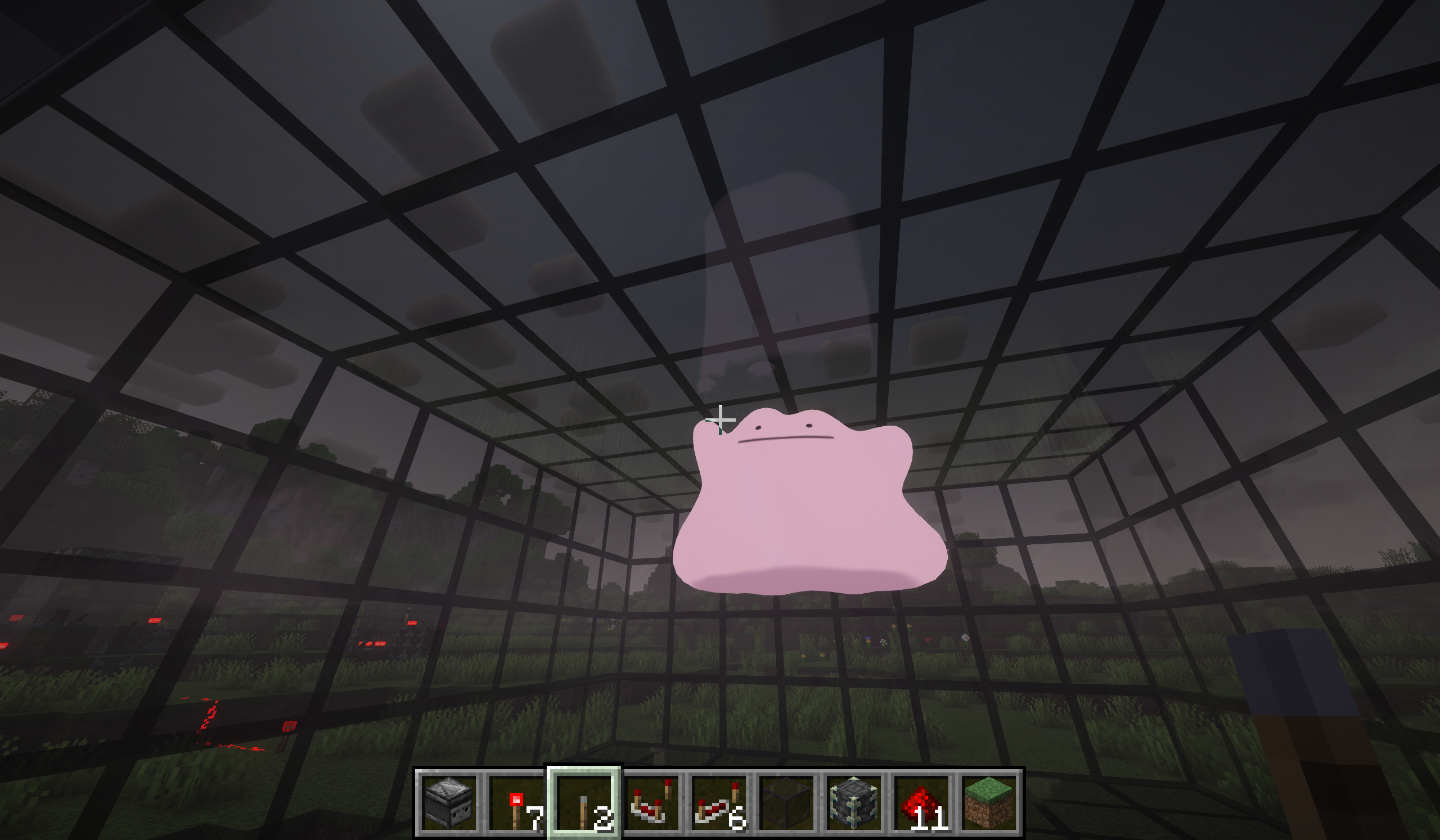
Render 3D “holograms” inside tinted-glass cuboids and drive them with redstone. Bring your own models/animations; powered by BlazeRod.
截图
介绍
Overview
- Render 3D “holograms” inside tinted-glass cuboids and control them entirely with redstone.
- Bring your own models and animations (none are bundled).
- Powered by the BlazeRod rendering library.
- Server play is currently not tested.
Features
- BlazeRod-based rendering, with a stable CPU transform path by default.
- External VMD animation support for PMX/PMD models. Drop .vmd files next to the model.
- Universal Edge Bus (UEB) redstone control:
- Model code: 0–255
- Animation code: 0–255 (0 = rest pose)
- Ctrl code: 0–15 (reserved for future use)
- Param bus (scale/offsets), quantized 0–15
- Helpful commands to detect, map, watch, and manage cuboids.
- Clickable TP coordinates in the /holo map output.
Requirements
- Minecraft: 1.21.8
- Fabric Loader
- Fabric API
- Fabric Language Kotlin
How to use
- Build a filled tinted-glass cuboid anywhere in the world.
- Use /holo watch while looking at a tinted glass block (or let auto-watch pick it up).
- Place your model content in your Minecraft run directory (not inside the mod jar):
- Windows: %appdata%/.minecraft/hologram/models/
- Linux: ~/.minecraft/hologram/models/
- Select model/animation via redstone or commands.
Content folder structure
- One folder per model code (3-digit, zero-padded):
- hologram/models/003/
- model.pmx (.pmd/.glb/.gltf/.vrm also supported)
- Idle.vmd, Walk.vmd, etc. (optional; VMD for PMX/PMD)
- manifest.json (optional)
Optional manifest.json
- Place next to your model:
{
  "file": "model.pmx",
  "scale": 1.0,
  "offset": [0.0, 0.0, 0.0],
  "defaultAnimation": 0
}- file: picks a model file (otherwise the first supported file is used)
- scale/offset: default transform applied to the hologram root
- defaultAnimation: ignored when anim=0 (since anim=0 is rest pose)
Supported formats
- Models: .pmx, .pmd, .vrm, .glb, .gltf
- Animations: .vmd (MMD; expects PMX/PMD rigs with matching bones)
Redstone: Universal Edge Bus (UEB)
- The mod reads redstone from the cuboid edges:
- Bottom edges → Model bits (8)
- Top edges → Anim bits (8)
- Vertical edges (middle Y centers) → Ctrl bits (4)
- If a bus can only fit a single port on a small cuboid, it falls back to an analog nibble (0..15) at that one position.
- Use /holo map to print clickable coordinates for all bus ports and the param bus.
Parameter bus (analog, middle face centers)
- scaleQ: north face center
- offXQ: east face center
- offYQ: south face center
- offZQ: west face center
- Quantization: 0..15 (0 = inactive; use manifest defaults)
- Client mapping:
- Scale: 0.25 + (scaleQ / 15) * 1.75 (if scaleQ > 0), else 1.0
- Offsets: (Q − 8) / 8.0 (if Q > 0), else 0.0
Animation behavior
- anim=0 → rest pose (no animation applied)
- anim=1..N → clip indices 0..N−1 (wraps if out of range)
- On clip change: the mod resets relative transforms and morphs for a clean start.
Commands
- /holo detect [x y z]
- Detect cuboid bounds/size for where you’re looking or a position.
- /holo map [x y z]
- Print the bus layout (Model/Anim/Ctrl ports + Param ports).
- Coordinates are clickable:
- OP (permission ≥ 2): click to teleport.
- Non‑OP: click to get a suggested /tp command in chat.
- /holo codes [x y z]
- Print current Model/Anim/Ctrl codes for that cuboid.
- /holo setcodes [x y z]
- Set codes and broadcast instantly to clients.
- Requires OP (permission level 2).
- /holo watch [x y z]
- Start watching a cuboid (bus is read and broadcast).
- /holo unwatch [x y z]
- Stop watching a cuboid.
Tips
- To play animation 10, set anim bus = 10:
- Command: /holo setcodes 10 (OP only)
- Redstone: power anim bus ports that sum to 10, or feed strength 10 to the analog fallback.
- To select model folder 003, set model bus = 3.
Troubleshooting
- Nothing renders:
- Ensure you’re watching the cuboid (/holo watch).
- Ensure your model folder exists and contains a supported model file.
- VMD doesn’t play:
- Use PMX/PMD models; ensure VMD files are next to the model file.
- Check client log for “Loaded scene … animations=K”; K=0 means no usable clips were found.
- Weird pose when switching animations:
- The mod resets pose on clip change. If issues persist, the rig or channel mapping may be unusual—please report the model format/rig.
Content policy
- No models are bundled with this mod. You must supply your own content.
- The included screenshots/videos are for demonstration only and are not part of the mod jar.
Credits
- Rendering library: BlazeRod by Fifth Light (aka fifth_light). Thank you for the renderer and format loaders.
- This project does not redistribute BlazeRod source; BlazeRod JARs are included jar‑in‑jar for convenience.
License
- This mod: GPLv3.
- BlazeRod: LGPL 3.0.
- Third‑party models/media remain the property of their authors and are subject to their own licenses.
常见问题
Anime Hologram 支持哪些 Minecraft 版本?
Anime Hologram 支持 Minecraft Java 版 1.21.8,可用的加载器:Fabric。下载时注意选择和你游戏版本一致的文件。
Anime Hologram 怎么安装?
先用 PCL2 或 HMCL 启动器安装对应版本的 Fabric,再把下载的 .jar 文件放进游戏目录的 mods 文件夹,重新启动游戏即可。开启了版本隔离的,mods 文件夹在 versions/版本名 下面。运行环境:客户端和服务端都要装。
Sylsatra 的其他作品
查看全部 →
Attract to Sound ([NEO]Forge/Fabric): Realistic mob hearing & stealth AI.
[(NEO)Forge 和 Fabric 1.18.2 至 26.2] 生物会被声音吸引,还拥有更真实的视野和嗅觉。

Attract to Sound ([NEO]Forge/Fabric): Sound & Stealth.
[(Neo)Forge 和 Fabric 1.18.2-1.21.11] 全面改造生物 AI,带来真正的潜行体验。它们会根据视觉、听觉和感知追猎你。

Fear of Sound
一款 Forge 模组,让生物听到附近声音时会因恐惧而逃跑。它使用自定义 AI 动态侦测声源、寻路并躲避声音。

Fear of Anything
让指定生物远离可配置的方块和物品。你可以自定义受影响的实体及其惧怕的对象,还能通过冷却时间、距离检测和火焰相关设置优化性能。
评论
登录后评论和评分