
Wabbanode Companion
A plug-and-play companion mod to hook up a create-server button in Minecraft
介绍
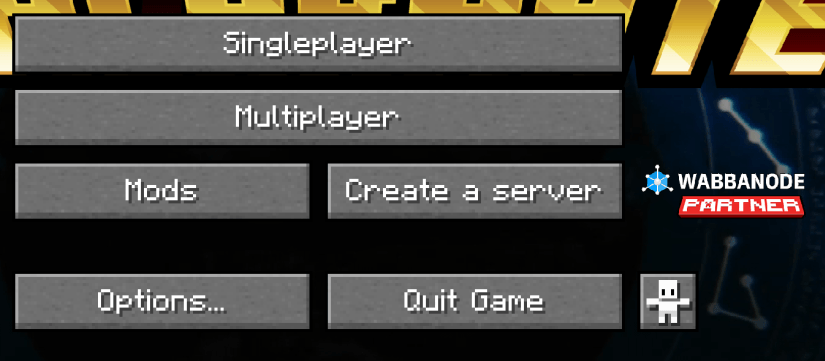
The Wabbanode Companion Mod is a lightweight client-side utility that adds a customizable button and logo to the Minecraft title screen.
Partners can configure the button text, destination link, and whether or not to display the Wabbanode logo.
This mod is designed to provide quick, in-game access to Wabbanode’s partner links without affecting gameplay.
Features:
- Customizable button text and clickable link on the title screen in config/wabbanode/config.json
- Optional display of the Wabbanode logo.
- Fully client-side with no gameplay changes.
- Intended specifically for Wabbanode partners; players can remove the mod from their packs at any time if they don’t wish to see the branding.
Ideal for Wabbanode customers and affiliates who want easy access to the Wabbanode site directly from their Minecraft client.
Setup:
- Drag-and-drop the correct version of the mod into your mods folder.
- Create the config/wabbanodecompanion/config.json file and populate it with your unique link e.g.
{
   "link": "<your unique affiliate link>",
   "displayLogo": true
}
Once configured, you’ll see the button on your main menu screen.
常见问题
Wabbanode Companion 支持哪些 Minecraft 版本?
Wabbanode Companion 支持 Minecraft Java 版 1.18.2–1.21.1,共 4 个版本,可用的加载器:Fabric / Forge / NeoForge。下载时注意选择和你游戏版本一致的文件。
Wabbanode Companion 怎么安装?
先用 PCL2 或 HMCL 启动器安装对应版本的 Fabric / Forge / NeoForge,再把下载的 .jar 文件放进游戏目录的 mods 文件夹,重新启动游戏即可。开启了版本隔离的,mods 文件夹在 versions/版本名 下面。
评论
登录后评论和评分