
Auto Music
A client mod that automatically plays local music based on battle conditions, supporting custom trigger conditions, music libraries, battle rain, and debug info.
截图
介绍
Auto Music
A client-side combat music mod for Minecraft.
Auto Music plays your own local music automatically when combat becomes intense. Customize the trigger conditions,
select tracks from an in-game music library, preview them before use, and tune the experience for your own playstyle.
Features
- Supports local MP3 and OGG music files
- In-game music library with track selection and preview
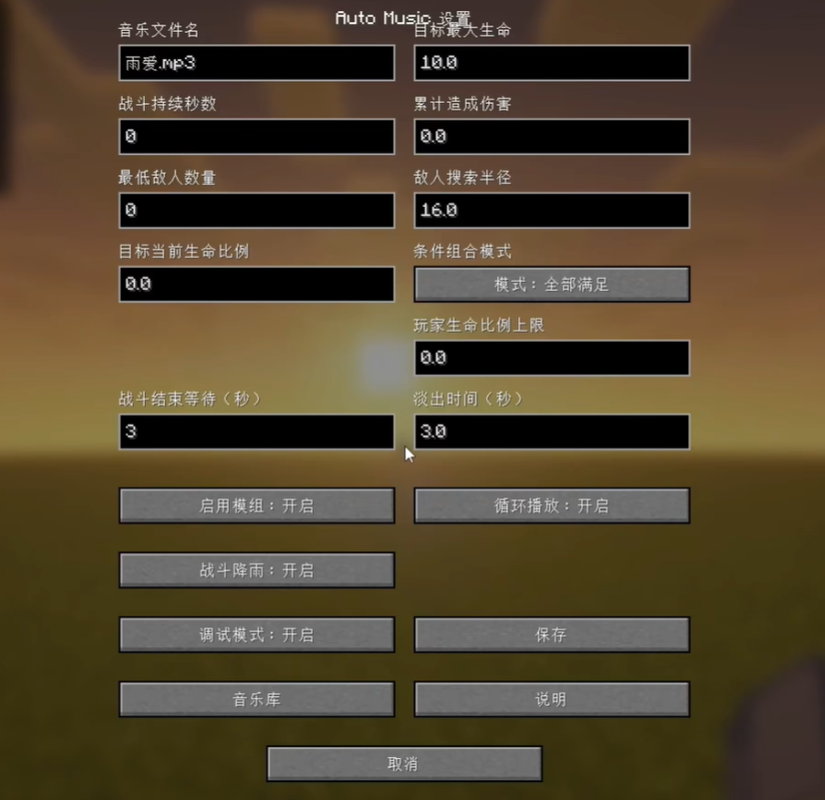
- Configurable combat triggers:
- Target maximum health
- Target health percentage
- Player health percentage
- Combat duration
- Damage dealt
- Nearby enemy count
- ALL and ANY condition modes
- Configurable combat end delay and fade-out duration
- Optional combat rain for atmospheric battles and Riptide support
- Debug overlay and client commands for testing
- Hover tooltips and an in-game guide for every setting
Installation
This is a client-side mod. The server does not need to install it.
Place your music files in:
config/auto_music/music/
Then press O in-game to open Auto Music settings and select a track from the Music Library.
Dependencies
- Fabric version: Fabric API
- Forge version: no additional mod dependencies
This mod does not include any music files. Add your own MP3 or OGG files locally.
常见问题
Auto Music 支持哪些 Minecraft 版本?
Auto Music 支持 Minecraft Java 版 1.20.1–26.1.2,共 3 个版本,可用的加载器:Fabric / Forge。下载时注意选择和你游戏版本一致的文件。
Auto Music 怎么安装?
先用 PCL2 或 HMCL 启动器安装对应版本的 Fabric / Forge,再把下载的 .jar 文件放进游戏目录的 mods 文件夹,重新启动游戏即可。开启了版本隔离的,mods 文件夹在 versions/版本名 下面。运行环境:仅客户端。
评论
登录后评论和评分