
BlurCords
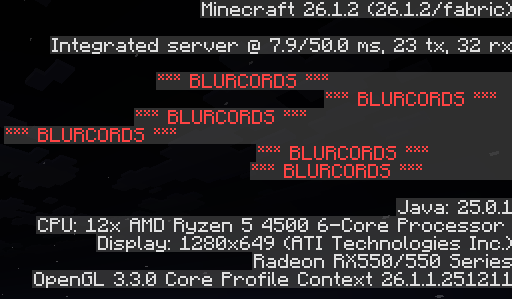
BlurCords is a security-focused mod that automatically censors your coordinates and sensitive data from the debug screen (F3). It's a perfect tool for streamers and players on Anarchy servers to protect their base locations from accidental leaks with just
截图

介绍
BlurCords
Keep your base safe from accidental coordinate leaks.
I made BlurCords because accidentally leaking your base on an anarchy server or during a stream is the worst feeling ever. It’s a simple, straightforward client-side mod that automatically censors sensitive information on your F3 debug screen.
What it does:
Auto-Censor: Whenever you open the F3 screen, your XYZ, Block, Chunk, Facing, and Biome are instantly blurred out and replaced with “* BLURCORDS *“.
Toggle Key: Need to check your coords real quick? Just press the M key to reveal the numbers. Press it again to hide them back.
HUD Status: There is a clean, unobtrusive text on the corner of your screen telling you if BlurCords is active, so you’re never guessing if you’re safe.
Auto-Save: The mod remembers your choice. If you close the game with the coords hidden, they will stay hidden when you log back in.
Why use it?
On no-rules servers, a single screenshot on Discord or a random video frame with F3 open is enough to lose months of grinding. With this mod, even if you press the F3 button by mistake, your location stays an absolute secret.
Technical details:
Modloader: Fabric
Client-Side only: You only need to install it on your PC. It works on any multiplayer server, Realms, or single-player world.
Developed by Gatosmias/MiausDEV. same person
常见问题
BlurCords 支持哪些 Minecraft 版本?
BlurCords 支持 Minecraft Java 版 26.1–26.1.2,共 3 个版本,可用的加载器:Fabric。下载时注意选择和你游戏版本一致的文件。
BlurCords 怎么安装?
先用 PCL2 或 HMCL 启动器安装对应版本的 Fabric,再把下载的 .jar 文件放进游戏目录的 mods 文件夹,重新启动游戏即可。开启了版本隔离的,mods 文件夹在 versions/版本名 下面。运行环境:仅客户端。
gatosmias 的其他作品
查看全部 →
RadioMC
Official RadioMC player. Stream 51,000+ live radio stations, podcasts, and YouTube audio via a seamless native interface. Supports MP3, AAC+, HLS, and video platforms through robust FFmpeg integration.

Wasted Screen GTA
Transform the Minecraft death screen into the classic "WASTED" transition from GTA, complete with grayscale filtering and synchronized audio.

CoreStats
CoreStats is the definitive performance benchmarking engine for Minecraft. It features a high-precision client-side Fabric mod that executes stress test routines, capturing critical hardware metrics (CPU/GPU) and performance data (Avg FPS, 1% Low). All
评论
登录后评论和评分