
截图


介绍
中文介绍正在准备中,下面暂时显示原文。
Twemoji Visibility
–
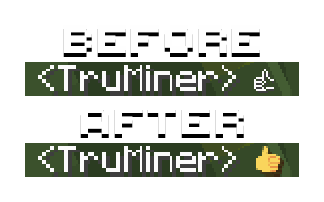
Twemoji Visibility is a resource pack that replaces the standard Minecraft emojis with Twemoji emojis, the same ones that Twitter/X and Discord use.
📝 Notes
If you are experiencing crashes or other weird behavior while using Twemoji Visibility 1.5 or higher, try using the latest version of 1.4.x. When downloading the resource pack, it is listed as the Release version. (in green)
- There are multiple ways to paste in emojis.
- On Windows: you can use Windows + . to open the emoji menu.
- On MacOS: you can use Control + Command + Space to open the emoji menu.
- You can use the Symbol Chat mod, which is officially supported by this Resource Pack.
- Sequence emojis are not supported by Minecraft, and by extension, this resource pack.
- This means that some emojis will come out as multiple parts when attempted to type in.
- Flags, skin tones, families, and some other emojis (such as 😶🌫️ and 🐦⬛) do not work properly.
- Force Unicode Font must be disabled for emojis to be visible.
- Game Menu (Escape) > Options… > Language… > Font Settings… > Force Unicode Font (set to OFF).
- If you are using the DiscordSRV plugin on a server, set
EmojiBehaviortoshowin the config.yml file to force all emojis sent in chat to display as their emoji and not the name. - You must be the host of the server to change this.
- The Beta version supports emojis on text that isn’t white.
- It is considered Beta because emojis may not render correctly in certain places. Please see the release notes to see what is broken.
⚖️ License and Credits
- The emoji images in this resource pack are used from Twitter’s Twemoji and jdecked’s forked Twemoji, which are both licensed by CC BY 4.0.
- This resource pack was based on AndrosDiscordEmojis and both resource packs are also licensed by CC BY 4.0. Feel free to use and adapt in your own resource pack but give appropriate credit and provde a link to the license.
- Androkai (the creator of AndrosDiscordEmojis) gave me permission to make this pack in this GitHub issue.
- The custom shader that allows emojis to keep their color on Signs and Books in the Beta build was created by AlphaLeoli. You can join his discord server here. He also helped with Symbol Chat support.
常见问题
Twemoji Visibility 支持哪些 Minecraft 版本?
Twemoji Visibility 支持 Minecraft Java 版 1.19.2–1.21.11,共 22 个版本。下载时注意选择和你游戏版本一致的文件。
Twemoji Visibility 怎么安装?
把下载的 .zip 文件(不用解压)放进游戏目录的 resourcepacks 文件夹,进游戏后在「选项 → 资源包」里把它移到右边启用。
AlphaLeoli 的其他作品
查看全部 →
Xray (Spectator X Ray)
by AlphaLeoli, TonyJamesStark
X-Ray通过一个简单的按键激活:F3 + N 即可有效进入旁观模式,而这个资源包正是在该模式下生效的。
156.9万
1 年前
Modrinth
Subtly Glowing Ores
by AlphaLeoli, robotkoer
为矿石添加发光的彩色轮廓!兼容大多数资源包!
114万
6 个月前
Modrinth

Glowing
by AlphaLeoli, 7777777_4547
使用OptiFine/ConnectedTextureMod/原版(CoreShaders)格式为原版内容制作发光或自发光效果。
99.1万
12 个月前
Modrinth · CurseForge

GUI Revision
by Vixel, AlphaLeoli
在保留原版 GUI 简洁风格的同时,带来全新的设计
54.6万
2 年前
Modrinth
评论
登录后评论和评分