介绍





Mini-Me Totem replaces the Totem of Undying with a small version of your Minecraft skin. This edition is made for skins with 4-pixel-wide arms.
Web Generator
- Enter your Minecraft username.
- Choose your Minecraft version.
- Generate and download your pack.
Open the Mini-Me Totem Generator
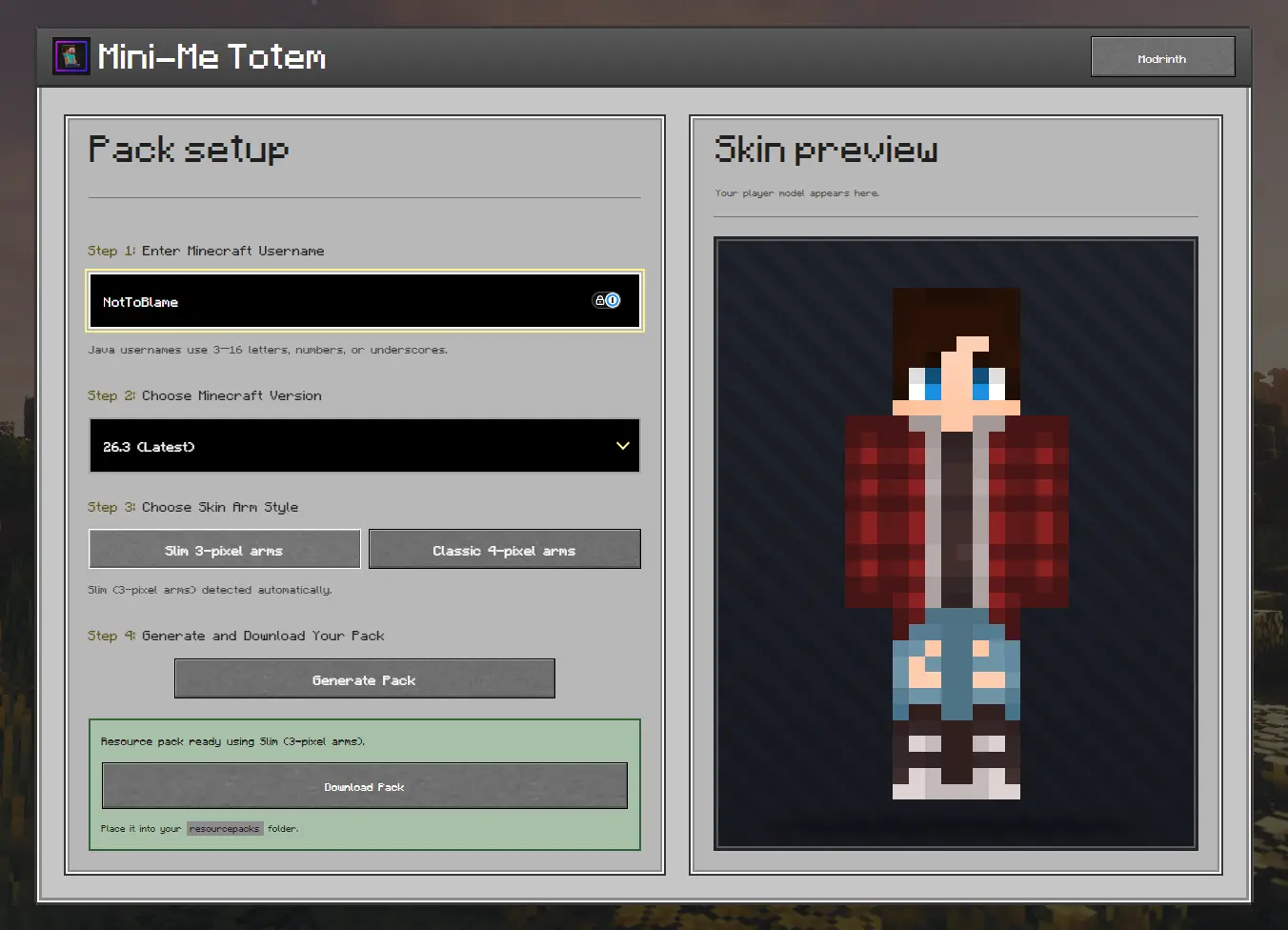
The generator retrieves your skin and prepares the correct resource pack for your selected Minecraft version.
Manual Setup
-
Download the pack made for your Minecraft version.
-
Download your skin from NameMC, MinecraftSkins, or use your own skin file if you already have it saved.
-
Rename your skin file:
- 1.11–1.12.2:
totem.png - 1.13 and newer:
totem_of_undying.png
- 1.11–1.12.2:
-
Open the resource-pack ZIP and replace the existing file inside:
assets/minecraft/textures/item/ -
Place the completed ZIP inside your Minecraft
resourcepacksfolder and enable it.
Do not place the pack inside another folder. Opening the ZIP should immediately show pack.mcmeta, pack.png, and the assets folder.
Troubleshooting
The normal Totem of Undying still appears
Make sure Mini-Me Totem is enabled and placed above any other pack that changes the totem. Also check that you downloaded the pack for your Minecraft version.
The texture is purple and black
Make sure your skin is a 64×64 PNG placed inside:
assets/minecraft/textures/item/
It must be named totem.png for 1.11–1.12.2 or totem_of_undying.png for 1.13 and newer. Check that it has not accidentally been named .png.png.
The arms do not look correct
This edition is made for skins with 4-pixel-wide arms. Check that your Minecraft skin uses the matching arm width.
Minecraft says the pack is incompatible
Download the pack made for your Minecraft version. Different versions use different resource-pack formats, so do not edit or replace pack.mcmeta.
The generator cannot find my username or shows an old skin
Check that the username is correct and try again after a short wait. If the skin still cannot be retrieved, follow the manual setup using your saved skin file.
The pack does not appear in Minecraft
Place the ZIP directly inside your Minecraft resourcepacks folder. When opening the ZIP, pack.mcmeta and the assets folder should be immediately visible rather than inside another folder.
For additional help or bug reports, join the Discord server.
License
🧸 Mini-Me Totem is © NotToBlame. You are permitted to:
- ✅ Use in modpacks if downloaded from official sources (Modrinth or CurseForge)
- ✅ Create and publish addon packs as long as no original files are included
- ✅ Make personal edits that are not redistributed
You may not:
- ❌ Reupload or redistribute this pack or its assets
- ❌ Include original files in your own uploads or forks
- ❌ Use the pack commercially without explicit permission
常见问题
🧸Mini-Me Totem (Classic) 支持哪些 Minecraft 版本?
🧸Mini-Me Totem (Classic) 支持 Minecraft Java 版 1.11–26.3,共 57 个版本。下载时注意选择和你游戏版本一致的文件。
🧸Mini-Me Totem (Classic) 怎么安装?
把下载的 .zip 文件(不用解压)放进游戏目录的 resourcepacks 文件夹,进游戏后在「选项 → 资源包」里把它移到右边启用。
NotToBlame 的其他作品
查看全部 →
🛡️ Hide Armor – See Player Skins
Hides the armor model so they don't render on the player

🎨 Custom Outline
Personalise your Minecraft block outline with Respackopts support and an online generator.

🌧️ Clear Weather
You can see clearly now the rain has gone... (almost)
🛡️ Hide Armor – See Player Skins
Hides the armor model so they don't render on the player
评论
登录后评论和评分