
Offline Whitelist
Simple mod that secures offline-mode servers by allowing access strictly based on player usernames.
截图
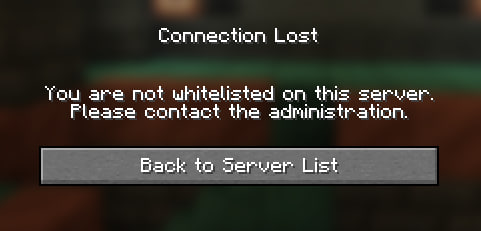
介绍

Offline Whitelist is a server-side mod designed specifically for servers running with online-mode=false. It validates players by nickname, ensuring that only approved users can access your server. Because it operates entirely server-side, it requires no client installation and works seamlessly with vanilla clients. The mod intercepts connections early, preventing undesirable players from entering the server.
Supported Languages


Features
- Offline-Mode Support: Validates players purely by their username, making it perfect for cracked/offline servers.
- Seamless Connection Blocking: Disconnects players during the connection phase before they spawn, leaving no trace in the server chat.
- Localized Kick Messages: Automatically detects the player’s client language and displays the kick reason accordingly (e.g., English clients get English text, Russian clients get Russian). You can add unlimited custom languages in the config file
config/offlinewhitelist.json. - Operator Bypass: An optional setting (enabled by default) that allows server operators to join the server even if they are not explicitly added to the whitelist.
- Clean File Structure: All player lists and configuration files are neatly organized in the
config/directory as simple, editable JSON files.
Commands
All commands require Operator permission. You can use either /offwhitelist or the shorter alias /owh.
/owh add— Adds a player to the whitelist./owh remove— Removes a player from the whitelist./owh getall— Lists all players currently in the whitelist./owh on— Enables the whitelist./owh off— Disables the whitelist./owh opbypass on— Allows operators to bypass the whitelist./owh opbypass off— Requires operators to be in the whitelist to join./owh status— Shows the current whitelist status./owh reload— Reloads the whitelist players and configuration messages.
常见问题
Offline Whitelist 支持哪些 Minecraft 版本?
Offline Whitelist 支持 Minecraft Java 版 1.21.1,可用的加载器:NeoForge。下载时注意选择和你游戏版本一致的文件。
Offline Whitelist 怎么安装?
先用 PCL2 或 HMCL 启动器安装对应版本的 NeoForge,再把下载的 .jar 文件放进游戏目录的 mods 文件夹,重新启动游戏即可。开启了版本隔离的,mods 文件夹在 versions/版本名 下面。运行环境:仅服务端。
rymusov 的其他作品
查看全部 →
Cataclysm & BetterCombat – Compatibility
这是一个用于 Cataclysm 和 Better Combat 之间兼容的数据包/模组

Cataclysm: Spellbooks & BetterCombat – Compatibility
This is a datapack/mod for compatibility between Cataclysm: Spellbooks and Better Combat

Cataclysm & BetterCombat – Compatibility
This is a datapack/mod for compatibility between Cataclysm and Better Combat

Create: Break Levitite
Break levitite block from Create: Aeronautics and get drop.
评论
登录后评论和评分