
介绍
Head Lab – Custom Player Head Editor & Generator
Design, preview and grab custom player heads — entirely in-game. No websites, no commands, no permissions.
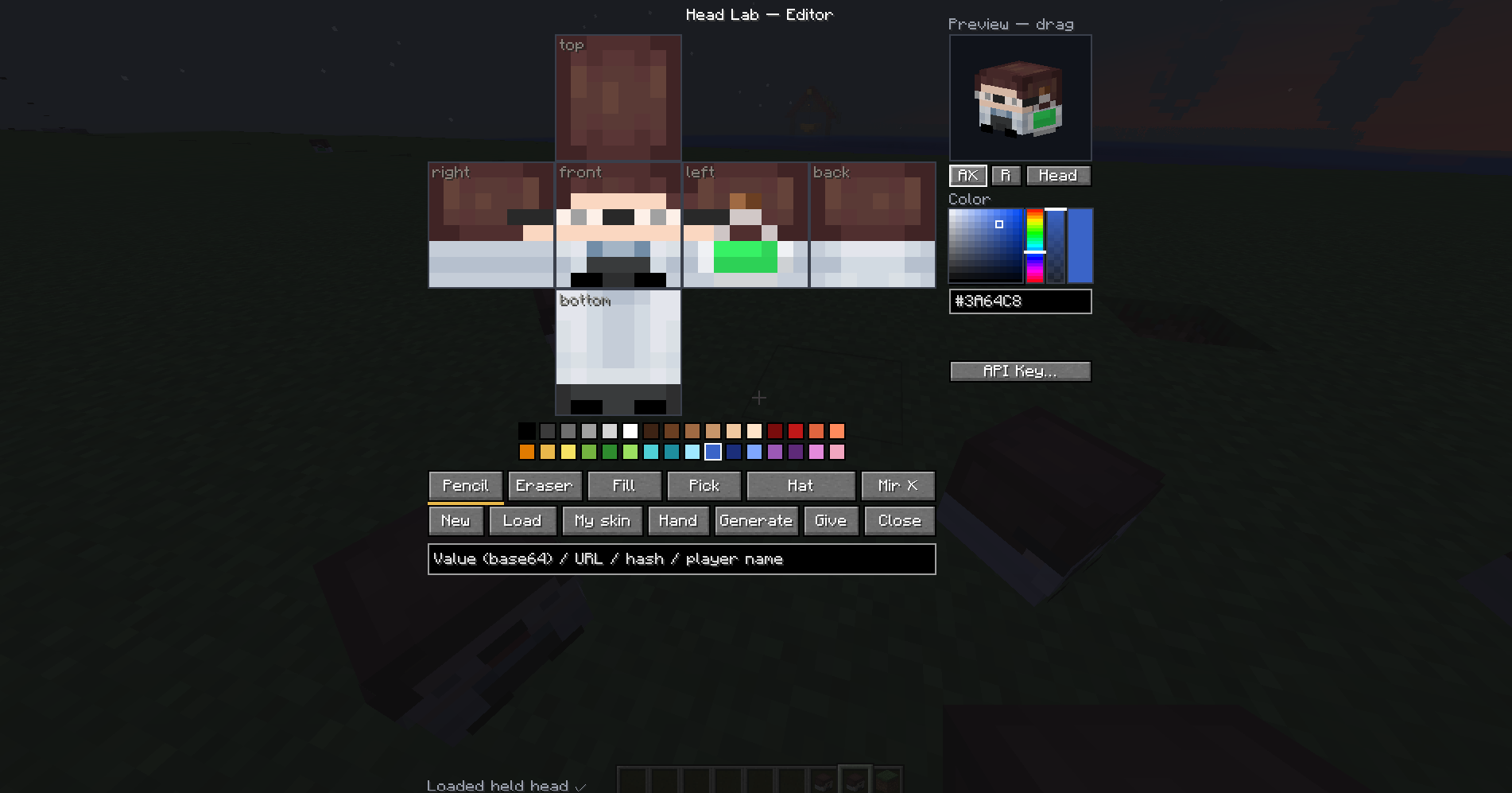
Head Lab is a client-side custom player head editor and generator for Fabric. Press K (rebindable) or run /headlab-editor to open a pixel editor, paint a custom head, watch it live in 3D, and get the finished player head straight into your inventory — in singleplayer or on any server. It’s an in-game replacement for online head generators and skin-to-head websites.
Features
- Pixel editor — paint all 6 faces on an unfolded net, base + hat layers, with pencil, eraser, fill and color picker. Undo/redo, mirror mode, and tool hotkeys.
- Live 3D preview — rotate, auto-rotate, and a head or full-body view.
- Full color control — 32-color palette, HSV picker, alpha bar for shading, hex input, and recent colors.
- Skin import — load any player’s skin as a head by nickname (from the server itself, with autocomplete), or one-click your own skin.
- No permissions needed — in creative the head is delivered via the vanilla creative packet, so it works on any server without OP, plugins or commands.
- Load existing heads — open the editor holding a head to edit it, or paste a Value / URL / hash.
How to use
- Press K (or
/headlab-editor) to open. Holding a head loads it automatically. - Start from New, My skin, a player’s skin (Load), or the head in your Hand.
- Paint on the unfolded net — pick a tool (
B/E/G/I) and a color, switch base/hat withTab, mirror withM, undo withCtrl+Z. - Check the live 3D preview — drag to rotate or switch to full-body view.
- Press Generate — in creative the head drops straight into your inventory.
Generating uploads your drawing to MineSkin for a Mojang-signed texture. An optional API key gives faster limits — set it with the API Key… button or in
config/headlab.properties.
FAQ
Does the server need the mod? No — everything except the optional /headlab give command is client-side.
Do I need OP/permissions? No. Creative delivery uses the vanilla inventory packet.
Why does Generate need internet? Head textures must be signed by Mojang; MineSkin does that.
Which versions? Minecraft 1.20.2 – 1.20.4 with Fabric Loader ≥ 0.16 and Fabric API.
常见问题
Head Lab 支持哪些 Minecraft 版本?
Head Lab 支持 Minecraft Java 版 1.20.2–26.3,共 20 个版本,可用的加载器:Fabric。下载时注意选择和你游戏版本一致的文件。
Head Lab 怎么安装?
先用 PCL2 或 HMCL 启动器安装对应版本的 Fabric,再把下载的 .jar 文件放进游戏目录的 mods 文件夹,重新启动游戏即可。开启了版本隔离的,mods 文件夹在 versions/版本名 下面。运行环境:客户端 / 服务端。
评论
登录后评论和评分