
Autocrafting Table by Sephamm
Autocrafting Table brings simple and powerful automation to Minecraft Forge 1.20.1. Define a recipe with a pattern, supply items in the buffer, and let the table craft automatically and output items to connected inventories.
截图

介绍
Autocrafting Table by Sephamm
Autocrafting Table by Sephamm adds a powerful and intuitive automatic crafting solution to Minecraft, designed to simplify automation while staying close to the vanilla experience.
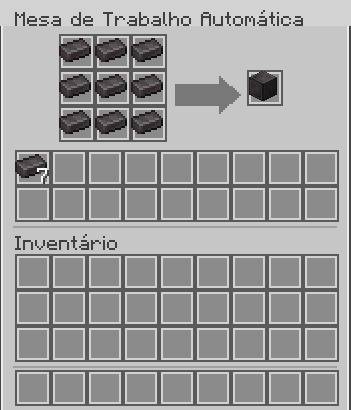
The Autocrafting Table uses a 3×3 pattern system to define recipes and a separate internal buffer to store and consume crafting materials. Once configured, the table crafts items automatically at a configurable interval, without requiring redstone or player interaction.
Crafted items can be exported directly into connected inventories such as chests, allowing seamless integration into automated setups and farms.
✨ Features
Automatic crafting without redstone
3×3 pattern grid to define recipes
Separate internal buffer for consumed items
Automatic output to connected inventories
Configurable crafting speed via commands
Clean, vanilla-inspired GUI
Fully compatible with Minecraft Forge 1.20.1
🕹️ Commands
/sephamm autocraft interval – shows the current crafting interval
/sephamm autocraft interval – changes the crafting speed
/sephamm autocraft interval reset – resets to default values
🔨 Crafting
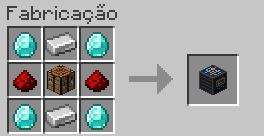
The Autocrafting Table can be crafted using a balanced recipe that fits naturally into the game’s progression.
📌 Notes
The pattern is never consumed
Only valid recipes are processed
Crafting stops automatically when resources run out
No item duplication
Works with all standard vanilla crafting recipes
常见问题
Autocrafting Table by Sephamm 支持哪些 Minecraft 版本?
Autocrafting Table by Sephamm 支持 Minecraft Java 版 1.20.1–1.21.1,共 2 个版本,可用的加载器:Fabric / Forge / NeoForge。下载时注意选择和你游戏版本一致的文件。
Autocrafting Table by Sephamm 怎么安装?
先用 PCL2 或 HMCL 启动器安装对应版本的 Fabric / Forge / NeoForge,再把下载的 .jar 文件放进游戏目录的 mods 文件夹,重新启动游戏即可。开启了版本隔离的,mods 文件夹在 versions/版本名 下面。运行环境:客户端和服务端都要装。
评论
登录后评论和评分