
[UO]Ultramodern optimization – UO
Network high optimization High stability Out of the box Compatible stability
截图




介绍
introduction
中文版:https://www.mcmod.cn/modpack/1289.html
Ultramodern Optimization features several highly customizable optimization configuration presets, allowing you to adjust settings based on personal needs in different scenarios. You can also manually disable unwanted mods within the DLC Manager to better tailor the modpack to specific requirements. The modpack includes a built-in new categorization system and offers a one-click option to enable server-side optimizations within the presets.
Precautions
Ultramodern Optimization’s default modules are sufficient for small modpacks. For large modpacks, you may need to manage settings within the DLC Manager or enable relevant optimizations in the presets.
Friendly Reminder: Optimization mods can only better utilize remaining hardware performance compared to vanilla; their effectiveness varies by hardware and could even result in negative optimization. The purpose of this optimization pack is to provide a smooth gaming experience for players in local multiplayer/modded environments. If you are a single-player client or a vanilla player, simply combining lighter mainstream optimization mods like Embeddium might already be sufficient.
In the new version of the Forge 1.20.1 2.5 modpack, the client itself is already highly lightweight and compatible with most modpacks. If you need to adjust settings in the DLC Manager, you should pay more attention to compatibility issues!
As is well known, Sodium is almost the only optimization mod that significantly boosts vanilla framerates. Combining more optimization mods aims to achieve stable framerates in multi-mod environments comparable to vanilla (meanwhile, the author is actively working on compatibility and creating optimized versions of modpacks).
FPS Improvement
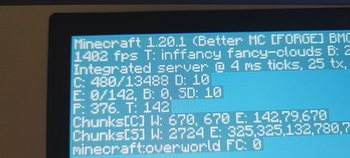
The following tests were conducted in 1.20.1 Forge:
Test Configuration: CPU: Intel i7-4710HQ (4 Cores, 8 Threads, 2.5GHz) GPU: NVIDIA GTX 860M (Dedicated Graphics) Resolution: FHD (1080P)
Vanilla Settings: Render Distance: 8 chunks V-Sync: Off Simulation Distance: 5 chunks
Results: Vanilla: Approached 100 FPS. With Optimization Pack: Reached 350 FPS. Improvement: Approximately 250% increase.

Vanilla: Unoptimized

Optimization Presets
Most optimization packs simply select mods for optimization without any unique features. However, in Ultramodern Optimization, the author has adopted an integrated optimization system, and the package includes several optimization configuration presets. Most optimization mods can be incorporated into modpack clients. For 1.20.1 Forge (Optimization Pack version 2.5.2): Detailed mod compatibility is provided.

Provided modpack optimization presets

Provides more perfect optimization presets

The image above shows the optional optimizations in the DLC Manager, with most compatibility issues clearly labeled.
Acknowledgements
[NRG] Random Gun Brawl, Vanity Works, [MYBL] Profane, Infinite Craftsmanship, [FIB] Fungal Profanity, Daydream Survival, [PNAA] Nexus of All: Age of Disorder, [SiF] Roam the Wild, [CY3] Chapter of the Brave III, [TTF] Oriental Tales of Craft, [NOD] The Devil’s Reverse Scale, [EJ] Journey to the Past, [IAM] Ice and M, Tale of the Ice Age, [SMNH] SMNH: New Horizons, [TGA] The Ascended: Aria of the Celestial Steps, [HATI] Primordial Ascension, [DTR] Death Tunnel: Return to the Dead, [ALONG] The Lone Star: The Witch’s End. I am very grateful to these modpacks for merging my optimizations.
The optimization and compatibility of this pack would not be possible without the testing contributions of community mod authors. Special thanks to authors Awei啊 and Argon4W, community contributors zjmt777, 阿飞L, QQ user: 周延杰 (who discovered the Iron Magic issue), and many others for their testing and suggestions.
This optimization pack also relies heavily on the contributions of major modpack authors (who supported my optimization pack):
First batch of supporters: NimShade, Silentmo, FXT1206
Second batch of supporters: 某不知名传送门方块, 如梦方醒, molomiu, Lovin
Third batch of supporters: 工程师April, CoZo (provided DLC Manager), 托尼也是INFJ, 稀神旭东, RRainbow, 枫桦灰桥, 古明地觉觉子, 折纸散人, 老本願, 奕暃, 永远的安东尼, LINNAI
Special Thanks:
Author Lovin provided immense help with the compatibility of the optimization pack, and 老本願 provided promotion.
常见问题
[UO]Ultramodern optimization – UO 支持哪些 Minecraft 版本?
[UO]Ultramodern optimization – UO 支持 Minecraft Java 版 1.12.2–1.21.1,共 4 个版本,可用的加载器:Forge / NeoForge。下载时注意选择和你游戏版本一致的文件。
[UO]Ultramodern optimization – UO 怎么安装?
点本页「前往下载」拿到整合包文件(Modrinth 的是 .mrpack,CurseForge 的是 .zip),在 PCL2 或 HMCL 启动器里选择「导入整合包」,启动器会自动装好 Minecraft、加载器和全部模组。建议在启动器里给游戏分配 4–6 GB 内存。
[UO]Ultramodern optimization – UO 开服需要多大内存?
推荐服务器内存 12 GB。在线人数多、或者建了大量机器和区块加载器时,可以再加 2–4 GB。
怎么和朋友一起玩 [UO]Ultramodern optimization – UO?
点本页的「一键开服」,选好配置后会自动安装 [UO]Ultramodern optimization – UO 的服务端,几分钟就能开好。把服务器地址发给朋友,大家用同一个版本的整合包连进去就行。
评论
登录后评论和评分