
Ai Inventory Sorter
Adds a small button that lets you use AI to sort your inventory.
截图
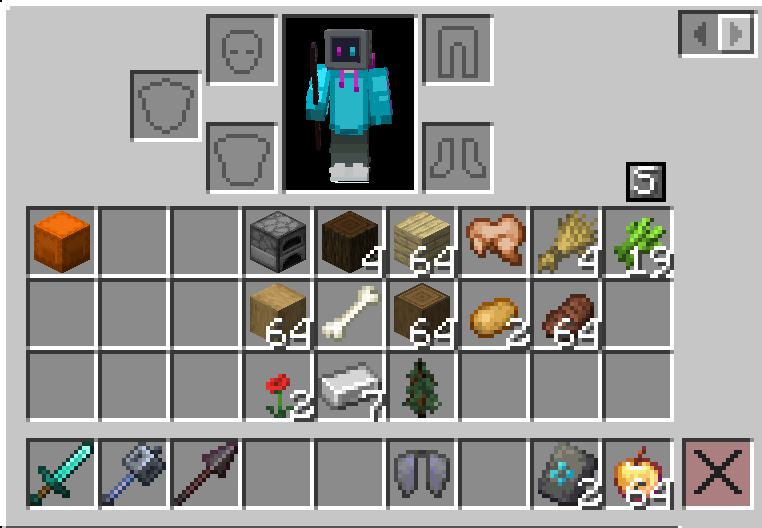
介绍
AI Inventory Sorter
AI Inventory Sorter is a Minecraft mod that automatically organizes your inventory using AI. It places items in the optimal slots, ensuring your hotbar and main inventory are efficiently arranged for gameplay.
Features
- Hotbar & Main Inventory Sorting Automatically assigns items to the most appropriate hotbar and inventory slots, following a strict priority order for weapons, tools, armor, utility items, and food.
- Intelligent Sectioning
- Left Third: Shulker boxes and storage items
- Middle Third: Tools, weapons, armor, blocks, and miscellaneous items
- Right Third: Food and consumables
- Shulker-Aware Reads shulker box contents for context but always places the box in the designated storage section.
- AI-Powered JSON Mapping Uses Ollama GPT-OSS 20B Cloud model to generate slot mappings.
- Robust Parsing Automatically handles code fences and extraneous text in AI responses, preventing JSON parsing errors.
Requirements
- Minecraft 1.21.11
- Fabric Loader
- Fabric API
- Ollama API key
Installation
- Place the mod
.jarinto yourmods/folder. - Configure your Ollama API key in
config/aiinventorysort.json. - Launch Minecraft.
FAQ
Q: How do I assign an Ollama API key?
A: Add your API key to config/aiinventorysort.json under apiKey.
Q: Does it support modded items?
A: Yes. The AI will classify modded items such as spears or custom tools according to your defined rules.
Q: What if the AI produces invalid JSON?
A: The mod automatically cleans code fences and extracts the JSON array, preventing MalformedJsonException.
Q: Can I customize slot priorities?
A: Hotbar and main inventory rules are built-in. Advanced users can modify the source code to change priorities, though this is not recommended. I do hope to add this feature soon.
Q: Why did nothing happen to my inventory after the AI finished?
A: This is a known bug. Try closing your inventory after clicking the sort button.
Q: How long should it take to sort?
A: With a full inventory, it might take up to 15-20 seconds. For a small inventory, you are looking at 5-10 seconds.
Q: Where is my config file?
A: If there is no config file, create a file at “/config` in your instance's directory (click the folder button in Modrinth), name the file `aiinventorysort.json“ and paste this in:
{
  "apiKey": "API_KEY_HERE",
  "snapshotLayout": [],
  "hotbarPins": {},
  "showButtons": true
}
Support
For bug reports or feature requests, feel free to contact me at: “[email protected]“
常见问题
Ai Inventory Sorter 支持哪些 Minecraft 版本?
Ai Inventory Sorter 支持 Minecraft Java 版 1.21.11,可用的加载器:Fabric。下载时注意选择和你游戏版本一致的文件。
Ai Inventory Sorter 怎么安装?
先用 PCL2 或 HMCL 启动器安装对应版本的 Fabric,再把下载的 .jar 文件放进游戏目录的 mods 文件夹,重新启动游戏即可。开启了版本隔离的,mods 文件夹在 versions/版本名 下面。运行环境:仅客户端。
评论
登录后评论和评分