
Cerv Dark Theme
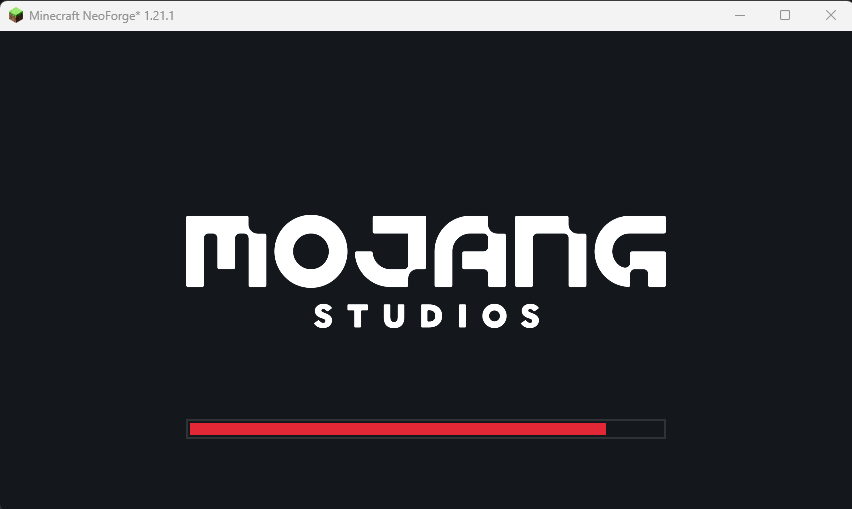
Makes the red Mojang loading screen dark - with fully customisable colors, bar, logo tint, and fade durations.
截图
介绍
CervDarkTheme
Tired of the bright red Mojang loading screen burning your eyes every launch?
CervDarkTheme turns it dark – and lets you restyle every part of it to match your setup.
✨ Features
- 🌑 Dark by default – deep dark background (
#14181C) instead of vanilla red (#EF323D) - 🎨 Full color customisation with an in-game color picker:
- Background
- Progress bar fill
- Bar background (unfilled part)
- Bar border
- Mojang Studios logo tint
- ⏱️ Adjustable fade-in / fade-out durations – make the loading screen snappier
- 🖥️ Client-side only – safe to use on any server, no server install needed
⚙️ Configuration
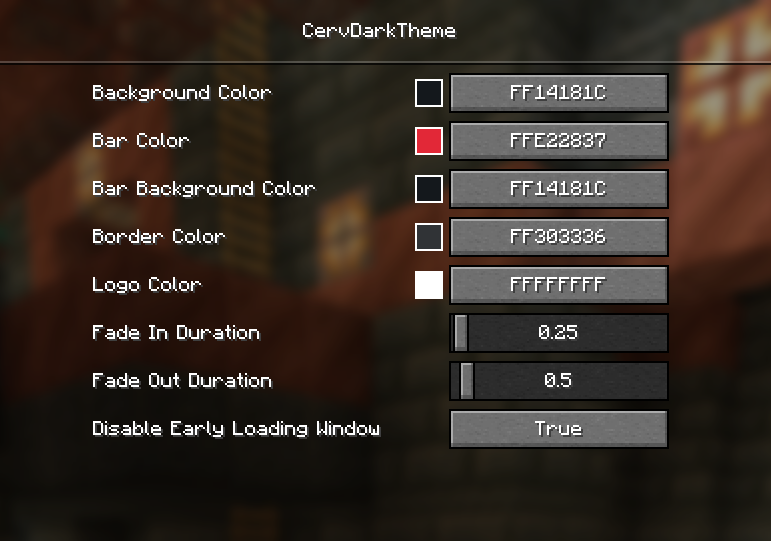
Open the config GUI in-game via Mods → CervDarkTheme → Config (powered by
Fzzy Config), or edit
config/cervdarktheme/config.toml directly.
| Setting | Default |
|—|—|
| Background Color | #14181C |
| Bar Color | #E22837 |
| Bar Background Color | #14181C |
| Border Color | #303336 |
| Logo Color | #FFFFFF |
| Fade In Duration | 0.25s |
| Fade Out Duration | 0.5s |
Early loading window handled automatically
NeoForge normally shows its own red-themed early loading window. CervDarkTheme
automatically sets earlyWindowControl = false in config/fml.toml for you –
no manual editing needed. The change applies from the second launch onward
(the loader reads that file before mods load). You can opt out via the
“Disable Early Loading Window” config option.
常见问题
Cerv Dark Theme 支持哪些 Minecraft 版本?
Cerv Dark Theme 支持 Minecraft Java 版 1.21.1,可用的加载器:NeoForge。下载时注意选择和你游戏版本一致的文件。
Cerv Dark Theme 怎么安装?
先用 PCL2 或 HMCL 启动器安装对应版本的 NeoForge,再把下载的 .jar 文件放进游戏目录的 mods 文件夹,重新启动游戏即可。开启了版本隔离的,mods 文件夹在 versions/版本名 下面。运行环境:仅客户端。

评论
登录后评论和评分