
ChatTabs Reloaded
Adds customizable tabs to the Minecraft chat UI with filters, notifications, profiles and more!
截图
介绍
ChatTabs Reloaded
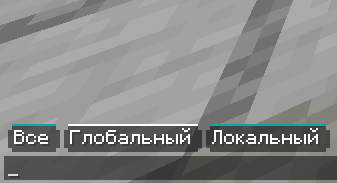
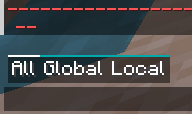
A modern Minecraft mod that adds tabbed chat organization. Filter messages into separate tabs per server, with per-tab send modifiers, color rules, and drag-and-drop management.
Features
- Chat tabs — messages are filtered into separate tabs based on regex rules
- Per-server profiles — different tab sets for different servers, configured in
config/chattabs-profiles.json - Send modifiers — auto-prepend/suffix when chatting from a specific tab (e.g.
!for global chat) - Drag & drop — reorder tabs by dragging
- Unread counter — shows number of unread messages per tab
- Fade animation — tabs fade when chat closes
- Right-click context menu — create, edit, delete, reorder tabs
- Tab editor — in-game screen to configure name, filter regex, hex color, send modifier
- Server profile detection — automatically loads and notifies about profile changes
- Config export/import — share your configurations with friends
- In-game commands —
/chattabs(alias/ct) - NeoForge config screen — accessible from Mods menu
Commands
| Command | Description | Example |
|—|—|—|
| /chattabs help | Show command list | /ct help |
| /chattabs reload | Reload config from disk | /ct reload |
| /chattabs save | Save current config | /ct save |
| /chattabs list | List all tabs | /ct list |
| /chattabs select <name> | Switch to a tab | /ct select Global |
| /chattabs tab add <name> | Create a new tab | /ct tab add Private |
| /chattabs tab remove <name> | Delete a tab | /ct tab remove Private |
| /chattabs toggle <feature> | Toggle features | /ct toggle unreadcounter |
| /chattabs filter <tab> <regex> | Set tab filter | /ct filter Private ^\\[PRIVATE\\] |
| /chattabs profile list | List server profiles | /ct profile list |
| /chattabs profile current | Show active profile | /ct profile current |
| /chattabs profile gui | Open profile editor | /ct profile gui |
| /chattabs export [file] | Export config | /ct export my-config.json |
| /chattabs import <file> | Import config | /ct import my-config.json |
/ct is a shorthand alias for /chattabs.
Examples
Filter by prefix
Tab: Global
Filter: ^\[GLOBAL\]
Matches messages starting with [GLOBAL]
Filter by sender (case-insensitive)
Tab: Friends
Filter: (?i)(alice|bob|charlie).*:
Matches chat from friends (case-insensitive)
Filter private messages
Tab: Private
Filter: ^From .* whispers:
Matches whisper format from most servers
Complex regex with multiple conditions
Tab: Spam Filter (inverse)
Filter: ^(?!.*\b(spam|ignore|trash)\b).*$
Matches messages that do NOT contain spam keywords
Configuration
config/chattabs.json
Main mod settings: enabled state, tab colors, chat dimensions, animation toggle.
config/chattabs-profiles.json
Per-server tab profiles. Structure:
{
  "profiles": [
    {
      "serverIp": "mc.hypixel.net",
      "name": "Hypixel",
      "tabs": [
        {
          "id": "all",
          "name": "All",
          "visibleByDefault": true,
          "filter": { "regex": ".*", "hexColor": 16777215 },
          "sendModifier": { "prefix": "", "suffix": "" }
        }
      ]
    }
  ],
  "defaultProfile": {
    "name": "Default",
    "tabs": [ ... ]
  }
}profiles[]— list of server-specific tab sets (matched by IP suffix)defaultProfile— fallback tabs when no server matches- Each tab supports:
id,name,visibleByDefault,filter(regex + hexColor),sendModifier(prefix + suffix)
Sharing Configurations
- Use
/ct export myconfig.jsonto save your setup - Share the
myconfig.jsonfile with others - They can import with
/ct import myconfig.json
Regex Filter Guide
Basic patterns
.*— match everything (catch-all)^text— starts with texttext$— ends with text[abc]— any single character: a, b, or c\d+— one or more digits
Common server filters
Hypixel levels:    ^(\[[\dMVP]+\])?
Minotar names:     ^<\w+>
Generic channels:  ^\[\w+\]
Whispers:          ^(From|To) .*:
Modifiers
(?i)— case-insensitive mode(?-i)— case-sensitive mode\b— word boundary\s— whitespace\S— non-whitespace
Languages
- English (default), Russian, Spanish, Chinese (Simplified)
常见问题
ChatTabs Reloaded 支持哪些 Minecraft 版本?
ChatTabs Reloaded 支持 Minecraft Java 版 1.21–1.21.11,共 12 个版本,可用的加载器:NeoForge。下载时注意选择和你游戏版本一致的文件。
ChatTabs Reloaded 怎么安装?
先用 PCL2 或 HMCL 启动器安装对应版本的 NeoForge,再把下载的 .jar 文件放进游戏目录的 mods 文件夹,重新启动游戏即可。开启了版本隔离的,mods 文件夹在 versions/版本名 下面。运行环境:仅客户端。

评论
登录后评论和评分