
Dynamic Views
Automatically adjusts render distance to match your FPS. Low FPS = less view distance, high FPS = more. Fully configurable in-game.
截图
介绍
Dynamic View Distance
No more manually fiddling with your render distance. **Dynamic View
Distance** monitors your framerate in real time and adjusts the view
distance automatically — giving you the best possible view your PC can
currently run smoothly.
How it works
The mod measures your FPS at regular intervals and compares it against two
thresholds:
- FPS too low → render distance is decreased by one chunk until things run smoothly again.
- FPS high enough → render distance is increased by one chunk to show more of the world.
- FPS in the sweet spot → everything stays as it is.
This way the mod finds the optimal balance between view range and
performance on its own — whether you’re running across a simple plains
biome or standing in a complex redstone base.
Features
- Automatic adjustment of render distance based on your current framerate
- Custom in-game settings menu — no Cloth Config or ModMenu required
- Freely configurable limits: minimum and maximum view distance, lower and upper FPS thresholds
- Cooldown system prevents the view distance from constantly flickering back and forth
- Adjustable check interval — how often your FPS is measured
- Settings are saved to a simple JSON file and persist across game sessions
How to use
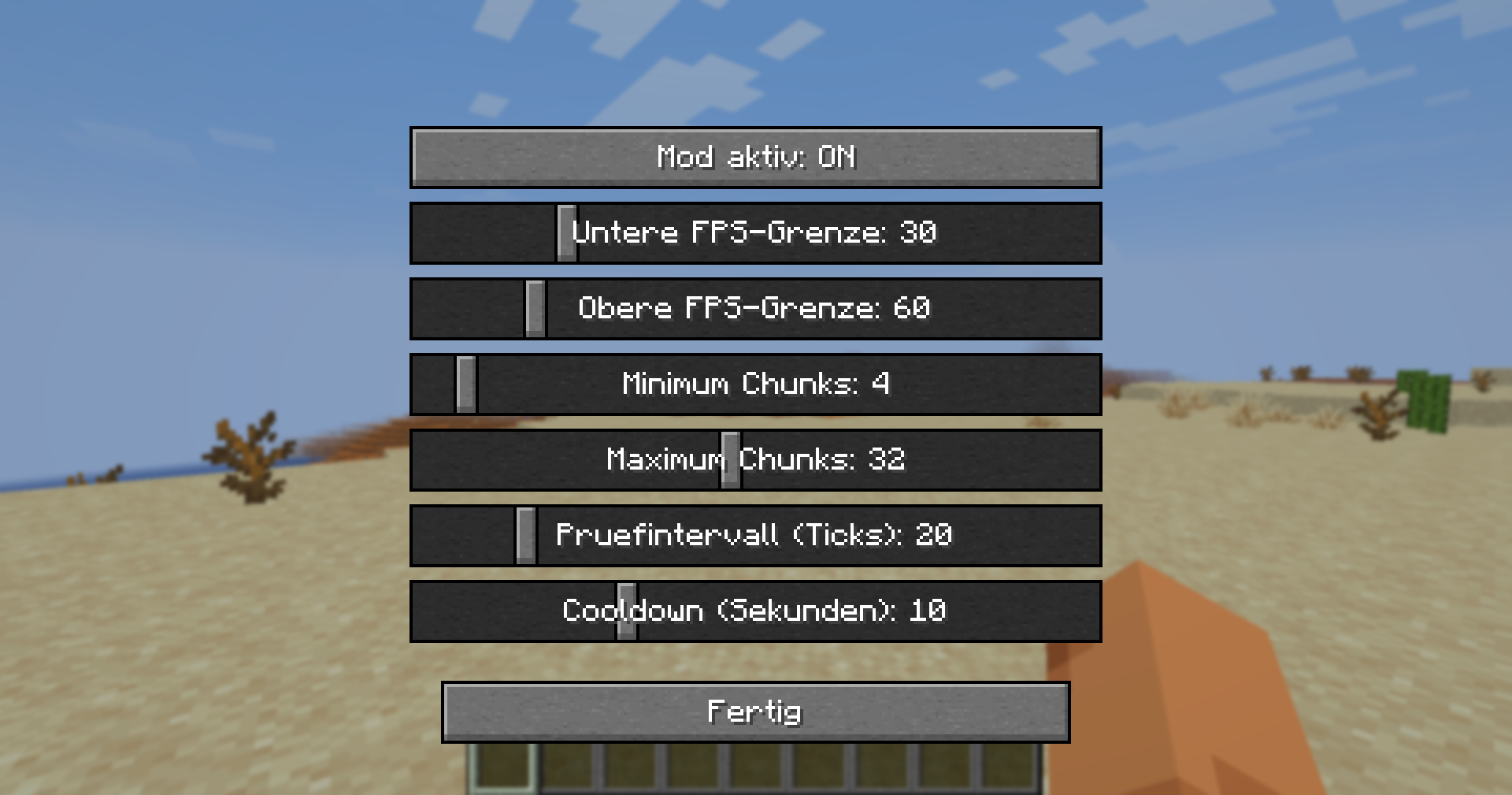
Press V in-game to open the settings menu (the key can be rebound under
Options → Controls). There you can adjust the following with sliders:
| Setting | What it does |
|———————|—————————————————-|
| Mod enabled | Turns automatic adjustment on/off |
| Lower FPS threshold | Below this, view distance is decreased |
| Upper FPS threshold | Above this, view distance is increased |
| Minimum chunks | View distance never goes below this value |
| Maximum chunks | View distance never goes above this value |
| Check interval | How often FPS is measured (in ticks) |
| Cooldown | Pause after each change (in seconds) |
Installation
- Install Fabric Loader for Minecraft 26.1.2
- Download Fabric API and place it in your
modsfolder - Place Dynamic View Distance in your
modsfolder as well - Launch the game — done!
Notes
- This is a client-side mod — it works on any server, even ones that don’t have the mod installed.
- Requires Fabric API.
- Built for Minecraft 26.1.2.
常见问题
Dynamic Views 支持哪些 Minecraft 版本?
Dynamic Views 支持 Minecraft Java 版 26.1.2,可用的加载器:Fabric。下载时注意选择和你游戏版本一致的文件。
Dynamic Views 怎么安装?
先用 PCL2 或 HMCL 启动器安装对应版本的 Fabric,再把下载的 .jar 文件放进游戏目录的 mods 文件夹,重新启动游戏即可。开启了版本隔离的,mods 文件夹在 versions/版本名 下面。运行环境:仅客户端。
theandulino 的其他作品
查看全部 →
Stage Equipment Essentials (SEE)
Stage Equipment Essentials (SEE) adds a collection of realistic stage gear to Minecraft including speakers, spotlights, trusses, microphones, and more. Perfect for building concert stages, event venues, streaming setups, or immersive roleplay scenes.

Create Cannon 2
The original mod for "Create Cannon 2"

Stage Equipment Essentials (SEE)
Stage Equipment Essentials (SEE) adds a collection of realistic stage gear to Minecraft including speakers, spotlights, trusses, microphones, and more. Perfect for building concert stages, event venues, streaming setups, or immersive roleplay scenes.

theandulino’s Money Mod
theandulino's Money Mod adds a currency system to Minecraft, featuring coins and banknotes for trading and economy-based gameplay.
评论
登录后评论和评分