
截图

介绍

Swift Wheel Mod – Enhanced Inventory Management for Minecraft
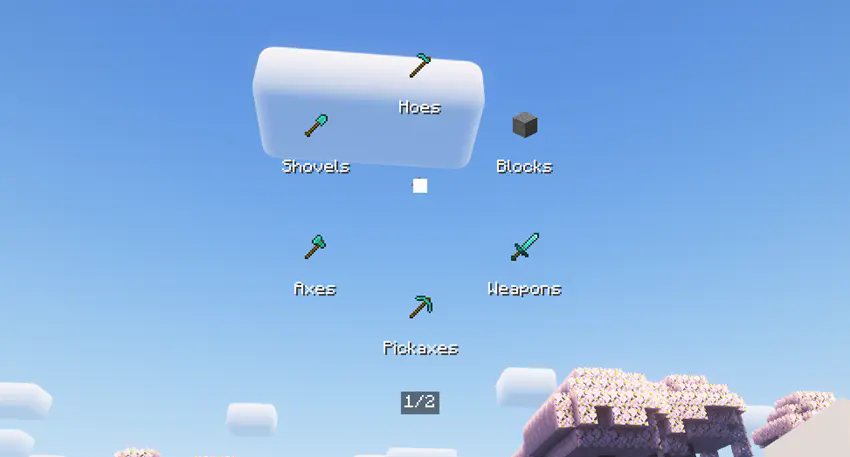
Swift Wheel is a versatile client-side utility mod designed to revolutionize your Minecraft inventory management experience. This innovative mod introduces a dynamic item wheel interface that allows players to quickly access and select items from their inventory without tedious scrolling or hotbar swapping.
Usage
Simply bind a hotkey to activate the item wheel, then hover over your desired category to quickly equip or use items. You are also allowed to right click into the specified item list for every category.Perfect for combat situations, building projects, and any scenario where every second counts!

Keybinds Notice
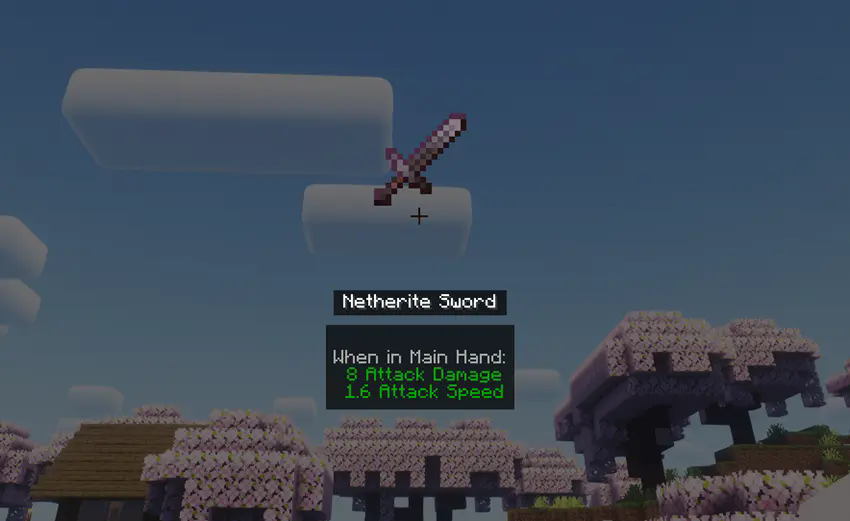
While holding the hotkey (default: “X”), standard mouse interactions are temporarily disabled. Left-click a category or release the hotkey to confirm your selection. Alternatively, right-click any category to enter Item List Mode, displaying all available items within that category. In this mode, middle-clicking an item reveals its detailed information.
Compatibility
Works with Forge only presently. Supports 1.20x game versions.
Configuration
Customize visible categories and rendering preferences through the mod’s configuration file located at “.minecraft/config/swiftwheel-client.toml”
常见问题
Swift Wheel 支持哪些 Minecraft 版本?
Swift Wheel 支持 Minecraft Java 版 1.20.1–1.20.4,共 3 个版本,可用的加载器:Forge。下载时注意选择和你游戏版本一致的文件。
Swift Wheel 怎么安装?
先用 PCL2 或 HMCL 启动器安装对应版本的 Forge,再把下载的 .jar 文件放进游戏目录的 mods 文件夹,重新启动游戏即可。开启了版本隔离的,mods 文件夹在 versions/版本名 下面。运行环境:仅客户端。
adwadg 的其他作品
查看全部 →
Slashblade Murasame
A Slashblade-Resharped Addon which added murasamemaru from SenrenBanka.

Slashblade Murasame
an addon for slashblade:resharped

Item Glint
Make your holding item shiny and glowing.

ItemGlint:Relight
A rewrite version of ItemGlint mod, presenting more features and visualized config UI.
评论
登录后评论和评分