
Hit Hud
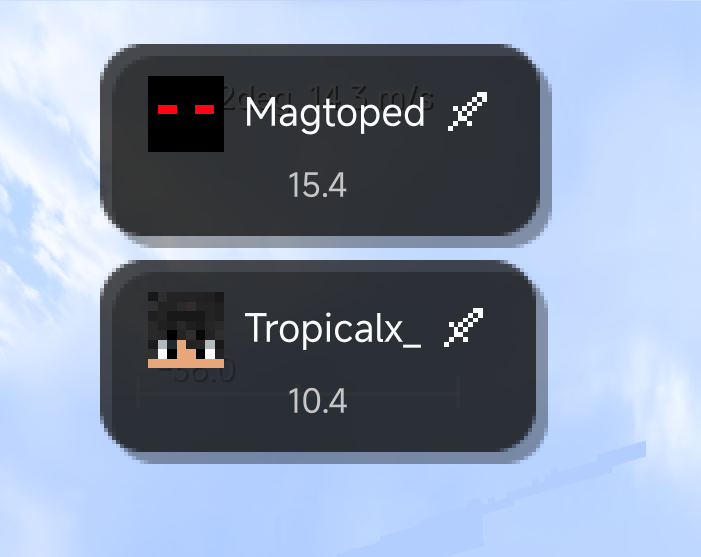
A Simple Hud which adds a combat timer, Says the name of them on top of your screen, And has a countdown, Useful for pvp in a group so you dont get messed up with your teammates, And whoever is invis and you hit them you know their name!
截图


介绍
Hit HUD
A lightweight, client-side mod that shows you who you last tangled with in
combat — no more losing track of who you were just fighting mid-chaos.
What it does
Whenever you hit another player, or another player hits you, a clean HUD
slides in at the top of your screen showing:
- Their username
- A 20-second countdown so you always know how “fresh” that fight is
Get hit or land a hit again before the timer runs out? The HUD instantly
resets with the new name and a fresh 20 seconds — perfect for PvP, duels,
and keeping track of skirmishes in busy fights.
Features
- 🎯 Triggers both ways — shows up whether you hit someone or they hit you
- 🧍 Players only — mobs and non-player entities never trigger it
- ⏱️ Live countdown — updates every frame, not just once a second
- ✨ Smooth animations — slides down and fades in on appear, fades and drifts up on exit
- 🪶 Fully client-side — safe to use on any server, no server-side install needed, won’t get you kicked for “unknown mod”
- ⚡ Zero configuration — install and go
Requirements
- Minecraft 1.21.11
- Fabric Loader 0.18.1+
- Fabric API 0.141.4+1.21.11 (or newer)
Installation
- Install Fabric Loader for 1.21.11
- Install Fabric API
- Drop
hithud-1.0.0.jarinto yourmodsfolder - Launch and hit someone!
Notes
- This mod is client-side only — it doesn’t need to be installed on the server, and it works on any server (or singleplayer).
- No config files, no commands — it just works out of the box.
Feedback
Found a bug or have an idea for a feature? Open an issue or leave a comment
— feedback’s always welcome.
常见问题
Hit Hud 支持哪些 Minecraft 版本?
Hit Hud 支持 Minecraft Java 版 1.21.11,可用的加载器:Fabric。下载时注意选择和你游戏版本一致的文件。
Hit Hud 怎么安装?
先用 PCL2 或 HMCL 启动器安装对应版本的 Fabric,再把下载的 .jar 文件放进游戏目录的 mods 文件夹,重新启动游戏即可。开启了版本隔离的,mods 文件夹在 versions/版本名 下面。运行环境:仅客户端。
评论
登录后评论和评分