
Command Block Editor
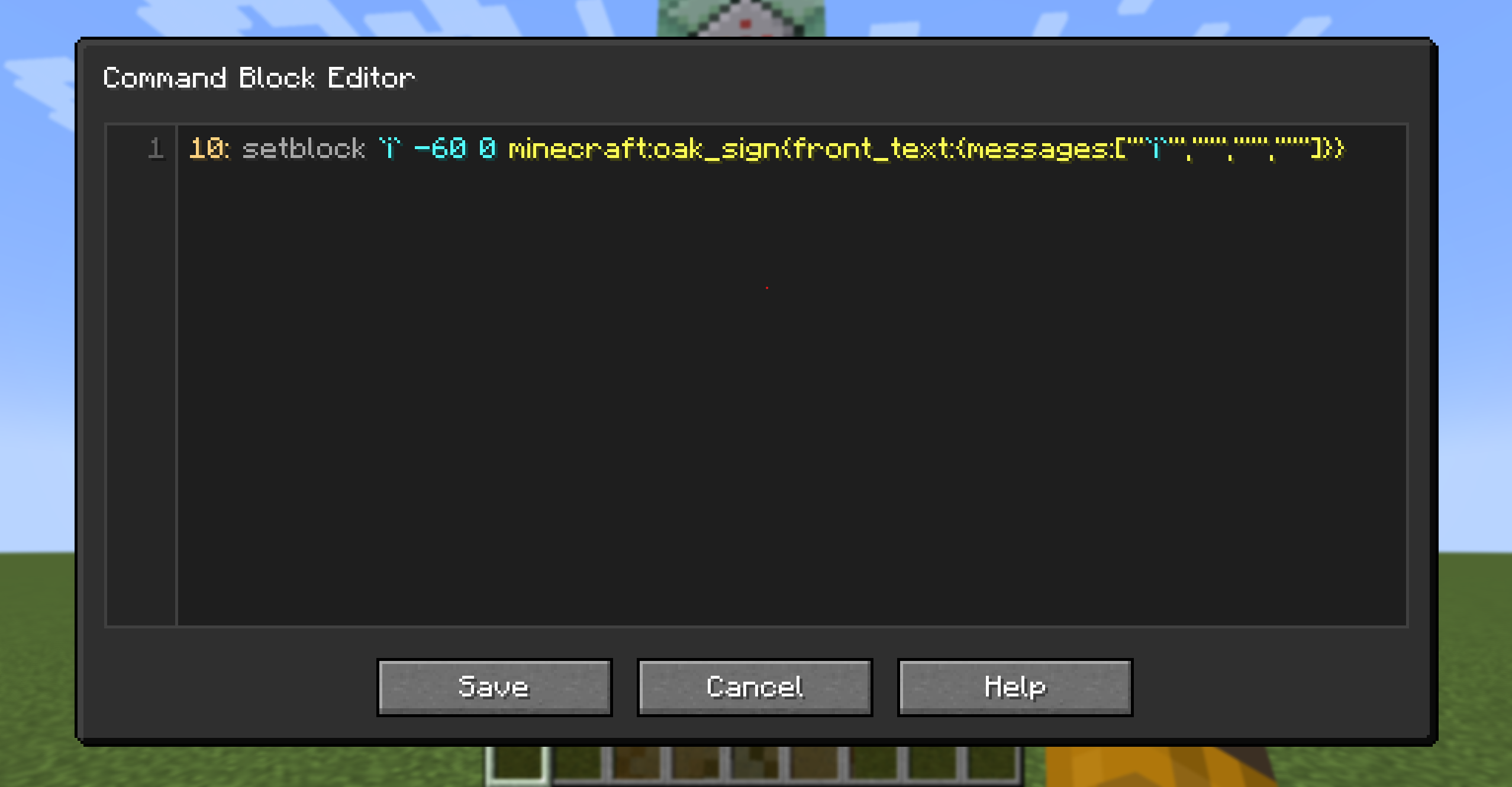
Command block editor that lets you edit multiple command blocks at once
截图
介绍
Command Block Editor
Command Block Editor is a utility mod that makes creating and managing command block systems much faster and more convenient.
Instead of editing command blocks one by one, you can write multiple commands in a single editor and automatically generate complete command block chains.
Perfect for map makers, technical builders, and anyone who works with large command block setups.
Opening the Editor
Press the configured keybind (default: =) to open the editor.
- If you are looking at a command block, the editor will open with that command block’s commands loaded.
- Otherwise, a new command block will be created at your current position and opened in the editor.
- Press
Ctrl + Sto save and close the editor.
Editor Syntax
| Syntax | Description |
|———-|————-|
| <number> | Repeat a command multiple times. |
| ! | Make the first command block a repeating command block. |
| @ | Toggle auto mode. On the first command it enables auto mode, on subsequent commands it disables it. |
| ? | Make a command block conditional. |
| ` expression ` | Evaluate a mathematical expression. |
Expressions support:
iiteration index+addition-subtraction*multiplication/division( )parentheses;separates values in a repeating pattern (for example, `produces1, 2, 1, 2, …`)
Example
Input:
3: say `i+1`
5: say `1;2`
say hi
?: say hi
Output:
say 1
say 2
say 3
say 1
say 2
say 1
say 2
say 1
say hi
say hi (conditional)
Keyboard Shortcuts
| Shortcut | Action |
|———-|——–|
| Ctrl + S | Save and close the editor. |
| Ctrl + U | Ungroup current line. |
| Ctrl + Shift + K | Delete the current line. |
| Alt + ↑ / Alt + ↓ | Move the current line up or down. |
| Alt + Shift + ↓ | Duplicate the current line. |
常见问题
Command Block Editor 支持哪些 Minecraft 版本?
Command Block Editor 支持 Minecraft Java 版 1.21–1.21.11,共 3 个版本,可用的加载器:Fabric。下载时注意选择和你游戏版本一致的文件。
Command Block Editor 怎么安装?
先用 PCL2 或 HMCL 启动器安装对应版本的 Fabric,再把下载的 .jar 文件放进游戏目录的 mods 文件夹,重新启动游戏即可。开启了版本隔离的,mods 文件夹在 versions/版本名 下面。运行环境:客户端和服务端都要装。


评论
登录后评论和评分