
FramingLib
A lightweight, client-sided configuration library for creating interactive, draggable HUD layout screens
介绍
Framing Lib



A lightweight, client-sided configuration screen library for creating interactive, draggable HUD layout screens!
📖 What is this mod?
This is a client-side configuration screen library for creating draggable HUD layout screens.
It allows developers to create configuration screens with interactive, draggable elements to make positioning their HUD/GUI elements easier for the player.
This is not a complete configuration API, it is simply for creating configuration screens.
Basically, this is for other mods that rely on it to work.
Here are some visuals to help show what this does:
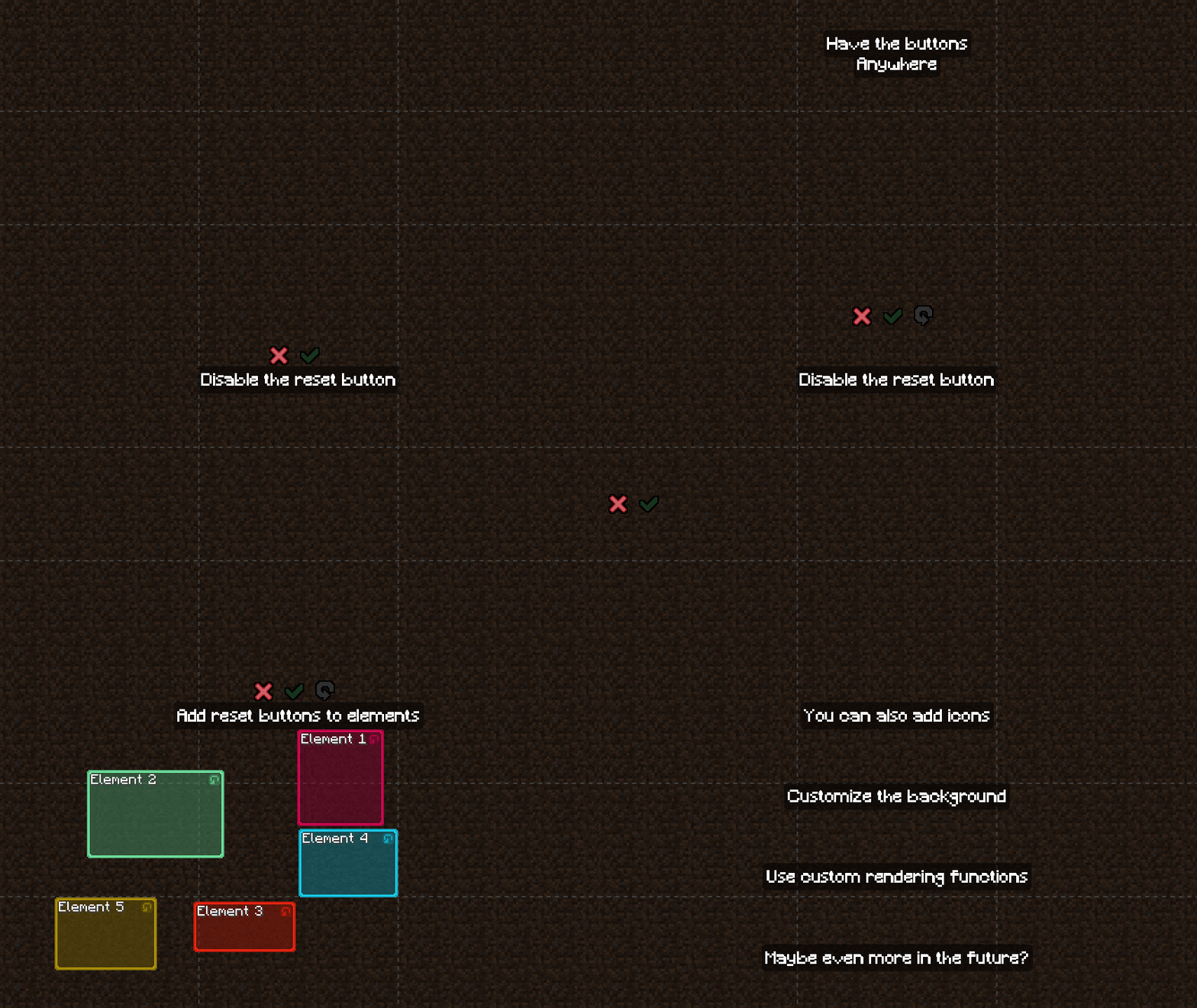
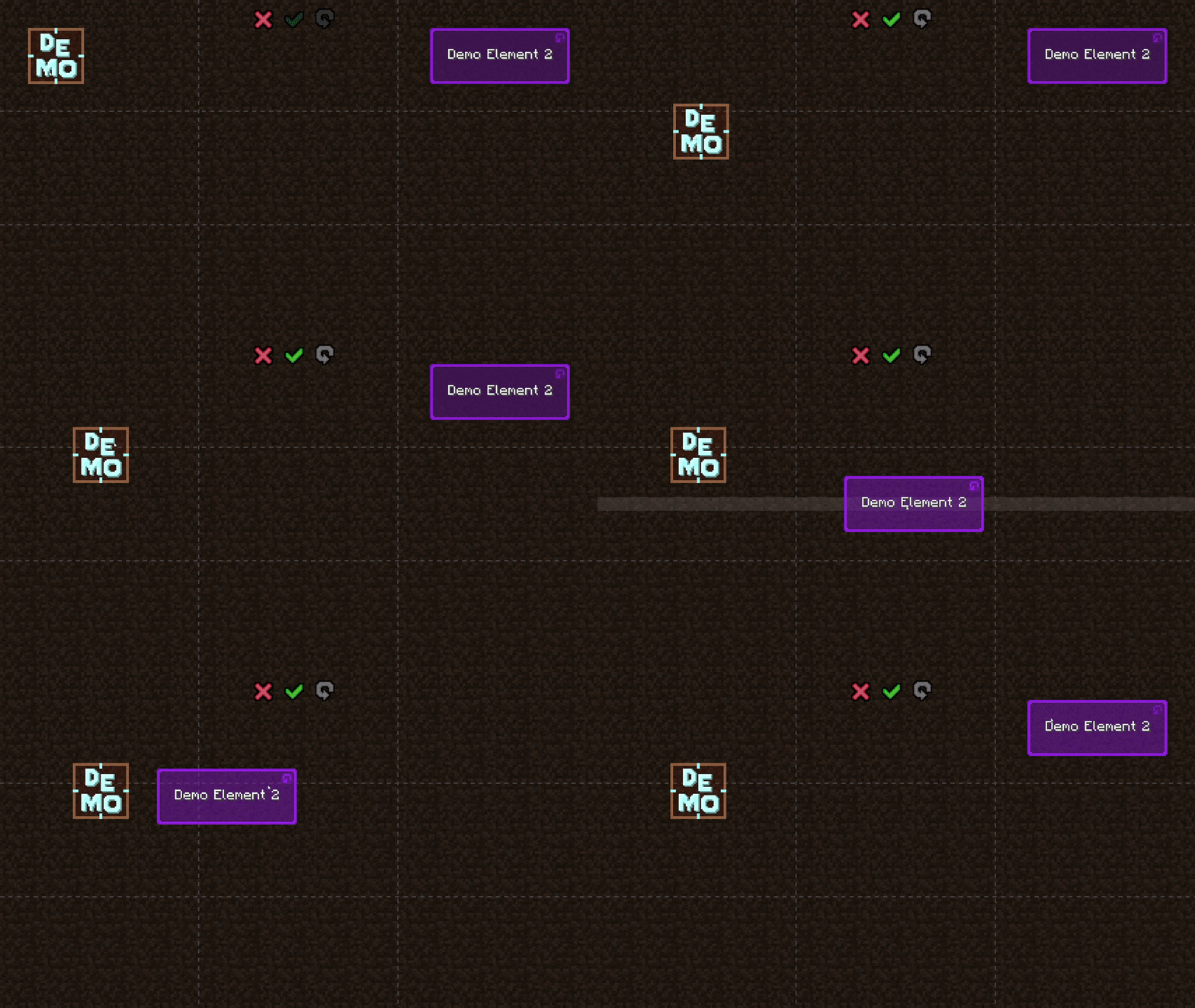
A more practical example, moving chat around:

✅ Features
- Multi-Loader Support: Fully compatible with Fabric, Quilt, Forge and NeoForge
- Intuitive for Players: Allows repositioning HUD/GUI elements by simply dragging them around with the mouse
- Developer-Friendly API: Uses a simple builder pattern, making integration easy for any HUD/GUI mod
- Dynamic Alignment: Anchors HUD/GUI elements to nine screen positions automatically, with optional snapping
- Smart Recalculation: Recalculates HUD/GUI locations when GUI scale or window size changes
- Lightweight & Performant: Caches and only recalculates positions when necessary to save frames
- Client-Side Only: Installed only on the client, no server-side footprint or installation required
- Extensively Customizable: Supports custom colors, icons, and even using your own custom rendering functions
⚠️ To remain flexible, this library does not automatically save or load layout data to the disk. Developers are responsible for serializing the layout object (into JSON/YAML/INI/your preferred config format) and deserializing it when the game initializes.
📖 Usage
📖 For Players
⚠️️ This is a library mod, and does nothing on its own.
Put the jar file in your mods folder and you’re good to go!
For [Fabric] and [Quilt] version, you probably also need to put [ModMenu] in your mods folder.
📖 For Developers
Developer documentation can be accessed here
🚀 Supported Versions
| Minecraft | Fabric | Quilt | Forge | NeoForge |
|:———:|:———-:|:———-:|:———-:|:——–:|
| 26.2 | ⏳ | ⏳ | ⏳ | ⏳ |
| 26.1.2 | ⏳ | ⏳ | ⏳ | ⏳ |
| 26.1.1 | ⏳ | ⏳ | ⏳ | ⏳ |
| 26.1 | ⏳ | ⏳ | ⏳ | ⏳ |
| 1.21.11 | ⏳ | ⏳ | ⏳ | ⏳ |
| 1.21.10 | ⏳ | ⏳ | ⏳ | ⏳ |
| 1.21.9 | ⏳ | ⏳ | ⏳ | ⏳ |
| 1.21.8 | ⏳ | ⏳ | ⏳ | ⏳ |
| 1.21.7 | ⏳ | ⏳ | ⏳ | ⏳ |
| 1.21.6 | ⏳ | ⏳ | ⏳ | ⏳ |
| 1.21.5 | ⏳ | ⏳ | ⏳ | ⏳ |
| 1.21.4 | ⏳ | ⏳ | ⏳ | ⏳ |
| 1.21.3 | ⏳ | ⏳ | ⏳ | ⏳ |
| 1.21.2 | ⏳ | ⏳ | ⏳ | ⏳ |
| 1.21.1 | ⏳ | ⏳ | ⏳ | ⏳ |
| 1.21 | ⏳ | ⏳ | ⏳ | ⏳ |
| 1.20.6 | ⏳ | ⏳ | ⏳ | ⏳ |
| 1.20.5 | ⏳ | ⏳ | ⏳ | ⏳ |
| 1.20.4 | ⏳ | ⏳ | ⏳ | ⏳ |
| 1.20.3 | ❌ | ❌ | ❌ | ❌ |
| 1.20.2 | ⏳ | ⏳ | ⏳ | ⏳ |
| 1.20.1 | ⏳ | ⏳ | ⏳ | ⏳ |
| 1.20 | ⏳ | ⏳ | ⏳ | ❌ |
| 1.19.4 | ✅(1.0.15) | ✅(1.0.15) | ✅(1.0.15) | ❌ |
| 1.19.3 | ✅(1.0.14) | ✅(1.0.14) | ✅(1.0.14) | ❌ |
| 1.19.2 | ✅(1.0.13) | ✅(1.0.13) | ✅(1.0.13) | ❌ |
| 1.19.1 | ✅(1.0.12) | ✅(1.0.12) | ✅(1.0.12) | ❌ |
| 1.19 | ✅(1.0.11) | ✅(1.0.11) | ✅(1.0.11) | ❌ |
| 1.18.2 | ✅(1.0.10) | ✅(1.0.10) | ✅(1.0.10) | ❌ |
| 1.18.1 | ✅(1.0.9) | ✅(1.0.9) | ✅(1.0.9) | ❌ |
| 1.18 | ✅(1.0.8) | ✅(1.0.8) | ✅(1.0.8) | ❌ |
| 1.17.1 | ✅(1.0.7) | ✅(1.0.7) | ✅(1.0.7) | ❌ |
| 1.17 | ❌ | ❌ | ❌ | ❌ |
| 1.16.5 | ✅(1.0.2) | ✅(1.0.2) | ✅(1.0.2) | ❌ |
✅ – Supported ⏳ – Planned ⏳ – Not supported
Notes:
- Latest mod version is written in parentheses
常见问题
FramingLib 支持哪些 Minecraft 版本?
FramingLib 支持 Minecraft Java 版 1.16.5–1.19.4,共 10 个版本,可用的加载器:Fabric / Forge / Quilt。下载时注意选择和你游戏版本一致的文件。
FramingLib 怎么安装?
先用 PCL2 或 HMCL 启动器安装对应版本的 Fabric / Forge / Quilt,再把下载的 .jar 文件放进游戏目录的 mods 文件夹,重新启动游戏即可。开启了版本隔离的,mods 文件夹在 versions/版本名 下面。运行环境:仅客户端。
PlagueTR 的其他作品
查看全部 →
Plague’s Chat Timestamps
A Minecraft mod that adds customizable timestamps to chat!

Plague’s Chat Timestamps
A Minecraft mod that adds customizable timestamps to chat!
Retouch Brush
A Minecraft mod that lets you cycle through paintings using the brush!

Plague’s Noisy Creepers
A client-side Fabric mod that adds footstep and idle sounds to creepers!
评论
登录后评论和评分