
截图

介绍
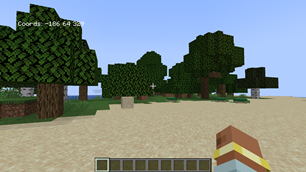
Visible coords
Welcome to the simplest mod you’ll find on CurseForge. While it may not be the only mod out there, I hope it proves useful to you, just as it is for me. Despite its simplicity, this page is designed to provide you with all the necessary details. My only intention is for it to be useful and accompany you throughout your gaming experiences.
Features:
- View coordinates on demand in your world
- Display coordinates upon starting a new world
- Show coordinates on a server
Instructions:
- Press “F3” to toggle the visibility of coordinates
- Press “C” to show or hide the coordinates
How it appears on the screen:

常见问题
Visible Coords 支持哪些 Minecraft 版本?
Visible Coords 支持 Minecraft Java 版 1.19.4,可用的加载器:Forge。下载时注意选择和你游戏版本一致的文件。
Visible Coords 怎么安装?
先用 PCL2 或 HMCL 启动器安装对应版本的 Forge,再把下载的 .jar 文件放进游戏目录的 mods 文件夹,重新启动游戏即可。开启了版本隔离的,mods 文件夹在 versions/版本名 下面。运行环境:仅客户端。
ModdyCraft 的其他作品
查看全部 →
Bodyguard
Bodyguard is a mod with which you can feel safe now. It's no longer difficult to have someone following you everywhere to protect you, someone you hire to cover you from dangers.

Bodyguard Reinvented
Spawnable Copper, Iron, Gold, Diamond, Emerald, or Netherite bodyguards that follow and defend the player from hostile creatures.
评论
登录后评论和评分