
Synchronised Blockstates
A mod to synchronise the list of blockstates from server to client to prevent mismatches
介绍
Synchronised Blockstates
Modded multiserver setups can be… complicated.
When you have multiple connected servers that all have different modlists, it’s not uncommon for different servers to have mismatched blocks, leaving you with sights like this:
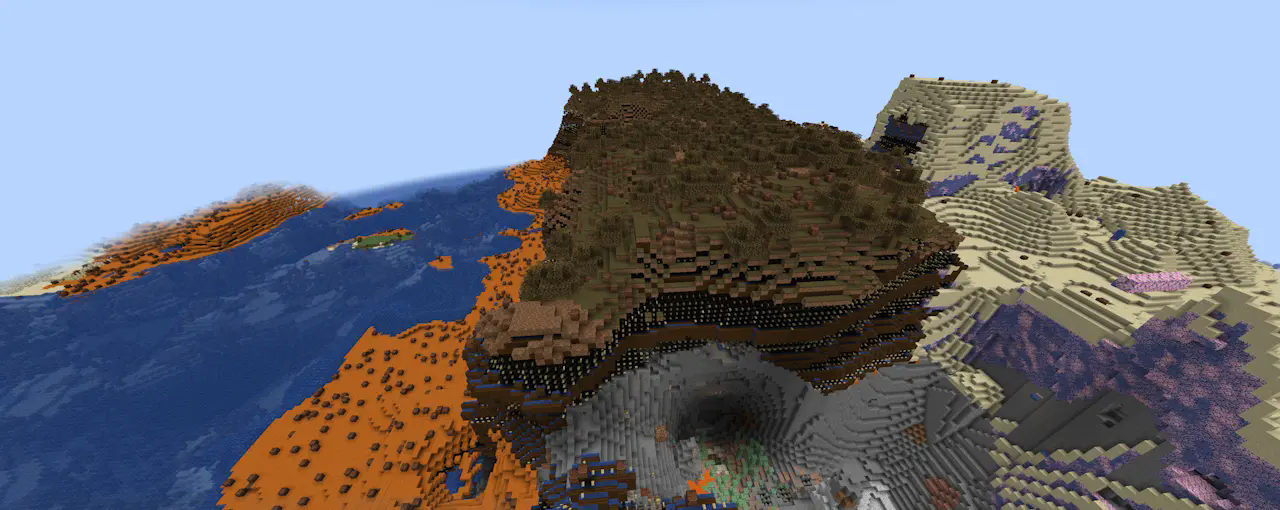
Obviously this isn’t ideal, so this mod takes the approach of synchronising all of the blockstates from the server to the client side when the player joins, allowing the client to compensate.
For example, that same image with synchronised blockstates enabled:

Note: if the client doesn’t receive blockstate info from the server, it’ll fall back to using vanilla states.
This mod is still a W.I.P. and there are plenty of improvements yet to be made, but it should function for the time being.
Configuration
In lieu of a proper config at this point in time, Synchronised Blockstates has several behaviours that can be enabled or customised using JVM arguments or environment variables:
-Dmod.synchronisedblockstates.dumpAllStates- Client-only.
- Accepted values:
true,1,yes,on. - On startup, encodes all blockstates (using the same format as if it were sending a single, unchunked, state registry packet) and writes it to
<minecraft run directory>/synchronized_blockstates/vanillablockstates.dat(note: not necessarily only vanilla blockstates, will also include modded blockstates if there are any modded blocks).
-Dmod.synchronisedblockstates.ouputMissingStates- Client-only.
- Accepted values:
true,1,yes,on. - When the client recieves a packet and remaps its local registry, outputs any mismatches between the client and server registries to
<minecraft run directory>/synchronized_blockstates/missing-states-<current time>.dat
-Dmod.synchronisedblockstates.propertyChunkingThreshold- Logical Server only.
- Accepted values: any integer, default
1024. - Max limit on properties before the server starts chunking data before sending it to the client. Additionally, the maximum number of properties that can be sent in a single property chunk.
-Dmod.synchronisedblockstates.blockChunkingThreshold- Logical Server only.
- Accepted values: any integer, default
4096. - Max limit on blocks before the server starts chunking data before sending it to the client. Additionally, the maximum number of blocks there can be sent in a single blockstate chunk.
-Dmod.synchronisedblockstates.stateChunkingThreshold- Logical Server only.
- Accepted values: any integer, default
32768. - Max limit on blockstates before the server starts chunking data before sending it to the client.
常见问题
Synchronised Blockstates 支持哪些 Minecraft 版本?
Synchronised Blockstates 支持 Minecraft Java 版 1.20.1–1.21.1,共 2 个版本,可用的加载器:Fabric。下载时注意选择和你游戏版本一致的文件。
Synchronised Blockstates 怎么安装?
先用 PCL2 或 HMCL 启动器安装对应版本的 Fabric,再把下载的 .jar 文件放进游戏目录的 mods 文件夹,重新启动游戏即可。开启了版本隔离的,mods 文件夹在 versions/版本名 下面。运行环境:客户端 / 服务端。
JoshieGemFinder 的其他作品
查看全部 →
Betweenlands Redstone
Adds redstone to The Betweenlands

Thermal Expansion Specialization Hooks
Adds hooks for 1.12 Thermal Expansion machine specializations.

Simple Origin Changer
A simple way to give players the chance to change their origin within a certain time limit after joining
DragonLoot Advanced Netherite Progression
Compatibility mod that patches DragonLoot to be after Advanced Netherite in progression
评论
登录后评论和评分