
PlaceholderMaker
A minecraft mod with which you can make unlimited placeholders on modded mc servers, using the placeholders api and much more!
截图
介绍
PlaceholderMaker
Overview
PlaceholderMaker is a Fabric mod that allows you to create placeholders that use conditions and rules to create unique and unlimited placeholders and even placeholders that are inside other placeholders that use detect to change during the game using conditions that detect changes from placeholders.
How It Works
- It works using conditions from rules in configure
jsonmade for placeholders, conditions detect changes from other placeholders that are used in configs from the placeholder! - Doing this using Placeholder API, and other placeholders from any type of mod!
- Placeholders can be created in a
jsonfile inpmaker/placeholdersand can be used in the game like this%pm:player_health%
Commands and Permissions
/pm reload- Permission:
pm.reload(or Operator Level ≥ 2) - Reloads all placeholder configuration files from
config/pmaker/placeholders/. - Use this after editing or adding new placeholder JSON files.
Conditions
| Operator | Meaning | Example |
|———-|———————————-|—————————|
| < | Less than | "<3" → if value < 3 |
| > | Greater than | ">12" → if value > 12 |
| <= | Less than or equal to | "<="5" → if value ≤ 5 |
| >= | Greater than or equal to | ">=10" → if value ≥ 10 |
| = | Equal to | "=3" → if value == 3 |
| ! | Not equal to | "!3" → if value != 3 |
| % | Checks if value is divisible by | "%5" → if value % 5 == 0|
| null | If it is null | Show the message directly |
Example: Creating a Placeholder
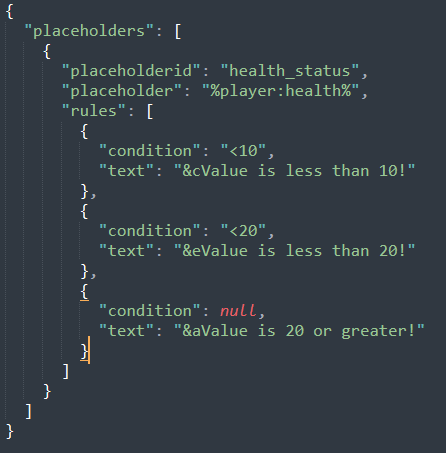
Below is a simple JSON file example you might place in config/pmaker/placeholders/health_status.json. This will create a placeholder health_status that references %player:health% and then decides which text to display based on the player’s health.
{
  "placeholders": [
    {
      "placeholderid": "health_status",
      "placeholder": "%player:health%",
      "rules": [
        {
          "condition": "<3",
          "text": "&cYou're about to die!"
        },
        {
          "condition": "<6",
          "text": "&eHang in there, warrior!"
        },
        {
          "condition": null,
          "text": "&aYou look perfectly healthy!"
        }
      ]
    }
  ]
}
Text Formats
Examples
- Bold, Italic, Underline, Strikethrough, Obfuscated
<b>Bold text</b><i>Italic text</i><u>Underlined text</u><strike>Strikethrough text</strike><obf>Obfuscated text</obf>
- Hex Colors
<#FF0000>This text is red</#><#00FF00>This text is green</#>
- Gradient
<gradient:#FF0000:#FFFF00:#00FF00>Hello Gradient!</gradient>- You can use multiple hex colors separated by “:” (e.g.
#FF0000:#0000FF:#00FF00). - The parser will blend colors across the text.
- Click Events
<click:run_command:'/say Hello'>Click to run a command</click><click:suggest_command:'/help'>Click to suggest a command in chat</click><click:open_url:'https://example.com'>Click to open a website</click><click:copy_to_clipboard:'Copied!'>Click to copy text</click>- Note:
run_commandis executed as if the player typed it in chat, so it requires permissions.
- Hover Events
<hover:show_text:'Hover message here'>Hover over me</hover>
- Links
<link:https://google.com>Click to open Google</link>- Equivalent to a
click:open_urlevent.
- Reset
<reset>or<r>resets any formatting to default.
- Vanilla Formatting Codes
- Use
&followed by a code (e.g.&a,&l,&r): &l= bold&o= italic&n= underline&m= strikethrough&k= obfuscated&r= reset&0–&f= color codes
常见问题
PlaceholderMaker 支持哪些 Minecraft 版本?
PlaceholderMaker 支持 Minecraft Java 版 1.21–1.21.4,共 5 个版本,可用的加载器:Fabric。下载时注意选择和你游戏版本一致的文件。
PlaceholderMaker 怎么安装?
先用 PCL2 或 HMCL 启动器安装对应版本的 Fabric,再把下载的 .jar 文件放进游戏目录的 mods 文件夹,重新启动游戏即可。开启了版本隔离的,mods 文件夹在 versions/版本名 下面。运行环境:仅服务端。
KrripeYT 的其他作品
查看全部 →
Cobblemon Shiny Boost Mod
Boost shiny rates for a limited time globally

ShadowCrates
It is a mod that implements the ability to add Crates System on fabric servers. And it has special support for cobblemon items display.

BEconomy
• BEconomy is a mod that adds virtual economy as well as item type economy, which makes it very customizable and easy to use. • Cobblemon Support

ShadowKits
A simple Kits system designed for Minecraft Fabric servers Compatible whit any mod! EX: Cobblemon etc...
评论
登录后评论和评分